Static reading edition · s10-02
Navigate the CLI command families
Use help, authentication checks, session continuation and review commands without mixing shell and composer syntax.
Understand the approach
The shell command codex can launch several workflows. Some commands inspect the local setup, some start work and others change saved state. Begin with help at the relevant level: codex --help for the command family and codex exec --help for a scripted run. A command that authenticates, installs a plugin or deletes a session is not equivalent to a read-only inventory command.
Useful inspection controls include codex --version and codex login status. The latter reports whether credentials are present; that does not prove access to every model, workspace or connected record. codex resume opens saved interactive sessions, while codex fork creates a new chat from a saved session. Confirm the working directory when resuming, especially if the current terminal folder differs from the session’s saved project.
For a repository review, codex review --uncommitted selects uncommitted changes as the target. Review findings still need evaluation and relevant tests. Inside the TUI, slash controls such as /status and /diff operate the live session; they are not external shell executables. Keeping a small notebook of command, location and effect prevents accidental execution of a state-changing operation while you were only trying to inspect something.
Find a CLI command by the job it performs

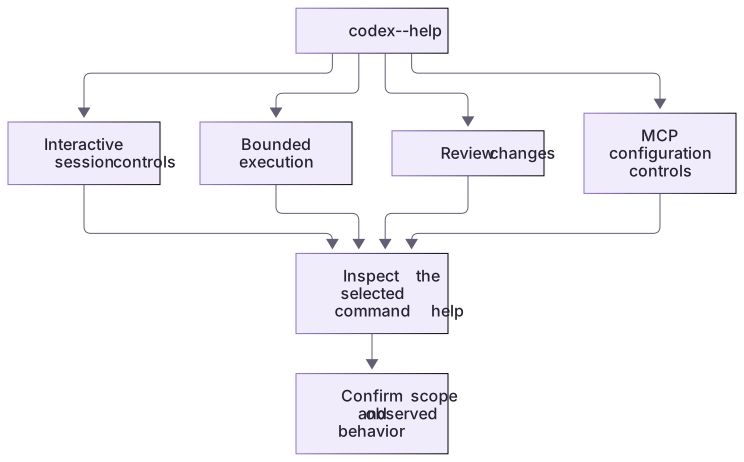
The executable's help lists command families. Starting or resuming a chat, running a task, reviewing changes, and inspecting MCP configuration are different jobs. Check the selected subcommand's help before using its options.
A saved session is not a restored repository
The linked matrix includes shell syntax and separate composer syntax. codex resume selects conversation history; codex fork creates a conversation branch. Inspect the working folder before accepting either selection. In the practice project, starting a new chat leaves a changed README heading unchanged.
A review examines the chosen diff and returns findings; it does not imply fixes were applied. For scripted continuation, codex exec resume --last chooses recent history associated with the directory. Deliberately select a harmless practice session and check installed help rather than relying on an unknown last task.
Read-only diagnostics can still contain sensitive details
A diagnostic report may reveal local paths, account context or configuration even when it does not edit anything. Inspect such output before sharing it and never paste authentication files into a support request. This lesson does not require logout, deletion, plugin installation or remote-control setup. Use the smallest command family that answers the current question and preserve the result with its project and client context.
About your environment
Checked 21 October 2026. Feature availability varies by client and host.
Try it step by step
- Classify each matrix entry as shell or composer and describe its observable effect.
- Inspect installed command help and version if a CLI already exists; do not install one for the exercise.
- Resume only an identified harmless practice session and verify its actual directory, or mark that observation unrun.
- Compare review findings with the chosen diff; neither session navigation nor review is file restoration.
A useful starting example
Illustration · adapt before use.
codex --version
codex login status
codex resume --help
codex fork --help
codex review --helpRead the producer result separately from its text
The local runner executes the same fixture text with different process outcomes. These are actual lab cases.
node labs/cli-pipeline/run-pipeline.cjs success
node labs/cli-pipeline/run-pipeline.cjs producer-failureBoth contain turn.completed.
The first producer exits 0; report exits 0.
The second producer exits 7; report exits 5.A command family or successful-looking event is not the process result. The wrapper captures the actual child status rather than the status of a downstream shell command.
Your turn
Use the control matrix to classify help, status, resume, fork, review, /diff and /new by shell/composer and observable effect. Inspect installed help when available. Resume only a harmless practice session you identify deliberately, then verify its actual directory and unchanged files. Record unavailable commands rather than fabricating a session.
Try the exercise before opening its reference answer. Use a disposable practice folder.
Offline CLI event pipeline
Extract into a new practice folder and keep the included labs folder. Run these commands from that extraction root, or from the course folder, using an existing Node.js installation.
- Command 1 text
node labs/cli-pipeline/capture-codex.cjs --project redCheck: Inspect argument boundaries without starting or resuming a real session. Use the linked matrix for installed-client observations.
Commands are relative to the course folder. Open the lab in the Codex app first. Lesson-specific artifacts separate offline execution from optional authenticated CLI observations; a dry-run plan is not a live model result.
Check your result
- The notebook distinguishes shell commands from interactive slash commands with correct examples.
- Credential status is described as a local authentication check, not a claim of unrestricted product or record access.
- A review result is reconciled with the selected diff and does not imply that fixes were applied automatically.
Reference answer & rubric Try the exercise before opening
Identify what a command inspects or changes and verify its real exit result at the boundary.
- Read run-pipeline.cjs and identify the executable, fixed arguments and shell:false setting.
- Run both fixtures and compare child status with report outcome.
- For optional real Codex commands, inspect command help and confirm the selected project.
- Compare the actual result with the lesson-specific answer key; record unrun client observations separately from executed local checks.
Check your understanding
What does a successful codex login status check establish?
- Every MCP server can retrieve every record.
- Local credentials are present; other access still depends on the task and environment.
- The current repository has passed its tests.
Reveal the answer and explanation
Answer 2: Local credentials are present; other access still depends on the task and environment.
Authentication status is one layer. Tool authorization, project access and task verification remain separate.
Take this quiz in the interactive lesson to save your answer in the browser.
When it does not work
A pipeline reports success despite a failed producer.
Likely cause: Only the last consumer command’s exit status was checked.
What to try: Capture the child process status directly, as the supplied wrapper does.
A help response is treated as a completed review.
Likely cause: The command’s purpose was confused with task execution.
What to try: Inspect the selected review target and actual findings separately.
Common mistakes
- Typing a terminal command into the composer and interpreting the model’s explanation as actual command execution.
- Resuming the most recent session without checking whether it belongs to the current project.
Source mapping & differences · different
The source command catalog is rewritten around Codex command families, credential checks, saved sessions and review targets rather than translating Claude subcommands by name.
Source topic: CLI commands ↗Go to the source
Official documentation, checked 21 October 2026. Product names, controls and availability may vary with your version, platform or account.
Completion and quiz progress are saved
only in the interactive course.