Static reading edition · s09-07
Run headless work with codex exec
Prepare a bounded non-interactive run with verifiable output and explicit failure handling.
Understand the approach
Headless or non-interactive work uses codex exec instead of opening the interactive terminal interface. It fits a stable task with clear inputs and an output another process or person can inspect. The source uses Claude's print mode; those flags and output contracts are not interchangeable. In Codex, progress normally goes to standard error and the final agent message to standard output; --json produces a JSON Lines event stream.
A scripted run still needs the correct repository, available tools, authentication, and permissions. Current documentation gives codex exec a read-only default, and this lesson makes that boundary explicit. Use a Git practice repository and public or fictional data. Do not add broad-access flags, skip repository checks, or create CI credentials simply to complete a first exercise. Process success and a convincing final message are different observations.
Choose the output contract before integrating a pipeline. Use a final message for a human-readable summary, JSONL for events, or a supported output schema when a downstream consumer needs a fixed final shape. Validate file existence, parseability, and semantic correctness. Missing data must remain distinguishable from an empty result. A testable headless workflow also states what happens on unavailable tools, denied operations, interrupted execution, and stale inputs.
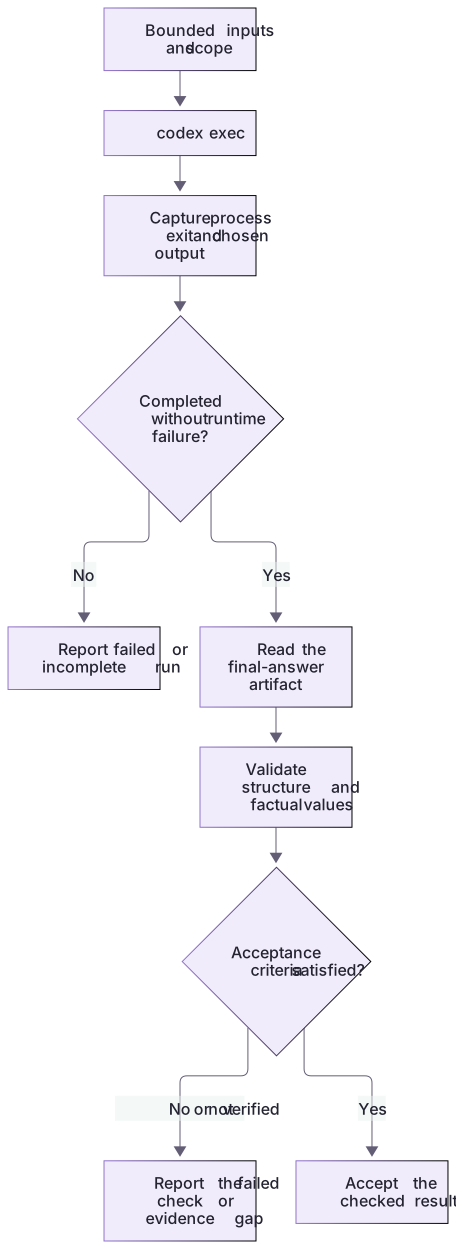
Headless success needs process and artifact checks

Provide bounded inputs and scope, run the non-interactive task, capture process status and outputs, and verify the report's structure and facts. A zero exit code and a saved file are necessary evidence in some workflows but are not sufficient acceptance by themselves.
Start with a manual consumer
Read the first output yourself before writing a program that acts on it. A summary may be formatted correctly yet cite a nonexistent script or overlook a conflicting document. Once the workflow is reliable, define a machine-readable schema and validate it separately from factual accuracy. Keep downstream writes disabled until the receiving system, target record, and authorization are explicit. This reduces the risk of turning a minor analytical error into an external change.
About your environment
Verified October 21, 2026. Native controls depend on current client, account, model, host and managed policy. Local graders and isolated plugin metadata lifecycle were tested; authenticated model runs, app selection changes and scheduling were not performed by the course author.
Try it step by step
- Use the generated package root, existing authentication and a Git-initialized scratch directory. Read the fixed prompt and final-output schema.
- Run the documented codex exec pipeline if you intend a real inference run. Keep event JSONL, final JSON and stderr in separate fresh files.
- Inspect the actual process exit and turn.completed/turn.failed/error events before consuming the final file; never reuse a stale result from a failed run.
- Validate the final object against both schema and deterministic fixture facts. Empty findings for missing-checks are incorrect even when JSON parses.
- Record the actual model/session/input checkpoint and limits. The app/IDE interactive workflow and offline expected result are separate from this shell run.
A useful starting example
Illustration · adapt before use.
& {
  $ErrorActionPreference = 'Stop'
  $outputDirectory = Join-Path (Get-Location).Path ('review-output-' + [guid]::NewGuid().ToString('N'))
  New-Item -ItemType Directory -Path $outputDirectory | Out-Null
  $finalOutput = Join-Path $outputDirectory 'review.actual.json'
  $eventOutput = Join-Path $outputDirectory 'review.events.jsonl'
  $errorOutput = Join-Path $outputDirectory 'review.stderr.txt'
  $reviewPrompt = Get-Content -Raw workflows/review-prompt.txt
  $codexCommand = @(Get-Command codex -CommandType Application -ErrorAction Stop)[0]
  try {
    $ErrorActionPreference = 'Continue'
    $reviewPrompt | & $codexCommand.Source --ask-for-approval never exec --sandbox read-only --json --output-schema workflows/review-result.schema.json --output-last-message $finalOutput - > $eventOutput 2> $errorOutput
    $reviewExit = $LASTEXITCODE
  } finally { $ErrorActionPreference = 'Stop' }
  if ($reviewExit -ne 0) { throw "Codex failed ($reviewExit); inspect $errorOutput. Final output was not accepted." }
  if (-not (Test-Path -LiteralPath $finalOutput -PathType Leaf)) { throw 'No fresh final output was written.' }
  node workflows/validate-artifact.cjs review $finalOutput --expected-fixture missing-checks
  if ($LASTEXITCODE -ne 0) { throw 'The actual answer failed factual/schema validation.' }
  Write-Output "Verified actual result: $finalOutput"
}Three separate output artifacts
The generated package is reviewed by an authenticated read-only codex exec run.
workflows/review-prompt.txt → codex exec --json --output-schema ...
Events → review.events.jsonl
Final answer → review.actual.json
Diagnostics → review.stderr.txt
Expected final fixture: missing-checks
Expected finding kind: missing-verification
Validate actual result with workflows/validate-artifact.cjs.This is the supported pipeline and deterministic factual expectation, not a recorded author model response. Check process/turn failure before reading a fresh final file.
Your turn
Run a structured read-only codex exec review when your authenticated client is available. Deliver fresh event JSONL, final JSON, stderr, exit status and factual validation. If authentication, model, required tools or sandbox setup fails, diagnose the exact stage and do not label a fixture reference as the generated answer.
Try the exercise before opening its reference answer. Use a disposable practice folder.
Validate a headless result before using a live model
Extract into a new practice folder and keep the included labs folder. Run these commands from that extraction root, or from the course folder, using an existing Node.js installation.
- Command 1 text
node labs/workflow-plugin/workflows/validate-artifact.cjs review labs/workflow-plugin/workflows/expected-review-result.jsonCheck: review artifact passed local checks. No client action was performed.
- Command 2 text
node labs/workflow-plugin/workflows/compare-candidates.cjsCheck: Shows that the validator rejects a structurally plausible but factually incomplete result.
Schema-shaped output still needs factual checks. The supplied reference is a fixture result; a real codex exec run requires an existing supported CLI, authentication, and a learner-owned Git scratch project.
Check your result
- The actual pipeline separates events, final output and diagnostics, with an inspected process/turn outcome.
- The final output is complete for the requested missing-checks subject and matches both schema and actual heading evidence.
- No stale output, fabricated response or broad-access flag substitutes for a failed run.
Reference answer & rubric Try the exercise before opening
Prepare explicit read-only execution, a final-message file, an output contract, and a separate factual validation step.
- Check the supplied reference with the local factual validator first.
- Open the generated Git scratch package, read review-prompt.txt and run the native pipeline with existing authentication if available.
- Capture the actual exit immediately; inspect JSONL and stderr, then the fresh final JSON.
- Run validate-artifact.cjs review on that actual final file; an empty findings array must fail for missing-checks.
- Preserve success/failure artifacts separately. If no inference ran, state that and do not substitute expected-review-result.json.
Check your understanding
What does codex exec --json output?
- Only a single final object with no progress.
- A Git commit containing all changes.
- A newline-delimited stream of events, not one final JSON object.
Reveal the answer and explanation
Answer 3: A newline-delimited stream of events, not one final JSON object.
Consumers must parse JSON Lines appropriately and still inspect failures and the final task result.
Take this quiz in the interactive lesson to save your answer in the browser.
When it does not work
A JSON parser reports extra data after the first object.
Likely cause: The --json event stream was parsed as a single final response.
What to try: Use the -o final-message file for this result contract, or parse JSONL event-by-event deliberately.
The output file is valid but misses the missing heading.
Likely cause: Schema conformity does not guarantee correct findings.
What to try: Run the factual validator and inspect the fixture; report the result as failed or not verified rather than editing evidence to fit.
Common mistakes
- Parsing JSONL as one JSON object or assuming a final message proves every requested check ran.
- Copying a CI example that exposes credentials to untrusted build steps or posts results without authorization.
Source mapping & differences · different
Codex uses codex exec with its own stdout/stderr, JSONL, schema, and permission behavior instead of Claude print-mode flags.
Source topic: Headless mode ↗Go to the source
Official documentation, checked 21 October 2026. Product names, controls and availability may vary with your version, platform or account.
Completion and quiz progress are saved
only in the interactive course.