Static reading edition · s09-06
Read permission modes as effective boundaries
Explain the current sandbox, approval policy, and user authorization before changing access.
Understand the approach
Permission controls answer different questions: where commands may act, when an operation needs review, and who reviews eligible requests. The sandbox defines technical file and network boundaries; approval policy determines when Codex asks; the selected reviewer can route eligible requests to a person or automatic review. These layers should be explained separately instead of reduced to a single safe or unsafe label.
The source lists Claude-specific mode names. Codex app and IDE use their current permission controls, while CLI documents /permissions and flags such as --sandbox and --ask-for-approval. Available choices and managed constraints can vary. A configuration field shown in documentation is not proof that it is active in this chat. Inspect effective settings and writable locations before diagnosing a blocked action.
Task authorization remains another boundary. A request to inspect code does not authorize modifying production, even if technical access is broad. Conversely, already-authorized routine work inside a suitable boundary should not require repeated unnecessary confirmation. Choose the smallest access that meets the actual task. If a check fails, identify the precise operation and missing capability rather than turning off restrictions globally.
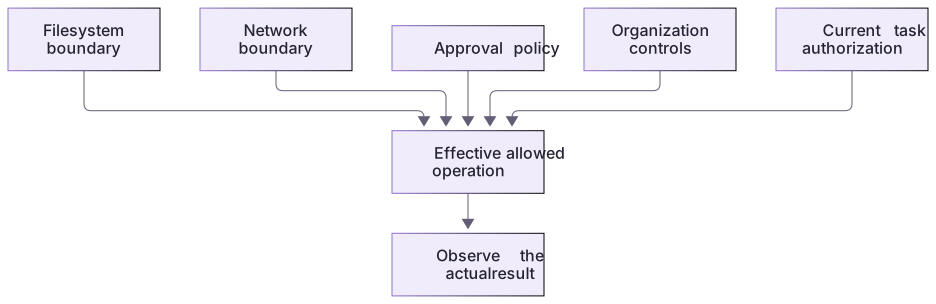
Effective access is constrained by several boundaries

Filesystem scope, network access, approval policy, and organization controls jointly constrain execution. Changing a setting label does not prove broader access or success. The task's own authorization remains an additional limit.
Document the exception, not a permanent broadening
If an authorized task genuinely needs another directory, identify that directory and the minimum action before choosing a supported scoped mechanism. Record whether the exception is once, for a session, or persistent. A future task may not need it. Keep the validation evidence with the project so a later operator knows why access was required and does not mistake an old exception for a standing instruction to use every available resource.
About your environment
Verified October 21, 2026. Native controls depend on current client, account, model, host and managed policy. Local graders and isolated plugin metadata lifecycle were tested; authenticated model runs, app selection changes and scheduling were not performed by the course author.
Try it step by step
- In the app select Ask for approval using the control below the composer; CLI users inspect /permissions and IDE users inspect their composer control.
- Perform a small project-local edit in a generated project and inspect actual file/tool evidence under that selected environment.
- For the deliberate OS boundary test launch a separate read-only CLI with never approval. Request a tiny scratch file and inspect actual denial or startup failure plus file absence.
- Compare the result with workspace-write/on-request. Explain why never removes prompting and does not grant permission, and why a model refusal alone is not enforcement evidence.
- End the probe and restore the app’s original mode. Keep technical boundaries distinct from the hook’s narrower lexical path policy.
A useful starting example
Illustration · adapt before use.
codex --sandbox read-only --ask-for-approval never

# In that session:
# Create permission-probe.txt in this scratch project; report the actual tool result.
# Do not escalate or substitute a different tool.A native boundary observation has multiple possible outcomes
A separate scratch CLI session requests a tiny file under read-only sandboxing.
codex --sandbox read-only --ask-for-approval never
# Request creation of permission-probe.txt, without escalation.Observe one of: actual tool denial + file absent; sandbox unavailable at startup; or a result requiring investigation.These are outcome categories for a real learner run, not measured author sandbox results. A matrix, hook replay or assistant refusal cannot substitute for the native tool observation.
Your turn
Observe real permission controls and one supported scratch boundary test. Retain selected mode, command/environment, actual tool result, and file check. If the host cannot start the requested sandbox, report unavailable rather than claiming an OS denial. Use the matrix only to organize these observations, not as a substitute for them.
Try the exercise before opening its reference answer. Use a disposable practice folder.
Validate the three permission questions
Extract into a new practice folder and keep the included labs folder. Run these commands from that extraction root, or from the course folder, using an existing Node.js installation.
This exercise uses both packs. Extract each into the same practice root, keeping their separate folders under labs.
- Command 1 text
node labs/workflow-plugin/workflows/validate-artifact.cjs permissions labs/workflow-plugin/workflows/permissions-matrix.jsonCheck: permissions artifact passed local checks. No client action was performed.
- Command 2 text
node --test labs/hook-policy/test.cjsCheck: The guard's 13 offline checks include outside-root and root-lookalike denial; they do not test OS sandbox enforcement.
Task authorization, sandbox access, and approval policy are independent. A local matrix documents expectations without proving runtime enforcement.
Check your result
- The client control/CLI flags describe the actually selected environment.
- An observed tool denial or unavailable sandbox is separated from an assistant refusal and expected policy.
- No broad-access workaround is used; the original mode is restored and scratch files are inspected.
Reference answer & rubric Try the exercise before opening
Observe selected native controls and the actual boundary result in a scratch environment.
- Inspect the app composer permission control or CLI /permissions and record the selected mode.
- Perform a tiny in-project operation and inspect actual tool/file evidence.
- For a deliberate read-only probe start the documented separate CLI session and request the scratch file without escalation or tool substitution.
- Distinguish a tool-level denial from startup-unavailable and assistant-refusal states; inspect actual file absence.
- End the probe, restore the original mode and state the host-specific evidence limit.
Check your understanding
What does approval_policy never tell you?
- Codex does not stop for approval prompts; it does not by itself define the sandbox.
- The filesystem is necessarily read-only.
- The user authorized all external writes.
Reveal the answer and explanation
Answer 1: Codex does not stop for approval prompts; it does not by itself define the sandbox.
Approval behavior and sandbox access are independent controls. Neither replaces task-specific authorization.
Take this quiz in the interactive lesson to save your answer in the browser.
When it does not work
A read-only request is assumed safe merely because the sandbox permits a write.
Likely cause: Technical capability was confused with task authorization.
What to try: Keep the requested scope read-only; propose a change for review instead of using every available permission.
A sample permission file differs from the observed behavior.
Likely cause: Managed policy, platform, or the current session can affect effective settings.
What to try: Use the actual permission control and runtime error as evidence, then consult the relevant platform and managed-configuration documentation.
Common mistakes
- Equating approval_policy never with read-only or treating no prompt as approval of the task.
- Changing global permissions to solve a path or runtime error that did not require broader access.
Source mapping & differences · different
The access-control purpose transfers, but Codex sandbox modes, approval policy, reviewer selection, and surface controls replace the source's mode names.
Source topic: Permission modes ↗Go to the source
Official documentation, checked 21 October 2026. Product names, controls and availability may vary with your version, platform or account.
Completion and quiz progress are saved
only in the interactive course.