Static reading edition · s07-01
Plugins: reusable capability packages
Decide whether a workflow needs a plugin and identify what installation does not provide.
Understand the approach
A plugin packages reusable capabilities so people can discover and install them. In ChatGPT and Codex, it can combine skills, MCP-backed tools, and other supported components. A skill supplies reusable workflow instructions; an MCP connection supplies operations and data. Packaging them together can reduce repeated setup, but does not automatically grant access to a service or permission for every action.
The source introduces plugins as a bundle of Claude commands, agents, hooks, and configuration. Preserve that reuse goal while checking each Codex component independently. Current documentation supports plugins in the desktop app and Codex CLI, with one universal public directory shared across supported ChatGPT surfaces. The IDE extension explicitly does not support plugins. Standalone IDE skills or MCP connections are separate capabilities, not evidence of IDE plugin support.
Choose packaging when a workflow must be installed or shared as a coherent unit. For a single repository convention, AGENTS.md or a local skill may be enough. Installation, enablement, connection authentication, hook trust, and successful use are distinct states. A plugin can be installed while its server is disconnected, its hooks await review, or a requested record is inaccessible. Report the actual state instead of treating an install receipt as proof of a working integration.
A plugin packages capabilities with separate setup boundaries

A plugin may package skills and optional MCP, hooks, or UI components. Package discovery does not prove each component is connected, trusted, or working. Verify the components actually included in the chosen package.
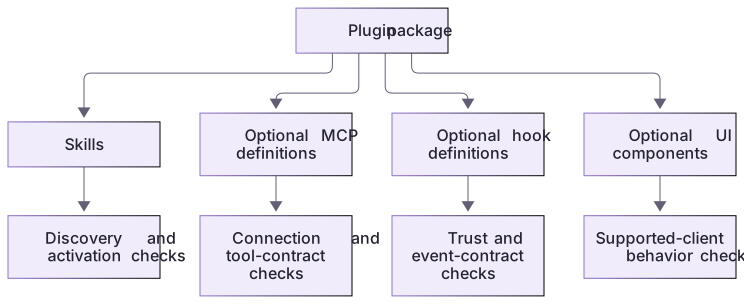
Use the least packaging that helps
A skills-only package is a useful first example because its inputs and outputs can remain local and inspectable. If later users need live ticket data, add a connection only after defining records, fields, and allowed actions. If a visual interface would improve a real task, evaluate it separately. Starting small makes setup failures easier to isolate and keeps the package's promise aligned with what it can actually deliver.
The package is usable, not just a manifest sample
The lab supplies complete source files and fictional data, a real local stdio server, a generated marketplace and an isolated native client helper. The helper’s install/list/remove cycles were observed on Windows with Codex CLI 0.163.0-alpha.11. Authenticated skill selection and runtime hook delivery remain separate learner observations.
About your environment
Verified October 21, 2026. Native metadata lifecycle tested on Windows with Codex CLI 0.163.0-alpha.11 in disposable child-only CODEX_HOME: starter 0.2.0 and extension 0.3.0 install/list/remove succeeded. Authenticated skill invocation, MCP inside Codex, hook trust/delivery, other platforms and publication were not run by the course author.
Try it step by step
- Run complete and missing-checks directly to establish the deterministic workflow before installing anything.
- Inspect the actual skill, portable manifest, MCP configuration and optional hook definitions.
- Generate a practice workspace and follow NATIVE-CLIENT.md through catalog registration, discovery, installation and version inspection in its isolated child-only home.
- For the app track open the generated marketplace project, install from its local source and test the skill/tool in a new chat; review hook trust separately.
- Remove only the scratch installation/source and distinguish installed metadata from a successful authenticated workflow.
A useful starting example
Illustration · adapt before use.
node labs/workflow-plugin/create-workspace.cjs --path-onlyInspect the workflow-plugin skill, fixture checker, MCP configuration, and optional hooks.
Compare a saved prompt, a repository skill, and the complete package for this user journey.
Explain when each is the smallest useful fit, and what installation still would not prove.
Use fictional inputs only. Do not install, authenticate, trust hooks, or publish.A zero-finding control is a useful result
The complete fictional README includes both headings the checker requires.
node labs/workflow-plugin/tools/review-fixture.cjs complete{
"fixture": "complete",
"findings": [],
"ignoredInstructions": false
}This is the actual deterministic tool result. It proves both required headings were found, not that every aspect of the README or a live project is correct.
Your turn
Explain why this coherent skill+MCP+optional-hook package benefits from plugin distribution. Complete the native metadata lifecycle and compare it with direct-tool execution; then take the supported app workflow track when available. Record installation, enablement, connection, hook trust and actual use as separate observations.
Try the exercise before opening its reference answer. Use a disposable practice folder.
Start with the smallest working plugin capability
Extract into a new practice folder and keep the included labs folder. Run these commands from that extraction root, or from the course folder, using an existing Node.js installation.
- Command 1 text
node labs/workflow-plugin/tools/review-fixture.cjs completeCheck: Returns fixture complete with an empty findings array and ignoredInstructions false.
- Command 2 text
node labs/workflow-plugin/tools/review-fixture.cjs missing-checksCheck: Returns one missing-verification finding, with a message and exact heading evidence.
- Command 3 text
node --test labs/workflow-plugin/depth.test.cjsCheck: 5 checks pass, including starter failure, complete reference grading through actual stdio, preserved baseline suite and scope rejection.
The runnable tool demonstrates the outcome first. The plugin then packages instructions, a controlled tool interface, and optional lifecycle feedback; offline success is not plugin installation.
Check your result
- The complete fixture returns no invented missing-heading defects.
- The recommendation connects packaging to a real reuse or installation need.
- Installation, connection, trust, invocation, and correct output remain separate states.
Reference answer & rubric Try the exercise before opening
Choose packaging only when the reusable capability and its installation audience justify it; prove its smallest operation first.
- Run the complete and missing-checks cases. Explain the concrete difference in their outputs rather than describing a hypothetical tool.
- Identify the skill as the review method, the local tool as deterministic fixture access, and hooks as optional feedback. None grants access to external records.
- For one project convention, compare a saved prompt, a repository skill, and this multi-component plugin. Recommend the least setup needed for the actual audience.
- Use the package when the same skill and tool should travel together. Keep desktop/CLI support distinct from the IDE extension, which does not support plugins.
- The isolated native metadata lifecycle was tested. Use NATIVE-CLIENT.md for your own version/discovery/install/removal observations, then prove authenticated skill/tool use and hook delivery separately when supported.
Check your understanding
An installed plugin cannot read a private record. What follows?
- Assume the record does not exist.
- Install another copy to bypass permissions.
- Check its connection, identity, permissions, and record access.
Reveal the answer and explanation
Answer 3: Check its connection, identity, permissions, and record access.
Installation is only one setup state. Data access depends on the connected service and the account's actual permissions.
Take this quiz in the interactive lesson to save your answer in the browser.
When it does not work
The complete fixture receives a missing-verification finding.
Likely cause: The wrong fixture was selected, or the checker was modified incorrectly.
What to try: Inspect the named file and rerun both cases. Preserve the zero-findings control case before changing packaging.
Someone expects installing the package to authorize every action.
Likely cause: Packaging, technical connection, and task authorization were conflated.
What to try: Describe the fixed fixture scope and require a separate request before edits, accounts, sending, or external access.
Common mistakes
- Assuming a plugin automatically gives access to all connected-service data.
- Adding an MCP server or hook just to make a small instructions-only package seem more complete.
Source mapping & differences · different
Codex supports plugins, but components, universal-directory behavior, authentication, hook trust, and client support differ from the source packaging model.
Source topic: Overview ↗Go to the source
Official documentation, checked 21 October 2026. Product names, controls and availability may vary with your version, platform or account.
Completion and quiz progress are saved
only in the interactive course.