Static reading edition · s09-02
Plan before consequential implementation
Create a decision-ready plan that leads to bounded implementation and acceptance.
Understand the approach
Plan mode gives Codex room to inspect context, ask about material ambiguities, and propose an approach before editing. In the app, /plan is a documented entry point; supported clients also expose planning controls. Use it when several implementation choices affect behavior, data, or maintenance. A clear single-file correction usually does not benefit from an elaborate planning phase.
A useful plan describes the starting state, intended behavior, constraints, affected areas, verification, and unresolved decisions. It should explain why the chosen approach fits, rather than merely listing generic development steps. Distinguish observation from assumption: a repository convention found in a file is evidence, while an inferred user preference should be labeled. The plan must preserve existing work and avoid broad unrelated changes.
In the app use /plan, with Shift+Tab available in supported clients; CLI users can also enter /plan. If the native control is absent, a written read-only request can still organize thinking but is not evidence of an enforced mode. Leave Plan mode deliberately before implementation, then run the checks against actual changed files. This lesson finishes with the extension artifact rather than stopping at an approval checklist.
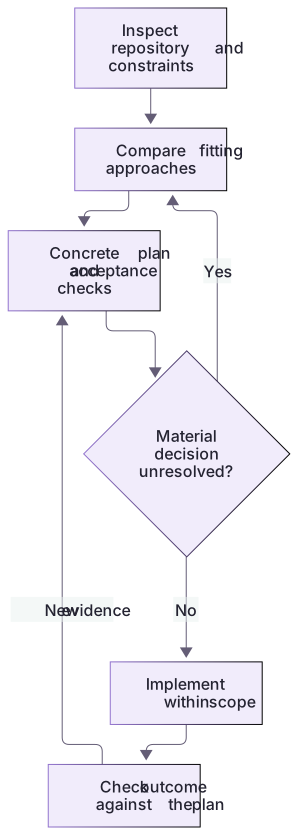
Planning resolves decisions before implementation

Inspect constraints, compare options, and make a concrete plan with acceptance checks. Resolve a material missing decision before implementation. Check the implemented result against the plan and update it when evidence changes.
Acceptance belongs in the plan
The missing-both change should return exactly missing-running and missing-verification, preserve the complete fixture's zero findings, and continue rejecting unknown IDs, extra arguments, and pre-readiness calls. The server enum follows the shared IDS export, while the headless review-result schema has a separate fixture enum that must also be updated. These concrete dependencies make a plan useful: a reviewer can evaluate the intended behavior before edits and repeat the same checks after implementation.
About your environment
Verified October 21, 2026. Native controls depend on current client, account, model, host and managed policy. Local graders and isolated plugin metadata lifecycle were tested; authenticated model runs, app selection changes and scheduling were not performed by the course author.
Try it step by step
- Open the generated packageRoot and enter native Plan mode using /plan or its supported control; inspect the selected mode.
- Send the bounded prompt, compare the plan with the actual package files and resolve any material ambiguity.
- Revise a missing schema/version/check step before leaving Plan mode. Keep the output as a small implementation contract.
- Leave Plan mode, request implementation, and run the original package’s extension/check.cjs against the generated workspace root.
- Review the diff, run the copied baseline suite and compare with the complete solution in a second fresh workspace after your attempt.
A useful starting example
Illustration · adapt before use.
/plan

Plan the missing-both extension in extension/README.md for this generated package.
Inspect the checker allowlist, fixture, MCP enum, output schema and version fields.
Keep arbitrary paths rejected and preserve the three original results.
Name exact file changes and direct plus stdio checks. Do not implement yet.An implemented reference with a failing starter
The generated starter has three fixtures; the completed reference adds the bounded fourth fixture.
node labs/workflow-plugin/extension/check.cjs <generated-root>
# After your attempt, in a separate fresh reference root:
node labs/workflow-plugin/extension/solution.cjs <reference-root>
node labs/workflow-plugin/extension/check.cjs <reference-root>Starter: intentionally fails the missing-both criterion.
Reference: actual fixture/schema/version and real MCP checks pass.The complete executable reference and grader were run. The printed roots are learner-generated absolute paths; this is not a fabricated Plan-mode transcript.
Your turn
Plan and implement missing-both in a generated package. Deliver an actual two-finding fixture, synchronized schema and version fields, preserved original behavior, grader result and reviewed diff. Compare your change with extension/solution.cjs after trying. A plan-only handoff is explicitly incomplete for this implementation track.
Try the exercise before opening its reference answer. Use a disposable practice folder.
Turn a worked plan into a bounded extension
Extract into a new practice folder and keep the included labs folder. Run these commands from that extraction root, or from the course folder, using an existing Node.js installation.
- Command 1 text
node --test labs/workflow-plugin/test.cjsCheck: The 19 baseline checks pass before you change the extracted practice copy.
- Command 2 text
node labs/workflow-plugin/tools/review-fixture.cjs missing-checksCheck: Returns one missing-verification finding, providing a concrete baseline for the new missing-both fixture.
The plan chooses a small allowlist extension over arbitrary file access, and defines evidence that an implementation must preserve.
Check your result
- The plan names the actual allowlist, fixture, output enum, server/package versions and verification commands.
- The implemented artifact passes the extension grader and original behavioral suite without weakening them.
- The final diff remains scoped; the readable reference is a comparison after an attempt rather than a fabricated model result.
Reference answer & rubric Try the exercise before opening
The complete reference adds one bounded fixture and synchronizes the contracts it affects.
- Keep your attempt in one generated workspace; create a second fresh workspace for the reference.
- Run extension/solution.cjs on the reference root, then extension/check.cjs on both roots.
- Compare the added missing-both fixture, IDS/label change, output enum, plugin version and server version.
- Run the copied existing suite and inspect actual MCP discovery/call behavior. Do not delete the baseline checks to pass.
- Explain any different correct implementation and retain its actual diff and results.
Check your understanding
What is a good reason to ask a planning question?
- The agent has not yet chosen a variable name.
- The answer materially changes scope, behavior, or authorization.
- A checklist says every task needs three questions.
Reveal the answer and explanation
Answer 2: The answer materially changes scope, behavior, or authorization.
Questions should resolve consequential uncertainty. Routine implementation choices can usually be handled within the authorized scope.
Take this quiz in the interactive lesson to save your answer in the browser.
When it does not work
The direct checker accepts the new fixture but MCP rejects it.
Likely cause: The server’s advertised input contract and implementation have drifted.
What to try: Use the shared IDS list for discovery and validation, and test a real tools/call for the new ID.
The new case passes after arbitrary paths were added.
Likely cause: The implementation changed the trust boundary beyond the plan.
What to try: Return to the fixed-ID design; add a negative path-traversal case and review the diff.
Common mistakes
- Using planning as an endless substitute for producing the delegated result.
- Treating a plan-mode label as an enforced security boundary or authorization for live-system changes.
Source mapping & differences · equivalent
Codex Plan mode supports the same plan-before-implementation purpose, with Codex commands and independent execution permissions.
Source topic: Planning mode ↗Go to the source
Official documentation, checked 21 October 2026. Product names, controls and availability may vary with your version, platform or account.
Completion and quiz progress are saved
only in the interactive course.