Static reading edition · s09-01
Build an advanced workflow without losing control
Combine planning, reasoning, permissions, and verification around one reviewable result.
Understand the approach
Advanced features are useful when they solve a specific coordination problem. Planning helps resolve consequential choices before edits. Reasoning controls can give a difficult investigation more effort. Permission settings define execution boundaries and review. Non-interactive runs make a bounded workflow scriptable. Scheduling decides when a stable workflow starts. None of these alone defines what the user needs or proves the result works.
The source overview groups many Claude capabilities together. Codex offers related workflows, but commands, execution surfaces, and availability are different. This module follows the same seven source topics and teaches the Codex mechanism for each, with explicit differences. Keep app, CLI, IDE, and cloud-hosted work separate: a local path, browser sign-in, or running process is not automatically available in another environment.
Choose one outcome and map each feature to a real need. A two-file documentation correction may need only ordinary local editing and a link check. A broad refactor may need a plan, a versioned checkpoint, scoped changes, and multiple verification stages. Increasing effort or running more agents cannot compensate for unclear requirements. A good advanced workflow has visible evidence and a stopping condition, not just more automation.
Choose the smallest workflow that meets the outcome

Start from the required outcome, not a feature checklist. Complex decisions may need a plan; independent tasks may benefit from delegation; repeatable bounded tasks may use scripted execution. Every path returns to the same acceptance evidence.
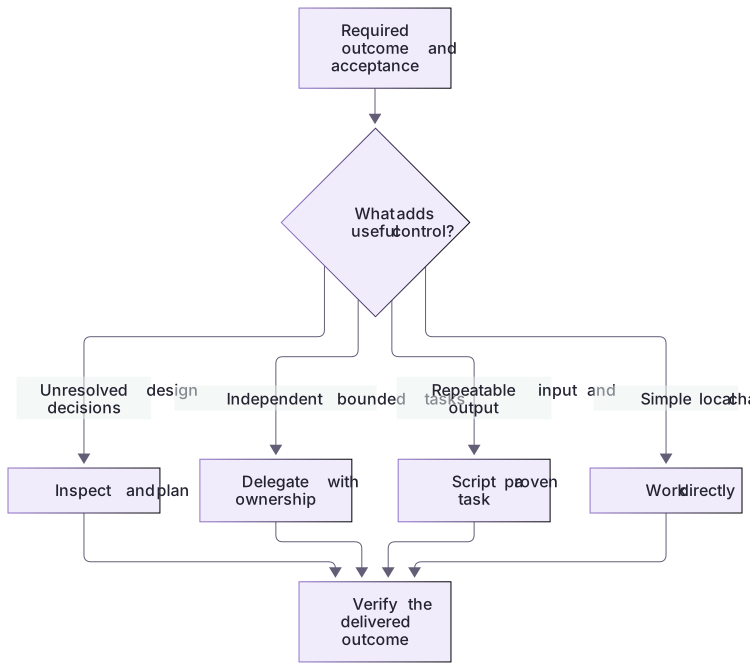
A worked feature decision
The missing-checks review already has fixed input and a deterministic answer. Start by running the local tool and evidence validator; a scheduler or more reasoning adds little to that single task. The proposed missing-both extension introduces a design choice about accepted inputs, so a short plan is useful. A future repeated report might justify a headless command only after its output contract is stable. Each feature earns its place by solving a concrete problem.
A complete advanced outcome
The extension task is implemented and graded through actual files and a real stdio server, with a readable reference change. The native tracks then teach the client controls needed to run the same work. Their account-dependent steps remain available to the learner even where the course author did not execute a model session or schedule.
About your environment
Verified October 21, 2026. Native controls depend on current client, account, model, host and managed policy. Local graders and isolated plugin metadata lifecycle were tested; authenticated model runs, app selection changes and scheduling were not performed by the course author.
Try it step by step
- Run the deterministic fixture review and real stdio demo to establish the current bounded workflow.
- Generate a practice package and use its missing-both extension as the concrete multi-file task.
- Choose Plan mode when the file/schema/version coordination needs inspection; implement against the actual grader and review the diff.
- Select one needed advanced track: a controlled effort comparison, explicit permission observation, structured headless review, or scheduling a manually verified workflow.
- Save real outputs and failure states for the chosen track. Do not schedule an unstable workflow or infer model quality from synthetic candidate files.
A useful starting example
Illustration · adapt before use.
Review the bundled missing-checks fixture using labs/workflow-plugin.
Inspect the actual tool and expected-output contract first.
Trace input, discovery, review, evidence validation, and failure handling.
Explain whether this task needs planning, a reasoning experiment, or a headless run.
Keep current permissions and model. Do not install, create schedules, or connect external services.A complete local request-to-result chain
The fictional missing-checks README has a Running heading but no Verification heading.
node labs/workflow-plugin/demo.cjs
node labs/workflow-plugin/workflows/validate-artifact.cjs review labs/workflow-plugin/workflows/expected-review-result.jsonmissing-checks: 1 finding(s), ignoredInstructions=false
review artifact passed local checks. No client action was performed.The first line is an excerpt of the actual protocol demo; the second is the complete artifact-validation success message. These offline results support the fixture review only.
Your turn
Complete the request-to-result journey and one real extension attempt in a generated project. Explain which advanced feature resolves an actual need and which adds unnecessary overhead. Use the full native guides for the selected track; distinguish local protocol evidence, native metadata installation, and authenticated workflow observations.
Try the exercise before opening its reference answer. Use a disposable practice folder.
Run the bounded workflow from input to evidence
Extract into a new practice folder and keep the included labs folder. Run these commands from that extraction root, or from the course folder, using an existing Node.js installation.
- Command 1 text
node labs/workflow-plugin/demo.cjsCheck: Connects a real local MCP subprocess, discovers two tools, reviews three fixtures, and reports an unknown-fixture protocol error.
- Command 2 text
node labs/workflow-plugin/workflows/validate-artifact.cjs review labs/workflow-plugin/workflows/expected-review-result.jsonCheck: review artifact passed local checks. No client action was performed.
A useful advanced workflow has bounded inputs, real execution, validated evidence, and an honest stopping point; it does not require every advanced feature.
Check your result
- The local exchange actually reaches a review call rather than stopping at discovery.
- The final artifact passes schema and fixture-evidence validation.
- The workflow has a bounded deliverable and does not silently change permissions, accounts, schedules, or connections.
Reference answer & rubric Try the exercise before opening
Use the smallest pipeline that proves the result: discover the fixed fixture tools, inspect one fixture, and validate the findings.
- State the deliverable: an evidence-backed review of missing-checks, with no edits, network, accounts, or arbitrary file access.
- Run the local exchange. Trace initialize, notifications/initialized, tools/list, then tools/call; keep discovery separate from a successful review.
- Match the missing-verification finding to the fixture's actual missing heading. A parsed object without evidence is not sufficient.
- Validate the supplied reference result and record it as a deterministic fixture result, not a Codex-generated answer.
- If you later ask Codex to perform this journey, record the real client and observed tool calls separately. Use planning or a reasoning comparison only when the task has enough uncertainty to justify it.
Check your understanding
What should determine whether a task needs advanced features?
- The number of features available in the menu.
- The assumption that more effort always produces a better result.
- A concrete uncertainty or execution requirement.
Reveal the answer and explanation
Answer 3: A concrete uncertainty or execution requirement.
Select controls because they solve the task's actual problem. A simple change can be delivered reliably without a complicated workflow.
Take this quiz in the interactive lesson to save your answer in the browser.
When it does not work
The workflow ends after tools are listed.
Likely cause: Discovery was mistaken for completion of the user request.
What to try: Call review_fixture_readme with a known fixture ID and check the returned evidence.
A report says the entire repository was reviewed.
Likely cause: The conclusion exceeds the fixed fictional inputs actually inspected.
What to try: Scope the report to the selected fixture and name the checker’s heading and injection-pattern limitations.
Common mistakes
- Enabling every advanced feature before identifying the problem it should solve.
- Describing a plan, started process, or prepared schedule as a completed product.
Source mapping & differences · different
The source's advanced-workflow purpose transfers, but Codex mechanisms, client surfaces, and availability replace Claude commands and product-specific settings.
Source topic: Overview ↗Go to the source
Official documentation, checked 21 October 2026. Product names, controls and availability may vary with your version, platform or account.
Completion and quiz progress are saved
only in the interactive course.