Static reading edition · s07-03
Write the right plugin manifest
Prepare a minimal portable package and distinguish it from supported compatibility layouts.
Understand the approach
New portable plugins use plugin.json at the package root. Skills live under the root skills/ directory; portable MCP configuration, when needed, uses root mcp.json with its transport declarations. A simple skills-only plugin can begin with identity fields and one SKILL.md. You do not need to scaffold unused servers, hooks, assets, or credentials. Keep the plugin's stable kebab-case name separate from a friendly display label.
Codex also supports a compatibility layout using .codex-plugin/plugin.json. The current creator can still scaffold that supported format with .mcp.json and optional resources. Do not rename the files mechanically and assume portability: the portable MCP format has its own schema and transport type. For a new manual package, follow the current portable guide; for an existing compatibility package, understand its actual manifest before changing it.
OpenAI-specific metadata belongs in extensions.com.openai in the portable root manifest. If that object is present, it replaces the compatibility overlay's OpenAI-specific settings rather than merging with it. Referenced resource paths must start with ./, resolve from the plugin root, and remain inside the package. Credentials do not belong in any manifest. A structurally valid file still needs workflow tests and source/license review.
The manifest identifies a package; components have their own files

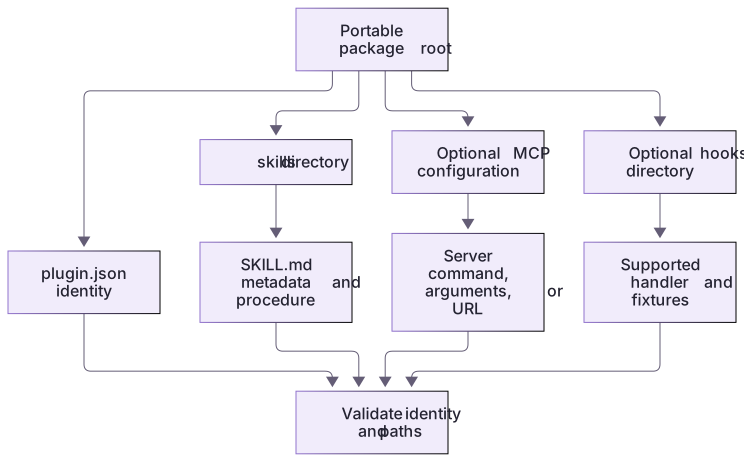
The portable package root contains its manifest and components. Skill metadata lives in SKILL.md; optional MCP and hook configuration use their documented files. Validate the package and each referenced path rather than assuming a manifest makes every component executable.
Names, paths, and ownership are different checks
A stable name helps hosts identify the package; safe paths keep resources inside its boundary; a license explains permitted reuse. Passing one check does not imply the others. If adapting third-party material, retain its required notices and identify your modifications. Do not copy the source course's author identity into your own package as though you were that publisher. Use truthful metadata when a real release is prepared.
A concrete versioned change
The complete extension reference changes identity metadata only where needed: stable package name remains, version advances from 0.2.0 to 0.3.0, server metadata follows it, and the separate output schema accepts the added bounded fixture. The grader catches mismatches instead of accepting a version string in a release note.
About your environment
Verified October 21, 2026. Native metadata lifecycle tested on Windows with Codex CLI 0.163.0-alpha.11 in disposable child-only CODEX_HOME: starter 0.2.0 and extension 0.3.0 install/list/remove succeeded. Authenticated skill invocation, MCP inside Codex, hook trust/delivery, other platforms and publication were not run by the course author.
Try it step by step
- Inspect root plugin.json and mcp.json, their canonical schema provenance and the root skills directory.
- Validate the package; introduce a missing-name or invalid transport only in a generated copy, then repair it and retain both outputs.
- Inspect OpenAI-specific hook references and confirm package-root paths remain inside the package.
- Run the extension reference in a separate fresh workspace; confirm the manifest and server version both become 0.3.0 and the actual MCP enum exposes missing-both.
- Use the native installation track to inspect the installed version; do not call a schema check a host activation test.
A useful starting example
Illustration · adapt before use.
{
  "$schema": "https://agent-plugins.org/schemas/1.0.0/plugin.schema.json",
  "name": "readme-review-practice",
  "version": "0.1.0",
  "description": "Review supplied README files for missing run and verification guidance."
}Portable stdio configuration
The local package launches its own bundled server, with no remote service.
{
  "mcpServers": {
    "workflowFixture": {
      "type": "stdio",
      "command": "node",
      "args": ["${PLUGIN_ROOT}/server.cjs"],
      "cwd": "${PLUGIN_ROOT}"
    }
  }
}Offline schema and path checks: pass. Native catalog/install metadata: observed in isolated CLI. Authenticated conversation MCP launch: not run.The full file also declares the canonical MCP schema URL. The placeholder is supplied by the supported plugin host; it is not a shell variable to substitute manually.
Your turn
Produce a before/after schema failure in a generated package, then repair it. Complete the bounded missing-both manifest/server/schema change and grade the actual protocol. Explain why a compatibility manifest cannot be converted by merely renaming files.
Try the exercise before opening its reference answer. Use a disposable practice folder.
Inspect a valid portable multi-component package
Extract into a new practice folder and keep the included labs folder. Run these commands from that extraction root, or from the course folder, using an existing Node.js installation.
- Command 1 text
node labs/workflow-plugin/schema-check.cjsCheck: Validates plugin.json and mcp.json against the bundled canonical schema snapshots and confirms the declared hook path remains inside the package.
- Command 2 text
node --test labs/workflow-plugin/test.cjsCheck: All 19 checks pass, including invalid-manifest and wrong-transport controls.
- Command 3 text
node --test labs/workflow-plugin/depth.test.cjsCheck: 5 checks pass, including starter failure, complete reference grading through actual stdio, preserved baseline suite and scope rejection.
Correct file names, transport declarations, and rooted paths make a package inspectable. Schema validation is one layer and does not establish runtime activation.
Check your result
- The final manifest and MCP configuration match the bundled canonical schemas.
- The negative control fails for the intended structural reason and the repaired copy passes.
- No secrets, external endpoints, unexplained executables, or escaped resource paths are introduced.
Reference answer & rubric Try the exercise before opening
Keep a root portable manifest, a schema-correct stdio entry, a focused skill, and package-contained references.
- Inspect root plugin.json and identify its stable name, version, description, and extensions.com.openai local-executor and hook fields.
- Inspect mcp.json: type stdio, command node, the ${PLUGIN_ROOT}/server.cjs argument, and plugin-root cwd. Confirm the actual file exists.
- Run the cached-schema check without fetching packages. Explain that its evaluator supports the keywords in these snapshots and does not certify every future schema or OpenAI extension.
- Keep portable metadata separate from the supported .codex-plugin compatibility layout. If extensions.com.openai is present, do not assume compatibility overlay settings merge into it.
- Review every executable and packaged fixture before optional client installation. Credentials, unused endpoints, and external file paths have no place in this practice package.
Check your understanding
Does a new portable skills-only manifest need a skills field?
- No; portable skills are discovered from the root skills/ directory.
- Yes; otherwise a server must be installed.
- Only if its filename starts with a dot.
Reveal the answer and explanation
Answer 1: No; portable skills are discovered from the root skills/ directory.
The current portable format uses fixed package locations. Compatibility manifests can use different declarations, so identify the format first.
Take this quiz in the interactive lesson to save your answer in the browser.
When it does not work
The manifest parses, but the server is not found after moving the folder.
Likely cause: A machine-specific or catalog-relative path replaced the plugin-root placeholder.
What to try: Use ${PLUGIN_ROOT} in the portable stdio entry and revalidate the actual scratch package.
A compatibility package loses interface or hook settings after migration.
Likely cause: The portable OpenAI extension replaces the compatibility overlay instead of merging it.
What to try: Move the required OpenAI-specific settings deliberately and check the final effective package; do not rename manifests mechanically.
Common mistakes
- Mixing portable and compatibility manifest assumptions without checking which settings take precedence.
- Copying a source .claude-plugin manifest or putting API keys into package metadata.
Source mapping & differences · different
Codex accepts a portable root manifest and supported compatibility format; source .claude-plugin paths and component declarations must be intentionally adapted.
Source topic: Plugin definition structure ↗Go to the source
Official documentation, checked 21 October 2026. Product names, controls and availability may vary with your version, platform or account.
Completion and quiz progress are saved
only in the interactive course.