Static reading edition · s07-04
Understand directories and marketplace sources
Inspect where a plugin comes from and prepare a local catalog without registering or installing it.
Understand the approach
A directory is where users discover plugins; a marketplace source is a catalog that tells a supported client which packages are available. ChatGPT and Codex share a universal public directory, while local or team catalogs can provide other packages. A listing is not the same as installation, enablement, connected-service authentication, or authorization for the task you want the plugin to perform.
The desktop app provides plugin browsing and installation. In Codex CLI, /plugins opens the plugin browser, and documented marketplace commands can inspect or register sources. The IDE extension does not provide plugin support. A repository catalog can live at .agents/plugins/marketplace.json, with entries pointing to package folders. source.path resolves relative to the marketplace root, not the catalog's nested .agents/plugins directory.
The lab now generates a complete active catalog in a new scratch root and provides a child-only native client helper. It runs the real marketplace commands with a disposable CODEX_HOME; it does not copy login data or edit the owner’s configuration. Inspect source ownership, contents, version, license and data destinations before using any remote source. Managed requirements may still restrict availability in ordinary clients.
A catalog points to packages without proving their setup

A marketplace source supplies catalog entries. Each entry identifies a package location and policy. The client chooses an entry, then installation, authentication, hook trust, and behavior require their own applicable checks.
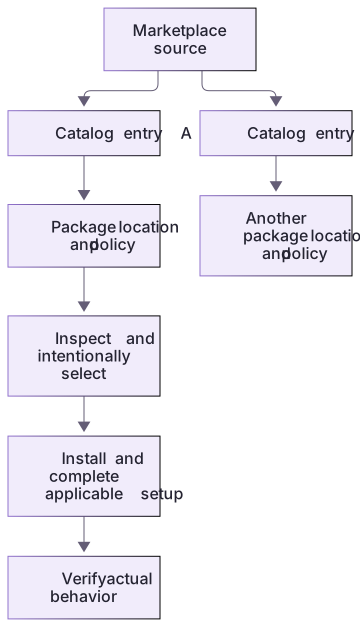
Choose a reproducible source
For a real team rollout, record the package version and the source reference you reviewed. A moving branch can change after approval, and a display name alone is not a stable identifier. Keep the reviewed contents available for comparison with later updates. If policy blocks a source, treat that as a constraint to resolve with the owner rather than a reason to mirror or reinstall it through an unreviewed channel.
About your environment
Verified October 21, 2026. Native metadata lifecycle tested on Windows with Codex CLI 0.163.0-alpha.11 in disposable child-only CODEX_HOME: starter 0.2.0 and extension 0.3.0 install/list/remove succeeded. Authenticated skill invocation, MCP inside Codex, hook trust/delivery, other platforms and publication were not run by the course author.
Try it step by step
- Generate the complete marketplace; inspect .agents/plugins/marketplace.json and resolve ./plugins/workflow-review-practice from its marketplace root.
- Run the native helper’s version, add-marketplace, marketplaces and available actions; inspect the actual native results.
- Install and list the package in the same disposable profile, then inspect enabled/version/installedPath fields.
- For app discovery open the generated marketplace project, refresh/restart as documented, choose the local source in Plugins Directory and use a new chat.
- Remove the scratch plugin and source. For Git distribution inspect owner and pin a reviewed ref rather than treating a local draft as an active remote catalog.
A useful starting example
Illustration · adapt before use.
$pluginPracticeRoot = & {
  $ErrorActionPreference = 'Stop'
  $createdRoot = & node labs/workflow-plugin/create-workspace.cjs --path-only
  if ($LASTEXITCODE -ne 0 -or @($createdRoot).Count -ne 1 -or [string]::IsNullOrWhiteSpace($createdRoot)) { throw 'Plugin workspace creation failed; no native action was run.' }
  $resolvedRoot = (Resolve-Path -LiteralPath $createdRoot).Path
  if ((Split-Path $resolvedRoot -Leaf) -notlike 'codex-howto-workflow-*' -or -not (Test-Path -LiteralPath (Join-Path $resolvedRoot 'PRACTICE-WORKSPACE.json') -PathType Leaf)) { throw 'Expected generated workspace is missing.' }
  $resolvedRoot
}
node labs/workflow-plugin/native-client.cjs version $pluginPracticeRoot
if ($LASTEXITCODE -ne 0) { throw 'Native version check failed; stop here.' }{
"name": "workflow-review-practice",
"source": {"source": "local", "path": "./"},
"policy": {"installation": "AVAILABLE", "authentication": "ON_INSTALL"},
"category": "Productivity"
}Native discovery, installation and cleanup
The generated catalog exposes the starter package in a disposable child-only profile.
node labs/workflow-plugin/native-client.cjs available <generated-root>
node labs/workflow-plugin/native-client.cjs install <generated-root>
node labs/workflow-plugin/native-client.cjs installed <generated-root>Observed native starter: version 0.2.0, installed false → installed/enabled true.
After remove: installed empty. After source removal: marketplaces empty.These state changes were observed with Codex CLI 0.163.0-alpha.11 on Windows. Paths differ per generated root; helper-alias warnings were retained. Authenticated skill/tool/hook use was not exercised.
Your turn
Complete an actual local marketplace add/list/install/list/remove cycle using the generated isolated profile. Retain the catalog, resolved root, native receipt and cleanup observations. Separately explain the app directory path and the Git --ref distribution path in RELEASE.md; do not present a fictional remote URL as a live service.
Try the exercise before opening its reference answer. Use a disposable practice folder.
Resolve an inactive catalog to a real package
Extract into a new practice folder and keep the included labs folder. Run these commands from that extraction root, or from the course folder, using an existing Node.js installation.
- Command 1 text
node labs/workflow-plugin/create-workspace.cjs --path-onlyCheck: Prints a new scratch root containing a complete marketplace, package and isolated profile.
- Command 2 text
node --test labs/workflow-plugin/depth.test.cjsCheck: 5 checks pass, including real extension protocol grading and scope rejection.
A catalog entry describes a source. Resolving its path and reviewing its contents precede registration, installation, or use.
Check your result
- The exact catalog resolves to the actual package and native discovery finds its version.
- Installation and removal are observed in the same disposable profile with no owner profile mutation.
- Local catalog, public directory, Git ref and app/CLI/IDE support are distinguished.
Reference answer & rubric Try the exercise before opening
Register and inspect the complete generated catalog through the real isolated native CLI.
- Generate a new workspace and inspect its actual .agents/plugins/marketplace.json with ./plugins/workflow-review-practice resolved from marketplace root.
- Run native-client.cjs actions version, add-marketplace, marketplaces and available against that root.
- Install and inspect enabled/version/installedPath from the same disposable profile.
- Take the app directory/new-chat workflow track separately when available; it uses the app’s normal profile, not the isolated helper profile.
- Remove the practice plugin and source, verify the lists, and retain source/version/cleanup evidence.
Check your understanding
From where does a local source.path resolve?
- Always the .agents/plugins folder.
- The user's current browser download directory.
- The marketplace root.
Reveal the answer and explanation
Answer 3: The marketplace root.
The documented root determines path resolution. Confusing it with the catalog folder can make an entry point to the wrong or missing package.
Take this quiz in the interactive lesson to save your answer in the browser.
When it does not work
The same catalog works at one root but finds no plugin when relocated.
Likely cause: source.path was resolved from the catalog file's directory instead of the marketplace root.
What to try: Write down the chosen marketplace root, resolve the relative path there, and validate the target manifest again.
A similarly named remote listing is treated as official.
Likely cause: Name similarity was used as provenance.
What to try: Inspect the actual owner, source revision, package contents, and license; do not register the source until its provenance is understood.
Common mistakes
- Copying the source's Anthropic marketplace commands into a Codex workflow.
- Treating a public listing, trusted-looking name, or installed state as proof of appropriate access and behavior.
Source mapping & differences · different
Codex uses its universal directory and documented local/Git marketplace catalogs, not the source's Anthropic marketplace names or commands.
Source topic: Plugin marketplace ↗Go to the source
Official documentation, checked 21 October 2026. Product names, controls and availability may vary with your version, platform or account.
Completion and quiz progress are saved
only in the interactive course.