Static reading edition · s07-02
Design the plugin around one user journey
Map a user request through instructions, tools, service permissions, and evidence.
Understand the approach
Plugin architecture should start with a user journey: what information enters, which operation is needed, what result is returned, and how it is checked. The package is a delivery unit, not an architecture by itself. For a README review plugin, a skill may read a user-selected document and produce evidence-linked suggestions without a server. For live records, an MCP server supplies the controlled service boundary.
Keep responsibilities explicit. Skills define the method, expected output, decision points, and fallback behavior. MCP tools expose actual operations and enforce service-side authentication and authorization. Optional UI can help users inspect structured results, but is not necessary for a text-only workflow. Hooks attach to documented lifecycle points and require reviewed definitions plus runnable scripts in the execution environment.
The source architecture bundles commands, agents, MCP, hooks, and configuration. Codex plugin architecture provides related building blocks, but a source component does not automatically map one-to-one. Turn reusable command or agent procedures into an appropriate supported skill when needed. Treat local hook execution and cloud-orchestrated Work as different paths. Installing a package on the web does not deploy its local executable scripts.
A multicomponent workflow still has one user outcome

The user selects a fictional fixture. A skill supplies the procedure; the local MCP tool reviews only permitted fixture IDs and returns evidence or an explicit error. Applicable informational hooks have separate event and trust checks. The final explanation distinguishes observed local evidence from unverified client activation.
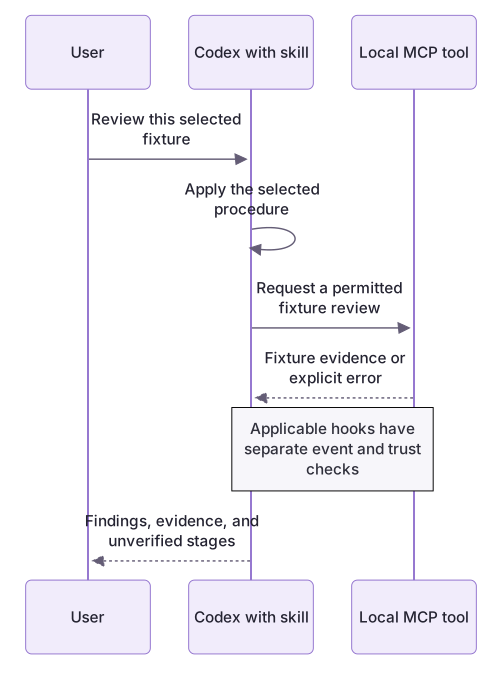
Design the unhappy path first
For a document review, specify what happens when the document is missing, its instructions conflict with the user's request, or its examples contain private credentials. A useful result identifies the missing or suspicious material without executing it. If a later server is disconnected, the plugin should explain the gap instead of replacing live facts with invented data. These behaviors belong in the architecture because they shape the user's experience, not just developer diagnostics.
An installed copy can differ from the source
The marketplace points to authoring files, while native installation may use a cached copy. Inspect the returned installed path/version; changing the source alone does not prove an existing session is using it. The extension task changes the server and manifest to 0.3.0 so this distinction is observable.
About your environment
Verified October 21, 2026. Native metadata lifecycle tested on Windows with Codex CLI 0.163.0-alpha.11 in disposable child-only CODEX_HOME: starter 0.2.0 and extension 0.3.0 install/list/remove succeeded. Authenticated skill invocation, MCP inside Codex, hook trust/delivery, other platforms and publication were not run by the course author.
Try it step by step
- Trace fixture-review/SKILL.md through list/review tool calls to exact fixture findings.
- Run demo.cjs and retain a real successful result and rejected traversal request.
- Identify what the skill instructs, what the server enforces, and what informational hooks can contribute.
- Install through the generated marketplace track and inspect the actual cached version before native invocation.
- In the app’s new chat select the skill, request missing-checks, and inspect the actual tool call/evidence when supported; label any unavailable stage.
A useful starting example
Illustration · adapt before use.
node labs/workflow-plugin/demo.cjsTrace labs/workflow-plugin from skill instructions through MCP initialization, discovery, tool call, and evidence.
Map the client, server, checker, fixed fixtures, and optional informational hooks.
Explain successful, rejected, and unavailable-data paths with actual outputs where available.
Identify which component could be omitted for a simpler single-user workflow.
Do not install or connect external services.The process boundary is actually exercised
The demo launches the packaged server and exchanges real newline-delimited JSON-RPC messages.
node labs/workflow-plugin/demo.cjsConnected local-fixture-review (2025-06-18).
Discovered: list_fixture_readmes, review_fixture_readme
Fictional fixtures: 3
Unknown fixture: protocol error -32602This is an excerpt of the measured local exchange. It verifies the bounded server/client path, not a real Codex plugin session or complete MCP conformance.
Your turn
Draw the exact request→skill→tool→fixture→finding path and annotate one real success/failure protocol trace. Follow the native app track to test the installed copy when available. Explain how discovery, authentication and hook trust could fail independently rather than calling every failure a broken manifest.
Try the exercise before opening its reference answer. Use a disposable practice folder.
Trace a real skill-to-tool architecture
Extract into a new practice folder and keep the included labs folder. Run these commands from that extraction root, or from the course folder, using an existing Node.js installation.
- Command 1 text
node labs/workflow-plugin/demo.cjsCheck: The local client initializes the server, discovers two bounded tools, calls them, and handles an unknown fixture as protocol error -32602.
- Command 2 text
node labs/workflow-plugin/hooks/demo.cjsCheck: Shows distinct SessionStart, successful PostToolUse, and failed PostToolUse context from offline fixtures.
- Command 3 text
node --test labs/workflow-plugin/depth.test.cjsCheck: 5 checks pass, including starter failure, complete reference grading through actual stdio, preserved baseline suite and scope rejection.
Separate workflow instructions, protocol transport, deterministic checking, and optional feedback. The local client tests a real process boundary without pretending to be Codex.
Check your result
- The architecture uses the real packaged components and observed protocol sequence.
- Read/write and arbitrary-path boundaries are explicit.
- The failure trace preserves the error instead of manufacturing a successful review.
Reference answer & rubric Try the exercise before opening
Draw and explain the actual request chain, including failure behavior and the places where evidence stops.
- Start with the skill's instruction to discover the tools and list fixture IDs. It provides the method but does not itself supply external permissions.
- Trace the local client through initialize and initialized, tools/list, then review_fixture_readme with a known ID. The server reads only the fixed packaged fixture.
- Match structuredContent to the text result and verify the finding against the input. Reject tool names, extra fields, and paths the interface does not expose.
- Place SessionStart and PostToolUse feedback alongside the main chain; they are informational hooks and cannot make a failed tool result successful.
- For a disconnected or rejected call, return an explicit gap. Only an actual supported-client run can prove Codex discovery, selection, hook trust, and activity delivery.
Check your understanding
Where should access to an external record ultimately be enforced?
- In the plugin's icon and display name.
- At the connected service/tool boundary, alongside the user's authorized scope.
- Only in a friendly description in SKILL.md.
Reveal the answer and explanation
Answer 2: At the connected service/tool boundary, alongside the user's authorized scope.
Instructions help guide use, but actual external access depends on the service and the identity and permissions used by the connection.
Take this quiz in the interactive lesson to save your answer in the browser.
When it does not work
A tools/call made immediately after process launch fails.
Likely cause: MCP initialization and the initialized notification were skipped.
What to try: Follow the lifecycle in client.cjs and wait for discovery before requesting a review.
The skill invents findings after a tool error.
Likely cause: Workflow recovery did not preserve the failed state.
What to try: Use the skill's error branch: name the failed operation and missing evidence, then stop or retry the bounded call.
Common mistakes
- Putting access-control rules only in a skill while the service accepts unrestricted operations.
- Treating optional UI, hooks, agents, and a server as mandatory plugin boilerplate.
Source mapping & differences · different
The modular architecture purpose transfers, but Codex's skills/MCP/optional UI/hooks boundaries and surface compatibility replace source-specific command and agent bundles.
Source topic: Plugin architecture ↗Go to the source
Official documentation, checked 21 October 2026. Product names, controls and availability may vary with your version, platform or account.
Completion and quiz progress are saved
only in the interactive course.