Static reading edition · s06-04
Place checks at the right event
Choose a lifecycle event whose timing and output semantics match the intended control.
Understand the approach
An event name tells you when a hook runs, which inputs it receives, and how its result is interpreted. PreToolUse runs before supported tool operations; PostToolUse sees their output after execution. SessionStart can supply context, while Stop can request continued work at the end of a turn. Selecting an event because its name sounds suitable is insufficient: timing determines what the hook can still influence.
Codex documents twelve lifecycle events across session start/end, subagent start/stop, prompt submission, tools, permission requests, compaction, stopping, and interruption. Do not import the source course's larger event matrix as a Codex promise. Matchers also have event-specific meaning. A SessionStart matcher filters the start source; PreToolUse filters tool names; Stop and UserPromptSubmit currently ignore matcher settings.
PostToolUse cannot undo a completed side effect. For Bash it also runs after a non-zero command exit, so seeing the event does not mean the command succeeded. PermissionRequest only runs when an approval would be requested; it is not a check on every ordinary operation. Stop's blocking decision asks Codex to continue, which differs from denying a pending tool. Record these distinctions in the event map.
A preventive decision must precede execution

PreToolUse occurs before the operation. A denial prevents the pending action. An approval request occurs only on paths that require one. PostToolUse observes a completed operation and cannot undo it.
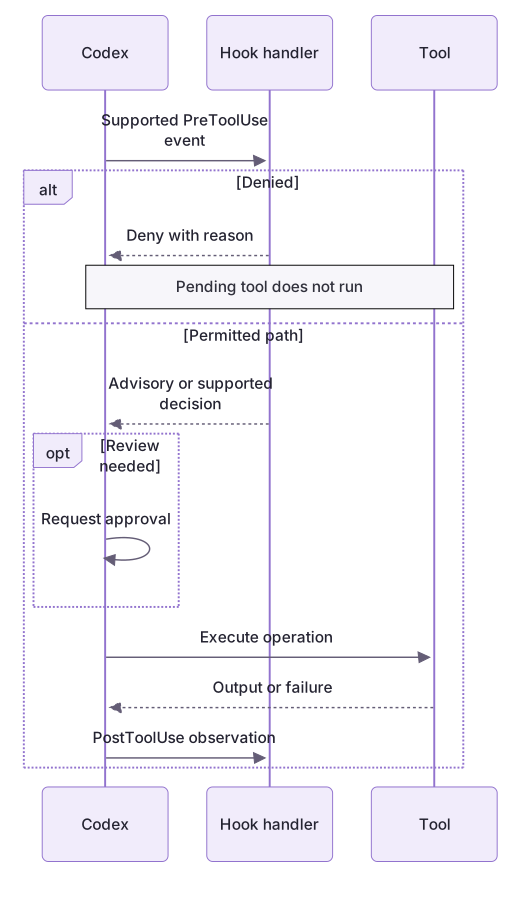
Compare prevention with later information
The deny-move fixture inventories a protected destination before any patch executes. Separately, workflow-plugin/hooks/demo.cjs replays SessionStart, successful PostToolUse, and failed PostToolUse input. The informational handler supports both those event kinds; other events return an empty object. Its PostToolUse message cannot undo an operation. Optional actual-client observations should record event, source or tool name, output, and effect on the supported host rather than claiming coverage of every tool.
One event, one interpretation
The same handler output cannot be reused blindly across events. Stop continuation creates another agent turn; it does not roll back a patch or certify correctness. The classroom Stop checker ends the retry when stop_hook_active is true, leaving the user a specific unresolved state instead of an endless loop.
About your environment
Verified October 21, 2026. Tool coverage includes documented exceptions; confirm the actual client and tool path before using an event as an enforcement boundary.
Try it step by step
- Map the desired outcome to the last point where it can still affect execution: before a patch, after an outcome, or before a turn stops.
- Replay deny-move and verify the destination is inventoried before returning PreToolUse deny.
- Inspect the plugin’s successful and failed PostToolUse fixtures; informational output does not reverse either operation.
- Run the Stop demo and compare decision:block with a PreToolUse permissionDecision:deny. Inspect the bounded retry state.
- In the generated --with-stop project, inspect the actual event bindings and run the covered native prompts if supported.
A useful starting example
Illustration · adapt before use.
node labs/hook-policy/replay.cjs deny-move
node labs/hook-policy/stop-demo.cjsFor each requirement, choose a documented Codex event and explain its limits:
1. Add short repository context when a session resumes.
2. Deny a supported tool before it writes a protected fixture.
3. Summarize a failed command after it exits.
4. Ask for one more verification pass before a turn ends.
Return a timeline; do not configure hooks.Move destination is part of the pending operation
A patch moves src/note.txt into protected/note.txt.
node labs/hook-policy/replay.cjs deny-move{"hookSpecificOutput":{"hookEventName":"PreToolUse","permissionDecision":"deny","permissionDecisionReason":"Patch targets a protected directory or environment file."}}This is the local handler's real response. It tests pending-patch analysis, not a live client denial or an after-the-fact undo.
Your turn
Build an event map backed by actual replay results: preventive move denial, SessionStart context, successful/failed tool information, and one bounded Stop continuation. Identify which event can still prevent a side effect and which can only report it. Use the native track to observe selected bindings when available.
Try the exercise before opening its reference answer. Use a disposable practice folder.
Trace before-tool and after-tool effects
Extract into a new practice folder and keep the included labs folder. Run these commands from that extraction root, or from the course folder, using an existing Node.js installation.
This exercise uses both packs. Extract each into the same practice root, keeping their separate folders under labs.
- Command 1 text
node labs/hook-policy/replay.cjs deny-moveCheck: Denies a move destination under protected/ before any patch is executed.
- Command 2 text
node labs/workflow-plugin/hooks/demo.cjsCheck: Prints SessionStart and PostToolUse context for three fictional events, including a tool-error case.
PreToolUse can inspect a pending supported patch; PostToolUse feedback never undoes a completed side effect.
Check your result
- The pending protected move is denied by PreToolUse in the offline fixture.
- The PostToolUse error example remains a failed operation rather than a successful policy check.
- The map names documented events and matcher meanings without importing the source course's event count.
Reference answer & rubric Try the exercise before opening
A correct event map ties timing, canonical names, matcher input, and output effect together.
- Inventory both the original and Move to destination in the pending patch; the protected destination makes the whole proposed patch objectionable.
- Contrast that denial with the PostToolUse fixture, whose tool_response already exists.
- Record the canonical apply_patch name and the separate documented Edit/Write matcher aliases; do not rewrite the payload name.
- Explain which matchers are ignored by Stop and UserPromptSubmit and why PermissionRequest does not cover ordinary in-sandbox actions.
- For any real scratch run, inspect the exact tool path rather than generalizing from these fixture traces.
- For native practice, follow NATIVE-CLIENT.md through discovery, current-definition trust, covered tool observation and disabling; record unrun stages honestly.
Check your understanding
A PostToolUse hook reports that a completed command changed a file. What can it guarantee?
- It can automatically rewind every changed file.
- It proves the command exited successfully.
- It can provide documented feedback, but cannot undo the side effect.
Reveal the answer and explanation
Answer 3: It can provide documented feedback, but cannot undo the side effect.
The event is after execution, and Bash PostToolUse can include unsuccessful commands. Recovery requires a separate, authorized action.
Take this quiz in the interactive lesson to save your answer in the browser.
When it does not work
A protected rename is allowed by a naive check.
Likely cause: Only the original Update File path was inspected.
What to try: Inventory Move to destinations and mixed patch operations before returning no objection.
The after-tool warning is mistaken for prevention.
Likely cause: The event occurs after execution.
What to try: Review the resulting state and propose any recovery separately; do not claim rollback from a feedback message.
Common mistakes
- Using PostToolUse as though it could reverse an external write.
- Adding a matcher to an event that ignores it, then assuming the hook is narrowly scoped.
Source mapping & differences · different
The learning purpose transfers, but Codex's documented event set, matcher inputs, and stop/permission semantics differ from the source matrix.
Source topic: Hook events ↗Go to the source
Official documentation, checked 21 October 2026. Product names, controls and availability may vary with your version, platform or account.
Completion and quiz progress are saved
only in the interactive course.