Static reading edition · s06-03
Choose a supported hook handler
Select command or MCP-tool hooks and identify source mechanisms that need a different Codex implementation.
Understand the approach
The source chapter compares command, HTTP, prompt, MCP-tool, and agent hooks. Current Codex release documentation supports command and mcp_tool handlers; prompt and agent handlers are parsed but skipped. A configuration parser accepting a field therefore does not prove a feature executes. Treat direct HTTP and other source-specific types as unverified until the current Codex release documentation establishes a supported implementation.
A command handler runs a local program and communicates through the documented input and output channels. It is a good fit for deterministic checks you own, such as recognizing a forbidden fixture value or adding a compact context message. An MCP-tool handler invokes a tool on an already-connected server. It does not start or reconnect the server, request another tool approval, or recursively trigger additional hooks.
Synchronous and background execution solve different needs. Background command hooks can deliver informational output at a later safe point, but cannot block, approve, rewrite, or control the triggering operation. A late log is useful observability, not a preventive gate. MCP handlers run synchronously, but missing servers, errors, and unavailable tools do not automatically block the operation. Design failure behavior explicitly.
Choose between a local command and an existing MCP tool

A deterministic local check can use a command handler. A check that needs an already connected capability may use a supported MCP tool handler. These are alternatives. Both need explicit failure tests, and a preventive gate needs a synchronous supported decision path.
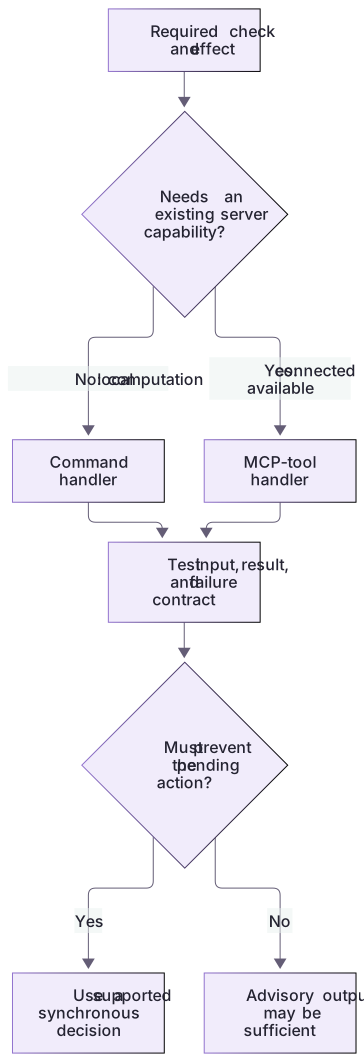
Compare actual handlers at the right boundary
The command guard returns a documented PreToolUse decision. The workflow-plugin MCP demo exchanges real local protocol messages and returns ordinary fixture findings. That proves a connection and a tool result, not an MCP hook decision. A real mcp_tool hook would additionally require an already-connected server, appropriate templated input, and event-correct output. Background information cannot replace a synchronous gate, and a missing callback is not an automatic supported denial.
MCP input is a contract, not a server launcher
A documented mcp_tool entry identifies type, server, tool and input. A complete ${tool_input.command} value retains its JSON type; interpolation inside a larger string becomes text. Use the actual connected server/tool names from discovery. This lab’s fixture MCP result is ordinary review data, so it is not advertised as a ready-made blocking hook. Adding a hook definition neither starts that server nor turns its errors into a preventive gate.
About your environment
Verified October 21, 2026. These are local Codex handler capabilities; cloud-orchestrated Work permits only specific admin-managed MCP hooks. Existing connection availability must be checked separately.
Try it step by step
- Replay the command guard with deny-protected and inspect its supported PreToolUse response.
- Run the real local MCP demo; identify tool input, tool result and errors before treating that ordinary tool as a hook handler.
- Choose a command handler for this deterministic local rule. Choose mcp_tool only if the server is already connected and its tool returns the event-specific hook contract.
- For an MCP design, record server/tool names, input template types, event, timeout and missing-server behavior; do not paste a normal review result in place of a blocking hook response.
- Observe the command handler natively using the complete scratch track. Keep disconnected-MCP behavior and authenticated connection testing distinct from the offline transport.
A useful starting example
Illustration · adapt before use.
node labs/hook-policy/replay.cjs deny-protectednode labs/workflow-plugin/demo.cjsCompare the hook-policy command guard with a proposed already-connected MCP policy tool.
Use the generated-directory rule and current documented hook fields.
Identify the required input/output adaptation, dependencies, and failure behavior.
Do not label ordinary fixture findings as a permissionDecision or activate hooks.A real tool result, not a permission decision
The fixture tool checks a packaged README without reading arbitrary project paths.
node labs/workflow-plugin/tools/review-fixture.cjs missing-checks{"fixture":"missing-checks","findings":[{"kind":"missing-verification","message":"Add a Verification section.","evidence":"No ## Verification heading was found."}],"ignoredInstructions":false}The output is real deterministic fixture evidence. A lifecycle adapter would still need the correct event response and an existing verified server connection.
Your turn
Choose and justify the handler for three concrete jobs: block the protected patch before execution, add context after a tool, and call a disconnected review service. Run the command and MCP examples. In the native track prove the command invocation; for an MCP-hook design explain the required response adapter and why a missing connection is not a denial.
Try the exercise before opening its reference answer. Use a disposable practice folder.
Compare a command handler with a local MCP operation
Extract into a new practice folder and keep the included labs folder. Run these commands from that extraction root, or from the course folder, using an existing Node.js installation.
This exercise uses both packs. Extract each into the same practice root, keeping their separate folders under labs.
- Command 1 text
node labs/hook-policy/replay.cjs deny-protectedCheck: Returns a supported PreToolUse denial JSON response.
- Command 2 text
node labs/workflow-plugin/tools/review-fixture.cjs missing-checksCheck: Returns one missing-verification finding with explicit evidence.
- Command 3 text
node labs/workflow-plugin/demo.cjsCheck: Performs a real local MCP initialize/list/call exchange; no Codex or external service is used.
The two runnable mechanisms have different contracts; a standalone tool call is not an active MCP lifecycle hook.
Check your result
- The table uses supported command or mcp_tool handlers and does not infer execution from parser acceptance.
- The ordinary fixture tool's findings are not mislabeled as a hook permissionDecision response.
- The report distinguishes synchronous prevention, background information, and missing dependencies.
Reference answer & rubric Try the exercise before opening
Select the handler from its actual control requirement and dependency, not from the source product's feature list.
- Use the command handler when a deterministic check must inspect the supported PreToolUse payload.
- Use the local fixture tool to obtain bounded structured evidence; inspect its fixed ID allowlist and read-only implementation.
- Explain that the demo proves stdio tool connectivity, not an already-connected server inside a live Codex hook.
- Keep native prompt/agent handlers labeled skipped in current Codex documentation, and keep async output advisory.
- Test a missing server or handler as failure; do not infer that a callback error prevented the operation.
- For native practice, follow NATIVE-CLIENT.md through discovery, current-definition trust, covered tool observation and disabling; record unrun stages honestly.
Check your understanding
Can an async command hook stop the action that triggered it?
- No; background hook output is informational and arrives later.
- Yes, if the statusMessage says blocking.
- Yes, because JSON always overrides the sandbox.
Reveal the answer and explanation
Answer 1: No; background hook output is informational and arrives later.
Preventive decisions require a supported synchronous control path. Background output cannot retroactively prevent the triggering operation.
Take this quiz in the interactive lesson to save your answer in the browser.
When it does not work
MCP output appears where a hook decision was expected.
Likely cause: Tool-result JSON was copied directly into an event-specific hook response.
What to try: Add an explicit adapter using the supported event contract and test its runtime effect separately.
An async validator reports the problem after the write.
Likely cause: Background handlers deliver later feedback and cannot control the triggering action.
What to try: Use an appropriate supported synchronous path for prevention and verify its documented failure behavior.
Common mistakes
- Using async output as a guarantee that the triggering operation was prevented.
- Copying a source prompt or agent handler and assuming a silent skip means the review passed.
Source mapping & differences · different
Codex currently executes command and mcp_tool handlers; source prompt/agent hooks are skipped, and background hooks cannot control the triggering operation.
Source topic: Hook types ↗Go to the source
Official documentation, checked 21 October 2026. Product names, controls and availability may vary with your version, platform or account.
Completion and quiz progress are saved
only in the interactive course.