Static reading edition · s06-05
Understand hook input and output
Validate a fictional event and produce an event-correct response without confusing status, feedback, and control.
Understand the approach
Command hooks receive a JSON object on standard input. Shared fields identify the session, current directory, event, and optional transcript location; event-specific fields carry tool inputs, tool results, or stop state. Read only the fields your handler needs and validate their types. A transcript path is a convenience, not a stable parsing interface, and the transcript may contain sensitive material.
Output must match the event. For example, a PreToolUse denial uses hookSpecificOutput with hookEventName, permissionDecision, and its reason. A Stop continuation uses decision block and a reason instead. The same-looking word block therefore has different effects at different lifecycle points. Several fields are parsed but unsupported for particular events, so a syntactically valid JSON response can still be operationally wrong.
Keep diagnostic logs on standard error and machine-readable response data on standard output. In this lab, malformed input handled by the running guard deliberately becomes a supported denial response at exit zero; successful process exit means the response was emitted, not that the proposed patch was allowed. A missing executable or crash is different because it may produce no usable policy response. Oversized model-visible context can spill to a temporary file, so never return secrets on the assumption that truncation removes them. A compact, typed result is easier to inspect and maintain.
A handler must distinguish a valid request from malformed input

A launch failure produces no handler decision. Once started, malformed input is handled as a denial at exit zero. A valid but out-of-scope event or tool produces an empty response with no policy decision. A matched valid patch is denied when a protected target matches, or produces no objection otherwise. Exit zero means the handler produced its response; the JSON and client policy determine the effect.
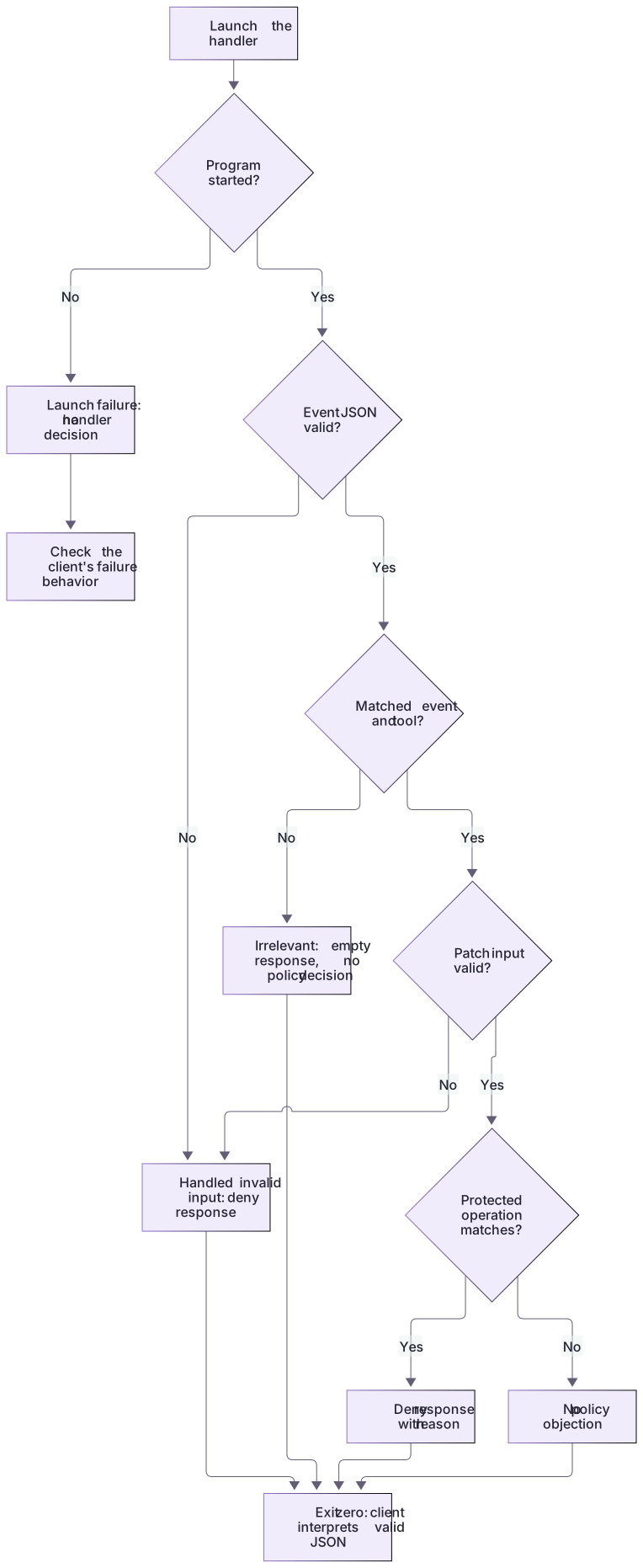
A useful failure is distinguishable
For the same input, distinguish policy denial from missing runtime, unreadable fixture, malformed JSON, and timeout. If all five produce the same vague message, an operator cannot know whether a safeguard worked. Record these outcomes explicitly in your test table. For prevention-sensitive workflows, also verify the documented runtime failure behavior; a crashing validator should never be assumed to have denied an operation.
Evidence must describe the latest artifact
The Stop example links a SHA-256 hash to the actual candidate and independently inspects both required headings. A copied all-passed record cannot conceal a missing heading, and editing the candidate makes the old hash stale. This protects the narrow classroom contract; it does not evaluate arbitrary prose or guarantee that every claimed external test actually ran.
About your environment
Verified October 21, 2026. This lesson uses offline fixtures only. Field availability and tool input shapes depend on the event and actual Codex tool path.
Try it step by step
- Inspect the exact fictional event and read tool_input.command rather than a Claude-specific patch field.
- Replay allowed, denied, irrelevant and malformed cases; retain stdout, stderr and process status separately.
- Inspect the missing-handler test: no running program means no JSON policy denial was produced.
- Run stop-demo.cjs and compare its fresh/stale artifact observations with the different Stop response fields.
- Keep responses compact and typed; attach actual native event observations only if the client track was run.
A useful starting example
Illustration · adapt before use.
node labs/hook-policy/replay.cjs deny-protected{
"hookSpecificOutput": {
"hookEventName": "PreToolUse",
"permissionDecision": "deny",
"permissionDecisionReason": "The fixture operation targets a protected practice file."
}
}Exit zero can carry a denial
The guard successfully emits a supported response for a protected target.
{
  "hookSpecificOutput": {
    "hookEventName": "PreToolUse",
    "permissionDecision": "deny",
    "permissionDecisionReason": "Patch targets a protected directory or environment file."
  }
}Handler response: valid JSON. Handler process: success. Policy classification: deny. Live Codex effect: not exercised.These states are intentionally separate. The offline tests verify the first three, while client delivery still requires a real supported scratch test.
Your turn
Produce wire-level evidence for allow, deny, irrelevant, invalid JSON and launch failure, then add the Stop continuation/no-block pair. Identify the exact response field interpreted by each event. Explain why exit zero, valid JSON, and a true passed field are each insufficient on their own.
Try the exercise before opening its reference answer. Use a disposable practice folder.
Validate event input and wire output
Extract into a new practice folder and keep the included labs folder. Run these commands from that extraction root, or from the course folder, using an existing Node.js installation.
- Command 1 text
node labs/hook-policy/replay.cjs deny-protectedCheck: Produces parseable event-specific denial JSON.
- Command 2 text
node labs/hook-policy/replay.cjs irrelevantCheck: Produces {}, explicitly outside the teaching policy's tool coverage.
- Command 3 text
node --test labs/hook-policy/test.cjsCheck: Covers malformed JSON, bad fields, unknown headers, path ambiguity, and launch failure.
JSON syntax, process status, policy classification, and runtime effect are four separate observations.
Check your result
- The expected JSON uses supported fields for the correct event and stays separate from stderr diagnostics.
- Exit zero is not confused with an allow decision, and irrelevant {} is not treated as universal protection.
- The report identifies the untested client effect rather than claiming a live blocked edit.
Reference answer & rubric Try the exercise before opening
The answer is an event-correct wire contract with explicit handling for invalid and irrelevant input.
- Validate a matched event's absolute cwd and string tool_input.command before inspecting patch headers.
- Keep diagnostics on stderr and one supported JSON response on stdout.
- For deny or invalid input after launch, return PreToolUse permissionDecision deny; exit 0 means the response was emitted successfully.
- For irrelevant tools, return no hook decision and document coverage rather than guessing their argument schema.
- Keep process launch failure distinct: no running program means no policy response was produced.
- For native practice, follow NATIVE-CLIENT.md through discovery, current-definition trust, covered tool observation and disabling; record unrun stages honestly.
Check your understanding
Why is valid JSON not enough to validate a hook?
- Codex accepts every parsed compatibility field.
- Its fields and decisions must also be supported for that event.
- JSON automatically executes shell commands.
Reveal the answer and explanation
Answer 2: Its fields and decisions must also be supported for that event.
The event-specific contract determines operational behavior. Unsupported fields may cause a failure even when parsing succeeds.
Take this quiz in the interactive lesson to save your answer in the browser.
When it does not work
The process exits zero, so a learner assumes the patch was allowed.
Likely cause: Process success was confused with the denial decision inside stdout.
What to try: Inspect hookSpecificOutput.permissionDecision and the actual client result separately.
JSON parsing fails in the receiving client.
Likely cause: Logs were mixed into stdout or the event output shape is wrong.
What to try: Replay the fixture locally; keep stderr separate and compare against the documented PreToolUse fields.
Common mistakes
- Printing debug messages before JSON on stdout and breaking the response contract.
- Returning a source product's accepted field and assuming Codex honors it identically.
Source mapping & differences · different
Structured stdin/stdout transfers, but Codex's event-specific decisions and unsupported fields require a new contract rather than a copied response schema.
Source topic: Hook input and output ↗Go to the source
Official documentation, checked 21 October 2026. Product names, controls and availability may vary with your version, platform or account.
Completion and quiz progress are saved
only in the interactive course.