Static reading edition · s06-02
Configure hook sources deliberately
Read a Codex hook configuration and prepare a project-scoped draft without activating it.
Understand the approach
Codex discovers hook definitions alongside active configuration layers. Common locations include ~/.codex/hooks.json, ~/.codex/config.toml, and their project-level .codex equivalents. A definition has an event, an optional matcher group, and one or more handlers. A hooks.json file and inline TOML in the same layer are both loaded, with a warning; choose one representation per layer to avoid accidental duplication.
Layering matters because hook definitions are additive. A higher-precedence configuration does not simply replace all lower-level hooks. Project-local hooks require a trusted project configuration layer, and non-managed hook definitions still need their own review and trust. A user-level hook can remain active even when a project hook is unavailable. Inventory sources before diagnosing an unexpected double run.
Commands execute with the session's current working directory. A relative path that works at the repository root can fail when a session starts in a subdirectory. Prefer a reviewed absolute script path or the documented repository-root resolution appropriate to the host shell. Windows can use commandWindows in JSON; inline TOML accepts command_windows or commandWindows. Choose an interpreter that actually exists on the learner's host.
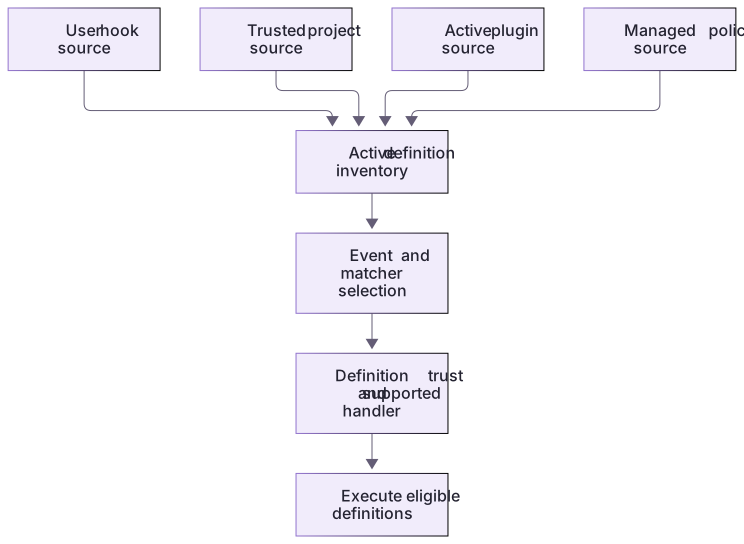
Active hook sources are additive

User, trusted project, plugin, and managed sources can contribute definitions. A project definition does not automatically erase lower-level definitions. Source loading, matching, and handler trust are separate checks.
Generated is different from active
The hook-policy generator prints a real PreToolUse command draft using the current Node executable and handler path. Run its 13 checks first, then compare baseline and --solution targets. Follow labs/hook-policy/README.md if you elect a supported-client test in your own disposable Git repository. Review project trust and exact-definition trust separately, then observe one allowed and one denied scratch patch. No live result has been recorded by the author, and moving the package requires regenerating its absolute paths.
Disable at the right scope
The documented features.hooks = false setting turns hooks off broadly; it is unnecessary for this exercise. Prefer the non-managed definition control or the generated project file. Managed definitions may be enforced and cannot be treated as ordinary learner-owned settings.
About your environment
Verified October 21, 2026. Paths and command quoting are host-specific. Managed policy can constrain hooks; the exercise does not edit personal or active project configuration.
Try it step by step
- Generate a fresh workspace; inspect its project hooks.json and the copied guard. Keep this source separate from any user or managed hooks already listed.
- Check executable, absolute handler path, event, ^apply_patch$ matcher and timeout. Regenerate after moving between Windows and Linux hosts.
- Open the printed project and inspect /hooks in a supported CLI; review the project and current non-managed definition before running it.
- Run one covered allowed/protected pair. If a double invocation appears, inventory active JSON, inline TOML and plugin sources before changing anything.
- Disable only the practice definition or rename only the generated project file, then start a fresh chat and inspect the loaded sources again.
A useful starting example
Illustration · adapt before use.
node labs/hook-policy/create-workspace.cjs --path-only
# Follow NATIVE-CLIENT.md for checked path validation and Git initialization.node labs/hook-policy/create-config-draft.cjs --solutionSupported draft structure
A local generator creates the event/matcher/handler structure documented for Codex.
const draft = {
  hooks: { PreToolUse: [{
    matcher: '^apply_patch$',
    hooks: [{ type: 'command', command, commandWindows, timeout: 10 }]
  }] }
};PreToolUse → ^apply_patch$ → command handler; timeout 10 seconds.command and commandWindows are the actual paths printed by create-config-draft.cjs. This excerpt omits machine-specific paths; it is not evidence of activation.
Your turn
Generate the actual configuration and complete the native source/trust/disable cycle in NATIVE-CLIENT.md when supported. Annotate one source inventory with event, matcher, executable, cwd assumptions, trust and managed status. A draft that parses is the first checkpoint; an observed covered invocation is the native checkpoint.
Try the exercise before opening its reference answer. Use a disposable practice folder.
Generate and inspect an actual config draft
Extract into a new practice folder and keep the included labs folder. Run these commands from that extraction root, or from the course folder, using an existing Node.js installation.
- Command 1 text
node labs/hook-policy/create-config-draft.cjsCheck: Prints JSON with PreToolUse, matcher ^apply_patch$, command and commandWindows paths, and timeout 10. Writes no config file.
- Command 2 text
node labs/hook-policy/create-config-draft.cjs --solutionCheck: Prints the same supported draft shape targeting the generated-directory solution handler.
Configuration paths are generated from the actual local runtime; review and optional scratch activation remain separate.
Check your result
- Both drafts parse and contain the intended PreToolUse matcher, command handler, and actual local path.
- The inventory explains additive loading and distinguishes project trust from exact-definition trust.
- The report separates generated, placed, discovered, trusted, and actually observed states.
Reference answer & rubric Try the exercise before opening
The correct draft targets the intended executable, event, and scope without touching active owner configuration.
- Parse the generated JSON and locate hooks.PreToolUse[0].hooks[0].
- Verify that its command points at this copy of guard.cjs and that the Windows override uses the same reviewed program.
- Explain why matcher ^apply_patch$ intentionally excludes shell and unrelated tools; broader matching would need a broader implemented contract.
- Check existing user/project/plugin sources before any chosen scratch activation because hooks load additively.
- Only in your own disposable supported client, review project trust and exact hook trust; inspect the actual denied scratch diff before claiming a client pass.
- For native practice, follow NATIVE-CLIENT.md through discovery, current-definition trust, covered tool observation and disabling; record unrun stages honestly.
Check your understanding
What happens if one active layer contains hooks.json and inline hooks?
- The project becomes automatically trusted.
- Codex loads both and warns, so duplicate execution is possible.
- The TOML always erases the JSON hooks.
Reveal the answer and explanation
Answer 2: Codex loads both and warns, so duplicate execution is possible.
The documented behavior is additive. A source inventory and one representation per layer help prevent unintended duplicate handlers.
Take this quiz in the interactive lesson to save your answer in the browser.
When it does not work
The generated command no longer exists.
Likely cause: The lab was moved or a different runtime is being used.
What to try: Regenerate the draft from the new copy; do not blindly edit personal settings.
One operation produces duplicate feedback.
Likely cause: The same definition is active in more than one source or representation.
What to try: Inventory hooks.json, inline hooks, and plugin sources; remove duplication only within your authorized scratch scope.
Common mistakes
- Copying ~/.claude/settings.json as though it were Codex configuration.
- Defining the same handler in hooks.json and config.toml and expecting one to override the other.
Source mapping & differences · different
Codex uses hooks.json or inline hooks beside active Codex config layers, with additive loading and definition trust, rather than Claude settings-file placement.
Source topic: Configuration ↗Go to the source
Official documentation, checked 21 October 2026. Product names, controls and availability may vary with your version, platform or account.
Completion and quiz progress are saved
only in the interactive course.