Static reading edition · s06-01
Hooks: a lifecycle, not a reminder
Decide which workflow checks belong in a Codex hook and which need an explicit task.
Understand the approach
A hook attaches a small operation to a point in Codex's lifecycle. Instead of asking the agent to remember a check in every prompt, you define when a script or an existing MCP tool should run. Useful examples include adding short repository context at session start or inspecting a pending tool operation. The trigger, handler, and interpretation of its result form one contract; a script alone is not a working hook.
The source course introduces several Claude hook mechanisms. Codex provides the same broad event-driven capability, but its supported handlers, events, and response fields differ. Current documentation supports command and mcp_tool handlers. Hooks from multiple active sources can match the same event, and matching command hooks can start concurrently. Do not rely on one hook running before another or preventing another handler from starting.
Start with the fictional fixture suite, then connect the same handler in a disposable project. The generated native track writes a complete project-local configuration with the actual host interpreter path. It lets you observe discovery, definition trust, a covered allowed edit, a protected edit denial, and disabling. These are separate from a program merely printing correct JSON. Keep personal configuration out of this first experiment.
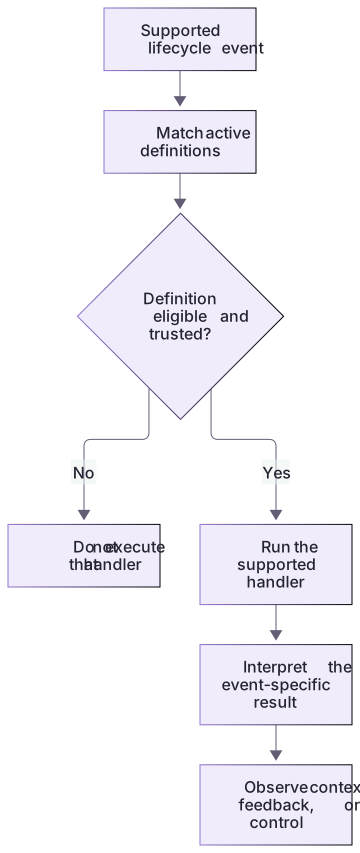
A hook is selected and interpreted at an event boundary

A supported lifecycle event is matched against active definitions. Only eligible, trusted handlers execute. The event-specific result contract determines whether output adds context, provides feedback, or affects a pending operation.
Observe the policy before trusting it
The lab begins with an offline policy precisely so its outcomes can be observed without preventing a real operation. Compare a no-objection response, explicit denial, irrelevant tool, handled-invalid input, and a process that never launched. A production credential filter would need a stronger threat model and broader coverage. Keep this small guard's lexical path and tool limits visible; completing its classroom exercise does not make it universal protection.
What this first hook actually establishes
The guard inventories paths in canonical apply_patch input before the operation. It is a deliberately small lexical rule, not a filesystem sandbox: other tools and symlinks remain outside its coverage. Native success means the particular covered tool event was observed and handled in that client, not that every possible file write is prevented.
About your environment
Verified October 21, 2026. This lesson targets local Codex workflows in the app or CLI. Cloud-orchestrated Work has separate, restricted enterprise MCP-hook support; do not transfer local examples unchanged.
Try it step by step
- Run the fixture demo and original suite; distinguish a running program returning a denial from a missing handler that never ran.
- Generate a new project with create-workspace.cjs --path-only. Inspect the actual .codex/hooks.json, executable path and two scratch files.
- Open that project in the app, or launch the CLI in it and inspect /hooks. Review project trust and the current hook-definition trust separately.
- Use the two covered apply_patch prompts in NATIVE-CLIENT.md. Compare allowed/protected file content and tool activity; do not test by asking the model whether it would obey.
- Disable the scratch hook, verify its loaded state, and retain the observed client/version separately from offline fixture results.
A useful starting example
Illustration · adapt before use.
node labs/hook-policy/demo.cjsInspect labs/hook-policy/guard.cjs and its fictional fixtures.
Explain the event, canonical input, path policy, output contract, and coverage limits.
Run the offline demo and tests; cite the observed cases.
Do not place configuration, trust hooks, or apply a patch.Two real fixture decisions
The same local handler checks an allowed source file and a protected file.
node labs/hook-policy/demo.cjsallow.json: allow | All inventoried patch paths are inside the permitted practice area.
deny-protected.json: deny | Patch targets a protected directory or environment file.These lines come from the actual local demo. No patch was applied and no Codex session ran.
Your turn
Complete the five-state offline table, then take the native track in a generated project when you have a supported authenticated client. Record the actual loaded source, trust status, covered allowed patch, denied protected patch, and disabling state. If native activation is unavailable, keep that track unrun; the complete steps remain available rather than replacing the feature with a prompt reminder.
Try the exercise before opening its reference answer. Use a disposable practice folder.
Observe a real local policy handler
Extract into a new practice folder and keep the included labs folder. Run these commands from that extraction root, or from the course folder, using an existing Node.js installation.
- Command 1 text
node labs/hook-policy/demo.cjsCheck: The demo reports allow, deny, irrelevant, invalid, malformed-JSON denial, and a distinct missing-handler launch failure.
- Command 2 text
node --test labs/hook-policy/test.cjsCheck: 13 tests pass without applying a patch or activating a hook.
- Command 3 text
node labs/hook-policy/exercise-check.cjsCheck: Initially exits 1 because learner.cjs has no generated-directory rule. After the correct candidate edit, exits 0 with both the extension and regression checks passed.
- Command 4 text
node labs/hook-policy/exercise-check.cjs --solutionCheck: generated/report.js: deny, followed by Extension criterion and candidate regression checks passed.
An event handler has observable behavior; a passing local program test is still different from live Codex delivery.
Check your result
- The allow fixture returns no-objection context; protected paths return the documented PreToolUse denial.
- The report separates invalid input handled by a running program from failure to launch that program.
- The 13 local checks pass and the remaining client acceptance states are labeled unrun.
Reference answer & rubric Try the exercise before opening
A successful overview lab distinguishes the policy's decisions from its integration and coverage limits.
- Match allow.json to a permitted in-root path and deny-protected.json to a protected destination.
- Identify irrelevant.json as a tool outside this apply_patch-only policy; do not call it universally permitted or universally protected.
- Explain why malformed stdin returns a denial response after the handler starts, while a missing executable cannot return a policy decision.
- Retain the no-live-client label and state symlink, shell-write, and other-tool coverage gaps.
- For the extension, change the separate learner.cjs candidate, not the frozen guard. Preserve every baseline non-allow result, then deny a normalized root-level generated/ path while allowing src/generated-helper.js. Pass the same candidate regression gate used by the reference.
- For native practice, follow NATIVE-CLIENT.md through discovery, current-definition trust, covered tool observation and disabling; record unrun stages honestly.
Check your understanding
What makes a hook operationally meaningful?
- A script with a memorable filename.
- Any instruction that says always.
- A supported event, a runnable handler, and a tested result contract.
Reveal the answer and explanation
Answer 3: A supported event, a runnable handler, and a tested result contract.
A hook is an event-to-handler integration. Naming a script or repeating an instruction does not establish when it runs or how Codex interprets its result.
Take this quiz in the interactive lesson to save your answer in the browser.
When it does not work
Every fixture seems blocked.
Likely cause: The fixture uses a malformed canonical apply_patch payload or an ambiguous root.
What to try: Start with allow.json and compare hook_event_name, tool_name, cwd, and tool_input.command before changing policy.
The local tests pass but no hook appears in Codex.
Likely cause: Offline tests exercise a Node program, not client discovery or trust.
What to try: Use the separate optional scratch-client procedure and record discovery, trust, delivery, and effect independently.
Solving the extension appears to require breaking a baseline assertion.
Likely cause: The learner changed the frozen guard instead of the separate editable candidate.
What to try: Restore guard.cjs and test.cjs, implement the extension in learner.cjs, and run both the candidate gate and the unchanged suite.
Common mistakes
- Treating a reminder in AGENTS.md as proof that an executable check always runs.
- Assuming all matching hooks run in a dependable sequence or that installation automatically trusts them.
Source mapping & differences · different
Codex has lifecycle hooks, but its handler types, event coverage, trust flow, and output semantics are not identical to Claude Code.
Source topic: Overview ↗Go to the source
Official documentation, checked 21 October 2026. Product names, controls and availability may vary with your version, platform or account.
Completion and quiz progress are saved
only in the interactive course.