Static reading edition · s05-03
Separate configuration scope from access scope
Choose where a connection belongs and distinguish sharing configuration from granting service access.
Understand the approach
The word scope can describe several different things. Configuration scope answers where a server definition is stored and who may inherit it. OAuth scope describes permissions requested from an authorization server. Tool visibility describes which operations the client exposes. The user's task scope describes the work being delegated. Do not collapse these into a single permission decision: a project-shared server definition can exist while a teammate lacks service access, and a valid token can permit more than today's task authorizes.
Codex documents user configuration in ~/.codex/config.toml and project configuration in .codex/config.toml for trusted projects. That differs from the source guide's Claude local, project and user files and --scope syntax. A project entry is useful for reproducible non-secret connection details, but reviewing repository trust and managed requirements still matters. Sharing a URL is not sharing the right to retrieve all private content, and sharing an environment-variable name must not turn into committing its value.
For the lab, prepare a project-scoped description of the public Docs MCP without applying it. Then compare it with a fictional private ticket connector. Identify what can be checked into a repository, what stays with each user's credentials, and which operations should be exposed. Codex's enabled_tools and disabled_tools settings can narrow the presented set, with the deny list applied after the allow list. Those controls should match actual tool names; they do not replace the service's authorization or validate a tool's safety.
Generate the complete host-specific table, then in a chosen scratch configuration keep all three names in enabled_tools and put get_task in disabled_tools. After restarting the native client, inspect whether get_task is absent while list_tasks and read_task_snapshot remain. The standalone transcript still lists all three because it never reads Codex TOML. A hidden lookup also does not hide those records from read_task_snapshot. Project configuration, tool presentation and data authorization therefore have different tests. App/CLI/IDE on the same host share this connection; another machine cannot reuse the first machine’s executable path just by copying its file.
Configuration does not define the entire access boundary

Configuration selects a server definition. Identity determines its account access; exposed tools determine possible operations; the current user task determines what is authorized now. The permitted action is the intersection, not the union, of those limits.
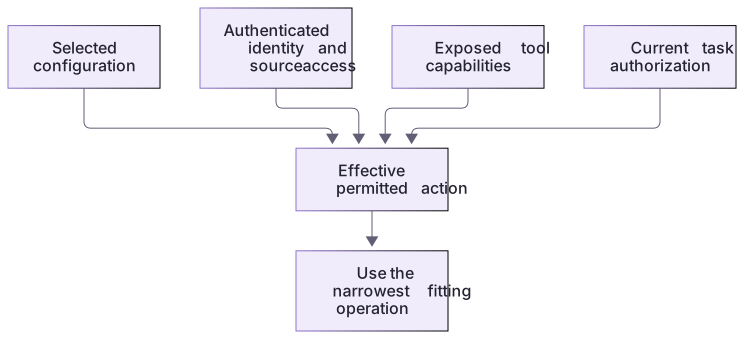
Practice and acceptance
What a server implements, what a host exposes and what a task authorizes remain different boundaries.
About your environment
Checked 21 October 2026. Managed requirements and client trust can constrain project configuration.
Try it step by step
- Read the linked lab guide, inputs and expected outputs before running the exercise.
- Create a four-column scratch table for configuration location, account authorization, tool exposure and delegated task; fill it for the Docs MCP.
- Review the project's trust and existing configuration before proposing a project entry. Preserve unrelated servers and organization requirements.
- For a fictional private service, list shareable non-secret details separately from user sign-in and credential handling.
- Choose the smallest required operation set using the server's actual tool catalogue; do not invent allow-list names from a marketing description.
- Ask Codex to explain the proposed configuration and its limits, then check that no claim of shared credentials or broader task authority has slipped into the plan.
A useful starting example
Illustration · adapt before use.
# Within the generated [mcp_servers.practice_tasks] table:
enabled_tools = ["list_tasks", "get_task", "read_task_snapshot"]
disabled_tools = ["get_task"]
# Deny applies after allow. This is a Codex-host setting, not a server ACL.An unknown operation is not a hidden write permission
The protocol test calls a name absent from the catalogue.
{"method":"tools/call","params":{"name":"erase_all","arguments":{}}}error.code: -32602
error.message: Unknown tool: erase_allThis is server-side name validation. It is independent of whether a future host allows a known tool.
Your turn
Compare connection-draft.toml's enabled_tools with the actual tools/list response. Find the test that attempts erase_all and inspect its -32602 result. Explain which restriction comes from this read-only server and which proposed restriction would belong to a Codex host. Do not claim the inactive TOML was enforced by the local harness.
Try the exercise before opening its reference answer. Use a disposable practice folder.
Inspect offered operations and inactive scope controls
Extract into a new practice folder and keep the included labs folder. Run these commands from that extraction root, or from the course folder, using an existing Node.js installation.
- Command 1 text
node labs/mcp-workbench/demo.cjsCheck: Only the three declared read-only tools are offered.
- Command 2 text
node --test labs/mcp-workbench/workbench.test.cjsCheck: Unknown erase_all tool is rejected with protocol error -32602.
What a server implements, what a host exposes and what a task authorizes remain different boundaries.
Check your result
- The proposed file path and format follow Codex rather than Claude conventions.
- Credentials are absent from the shared note and service permissions are treated separately.
- Any tool filter uses confirmed operation names and does not claim to enforce all service authorization.
- Local harness behavior and isolated native server discovery are distinguished from unrun app UI setup or model-selected tool calls.
Reference answer & rubric Try the exercise before opening
The server really has no write operation. The enabled_tools list is a future host configuration example, not the reason this harness rejects unknown tools.
- Discover the catalogue and locate its three tool implementation branches.
- Inspect the unknown-tool test and server error path.
- Compare all allow-list names with actual catalogue names rather than inventing identifiers.
- Document configuration scope, host tool exposure, account scope and task authority separately; this lab has no accounts or external records.
Check your understanding
A teammate has your project MCP entry but cannot read a private ticket. What is a likely distinction?
- The project file must contain your token value.
- All MCP configuration must be global to retrieve records.
- Configuration sharing does not supply the teammate's service authorization.
Reveal the answer and explanation
Answer 3: Configuration sharing does not supply the teammate's service authorization.
A connection definition and an authenticated identity are separate; each user needs appropriate service access.
Take this quiz in the interactive lesson to save your answer in the browser.
When it does not work
A read-only annotation is treated as access enforcement.
Likely cause: Annotations describe tools; the implementation and host permissions enforce behavior.
What to try: Inspect the actual tool branches and restrictions instead of relying only on readOnlyHint.
The draft allow-list is said to have filtered the harness.
Likely cause: The harness never loads Codex configuration.
What to try: Label TOML inactive and test host enforcement only in an actual deliberately configured client.
Common mistakes
- Copying Claude's --scope project or .mcp.json into a Codex setup without checking the format.
- Assuming that adding a project connection grants every teammate the same data access.
Source mapping & differences · different
The need for scope management transfers, but Codex uses trusted-project and user TOML configuration rather than Claude's three-scope files and flags.
Source topic: MCP scopes ↗Go to the source
Official documentation, checked 21 October 2026. Product names, controls and availability may vary with your version, platform or account.
Completion and quiz progress are saved
only in the interactive course.