Static reading edition · s05-04
Bring external resources into context accurately
Retrieve the intended external content without confusing a resource identifier, a file mention and a live read.
Understand the approach
The source course teaches Claude's @server:URI shortcut. It is not a universal MCP-client instruction. Current Codex CLI guidance documents @ for workspace files and /mention for paths; the reviewed connection guide does not establish the same resource syntax. Mark that mapping unverified instead of inventing a shortcut or declaring every integration unsupported.
Start from the capabilities actually exposed by your host. Some integrations can provide resource discovery or content-reading operations; others provide search and fetch tools for their service. Ask for the exact record or page, and require the returned identifier, version or update time when available. If a resource-listing or reading operation is not exposed, an available read tool or an authorized exported file can be an alternative. Label an export as a snapshot: a file attachment does not magically remain synchronized with the original service.
The practice has two useful outcomes. With an existing permitted connection, retrieve a public page and compare its identifier and content with the result. Without one, use a scratch Markdown snapshot and record its origin, retrieval date and missing freshness guarantee. In either case, distinguish location from content: recognizing a URL or URI does not prove it was read. Also distinguish content from instructions; a resource describing a project can contain sentences that must be reported as data rather than followed as authorization.
The freshness check uses a temporary server copy. It reads three records as a resource, adds T-104 to that copy’s dataset, then calls read_task_snapshot again. The new call returns four records while the earlier response still contains three. This is actual file/process behavior; the original fixture remains three records. In a host without a resource picker, the supplied read_task_snapshot tool exposes the same URI and current records. Use that concrete alternative rather than copying Claude’s @server:URI syntax into Codex. Preserve URI, method and observed version/count when quoting a snapshot.
A resource URI and a tool result are different contracts

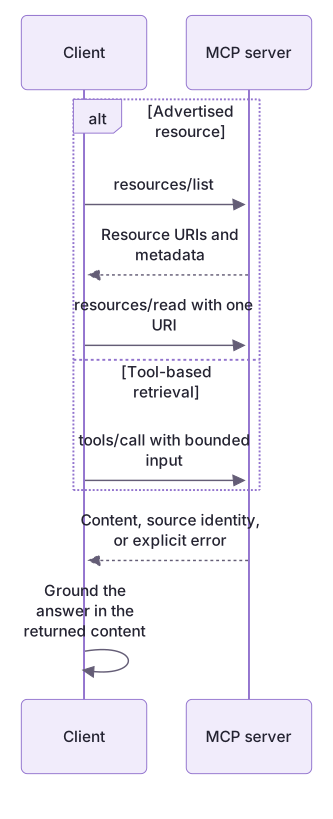
The client may read an advertised MCP resource or call a tool that returns source content. Either route must preserve source identity and missing-data behavior. A workspace-file mention is not evidence that a resource-mention syntax is supported.
Practice and acceptance
Protocol resource support is real in this lab; the host still decides how to expose it to a person or model.
About your environment
Checked 21 October 2026. Resource operations depend on the host and integration; absence of a documented shortcut is not proof that the protocol capability never exists.
Try it step by step
- Read the linked lab guide, inputs and expected outputs before running the exercise.
- Select a specific public source or a fictional exported record. Write the expected identifier and the question you want that content to answer.
- Inspect available operations without adding a connection. Ask Codex whether it can list/read resources or must use a service-specific search and read operation.
- Retrieve the content using the actual supported path, or attach a labelled Markdown snapshot through the client's file-context feature.
- Ask for a short finding with the source identifier, retrieval method and any unavailable version or update information.
- Compare the finding with the actual content and explain which parts could become stale if the source changes tomorrow.
A useful starting example
Illustration · adapt before use.
node labs/mcp-workbench/demo.cjs --transcript
node --test labs/mcp-workbench/native-setup.test.cjs
# resources/read {"uri":"practice://taskboard/tasks"}
# Tool alternative: tools/call {"name":"read_task_snapshot","arguments":{}}# Documentation snapshot
- Source: record the actual public URL
- Retrieved: record the actual date
- Method: exported Markdown, not a live connection
- Freshness limit: later source changes are not reflected
Paste only the content you are authorized to share.A resource response with explicit provenance
The client reads the single advertised resource.
{"method":"resources/read","params":{"uri":"practice://taskboard/tasks"}}contents[0].uri: practice://taskboard/tasks
contents[0].mimeType: application/json
parsed record count: 3The harness proves resource delivery by this server. It does not establish any particular Codex resource-picker interface.
Your turn
Locate resources/list and resources/read in the actual transcript, then compare the parsed contents with data/tasks.json and read_task_snapshot. In a copy, add a fourth record and explain which old snapshot becomes stale. Do not invent a Codex @server:URI interaction; report the retrieval method actually used.
Try the exercise before opening its reference answer. Use a disposable practice folder.
Read the same data as a resource and a tool
Extract into a new practice folder and keep the included labs folder. Run these commands from that extraction root, or from the course folder, using an existing Node.js installation.
- Command 1 text
node labs/mcp-workbench/demo.cjs --transcriptCheck: resources/list and resources/read return practice://taskboard/tasks with three records.
- Command 2 text
node --test labs/mcp-workbench/workbench.test.cjsCheck: Resource contents equal the dataset; unknown URI fails.
- Command 3 text
node --test labs/mcp-workbench/native-setup.test.cjsCheck: A temporary resource changes from three to four records; earlier response and original fixture remain three.
Protocol resource support is real in this lab; the host still decides how to expose it to a person or model.
Check your result
- You name the actual retrieval operation or explicitly identify an attached snapshot.
- No successful-read claim is based only on recognizing a resource identifier.
- The answer states freshness limits and does not interpret source text as permission for unrelated actions.
- Local harness behavior and isolated native server discovery are distinguished from unrun app UI setup or model-selected tool calls.
Reference answer & rubric Try the exercise before opening
The resource URI identifies a server resource, while read_task_snapshot offers the same content as a callable tool for hosts that expose tools differently.
- Read the advertised practice://taskboard/tasks URI from resources/list.
- Follow resources/read and parse its JSON text; compare all three records with the local file.
- Find read_task_snapshot in tools/list and its shared loadTasks path in server.cjs.
- When the dataset changes, retrieve again and distinguish current server content from any saved earlier snapshot.
Check your understanding
A Markdown export of a remote record was attached yesterday. What can you safely claim?
- The remote record remains identical because the file was mentioned.
- The attached snapshot contains the observed content; current remote state needs checking.
- A resource URI automatically keeps the snapshot synchronized.
Reveal the answer and explanation
Answer 2: The attached snapshot contains the observed content; current remote state needs checking.
File context provides a particular copy. Its freshness and relationship to the live source must be established separately.
Take this quiz in the interactive lesson to save your answer in the browser.
When it does not work
Pasting the URI into a composer does not retrieve data.
Likely cause: Protocol URIs do not define a universal host input shortcut.
What to try: Use the host's verified resource interface or an actually exposed read tool.
An unknown URI is presented as an empty resource.
Likely cause: The server returned a protocol error rather than content.
What to try: Preserve the error and correct the identifier; do not replace it with a fabricated empty dataset.
Common mistakes
- Pasting Claude's @server:URI form into Codex and claiming that it attached content without checking.
- Presenting an exported file as a live, automatically updated service record.
Source mapping & differences · alternative
A universal Claude-style resource mention is not established by the reviewed Codex guide; use exposed retrieval tools or explicitly labelled file context.
Source topic: Resources via @ mentions ↗Go to the source
Official documentation, checked 21 October 2026. Product names, controls and availability may vary with your version, platform or account.
Completion and quiz progress are saved
only in the interactive course.