Static reading edition · s05-02
Choose a transport and verify a connection
Prepare a documented MCP setup and distinguish initialization, authentication and a successful tool call.
Understand the approach
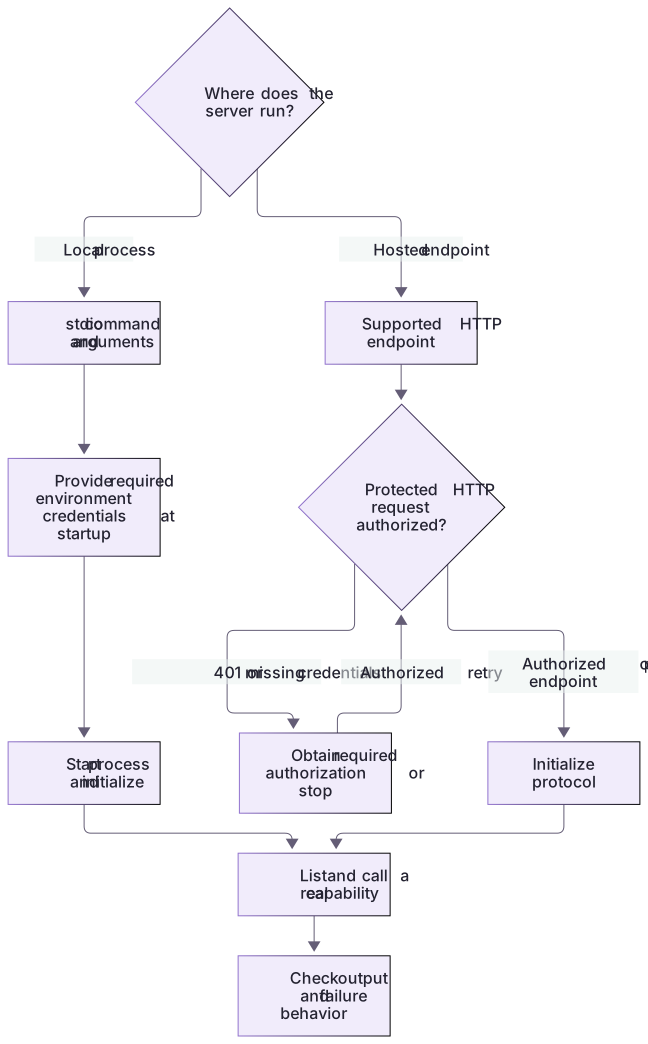
Choose a transport based on where the server runs. Codex documents STDIO for a local process and Streamable HTTP for a server address. STDIO depends on an installed executable, arguments and the environment in which it starts. HTTP depends on a reachable endpoint and any required authentication. Copying an unrelated Claude transport flag or a third-party server command without checking its owner and installation requirements can create a configuration that looks plausible but cannot initialize.
The public Docs MCP uses Streamable HTTP. The example shows its documented CLI registration, but configuration is an intentional change to your selected environment, not something this website performs. Check whether an equivalent entry already exists before adding it. The same Codex host can share MCP configuration across App, CLI and IDE, so changing clients does not necessarily require a second registration. For an OAuth server, sign-in is another step; a visible entry can still be unauthenticated or unable to read the expected record.
Verify the whole path with a small read after setup. Distinguish command not found, connection timeout, authentication failure and a tool-level error. Raising a timeout may help a slow approved server, but it does not repair an incorrect command or missing credential. Keep secret values out of examples and shared files. Prefer documented environment-variable references or the supported sign-in flow, and inspect which project or personal configuration the chosen action affects.
prepare-connection.cjs prints a complete inactive TOML fragment from this Node executable and extracted server path; no placeholder executable is needed. In the app choose Settings → MCP servers → Add server, select STDIO, enter those values, save and Restart. CLI offers codex mcp add NAME -- COMMAND and codex mcp list; IDE uses its gear menu and Restart extension. A trusted project can instead use the reviewed fragment in .codex/config.toml while preserving existing contents. Perform the native T-102/T-999 lookup and reconcile it with the dataset. The launch diagnostic actually executes the three failure boundaries; it does not register a server or invent an OAuth response.
Choose the transport before diagnosing the connection

Choose stdio for a local subprocess or supported HTTP for a hosted endpoint. A local service may require credentials in its startup environment. Protected HTTP requests require authorization at the transport layer, so a 401 can prevent initialization; authorize and retry, or stop. After successful initialization, discover and call a real capability.
Practice and acceptance
Process startup, protocol initialization and a successful read are separate milestones; registration is another step.
About your environment
Checked 21 October 2026. These are teaching examples; no server, account or setting is changed by reading the lesson.
Try it step by step
- Confirm an existing Node 20+ runtime and read the supplied process/client files; no package installation is needed.
- Run the eight protocol checks, then the demo, before considering any Codex setup.
- Inspect the transcript to verify capability negotiation and one actual read rather than relying on process exit alone.
- Read connection-draft.toml as inactive data and identify the two host-specific paths that a future setup must replace.
- If a separately chosen client exercise is later authorized, follow the official Codex stdio flow and verify its actual tool invocation independently.
A useful starting example
Illustration · adapt before use.
node labs/mcp-workbench/prepare-connection.cjs
node labs/mcp-workbench/diagnose-launch.cjs missing-executable
node labs/mcp-workbench/diagnose-launch.cjs missing-script
node labs/mcp-workbench/diagnose-launch.cjs bad-handshake
node labs/mcp-workbench/diagnose-launch.cjs ok[mcp_servers.openaiDeveloperDocs]
url = "https://developers.openai.com/mcp"codex mcp add openaiDeveloperDocs --url https://developers.openai.com/mcp
codex mcp list
# In the app use Streamable HTTP with that URL. Inspect existing entries first.Read the handshake
The supplied harness requests a supported MCP version.
initialize(protocolVersion=2025-11-25)
notifications/initialized
tools/list
tools/call(list_tasks)protocolVersion: 2025-11-25
capabilities: tools and resources
serverInfo.name: codex-howto-local-workbenchThe server implements a deliberately documented protocol subset; no HTTP endpoint, authentication, or general interoperability certification is claimed.
Your turn
Run all four launch diagnoses and retain their observed boundary/error results. Generate the host-specific inactive fragment. Follow native-client.md in a deliberately chosen scratch Codex environment if available: configure this exact server, restart, inspect the tool list and retrieve T-102/T-999. Compare real records/errors and identify each unrun native stage.
Try the exercise before opening its reference answer. Use a disposable practice folder.
Verify a stdio process before client setup
Extract into a new practice folder and keep the included labs folder. Run these commands from that extraction root, or from the course folder, using an existing Node.js installation.
- Command 1 text
node --test labs/mcp-workbench/workbench.test.cjsCheck: 8 checks pass, including actual subprocess startup, handshake and recovery.
- Command 2 text
node labs/mcp-workbench/demo.cjsCheck: Protocol 2025-11-25 negotiated by the supplied client and server.
- Command 3 text
node --test labs/mcp-workbench/native-setup.test.cjsCheck: Four checks cover real host paths, launch/initialization failure, prompt rejection after failure and freshness.
Process startup, protocol initialization and a successful read are separate milestones; registration is another step.
Check your result
- The selected transport matches the provider's actual server interface.
- The configured entry is not duplicated across clients sharing one host.
- A real read succeeds, or the failure is classified with evidence instead of being called a successful installation.
- Local harness behavior and isolated native server discovery are distinguished from unrun app UI setup or model-selected tool calls.
Reference answer & rubric Try the exercise before opening
The working reference uses process.execPath and a path resolved from __dirname; the inactive Codex example still needs the intended host's paths.
- Run the tests and confirm the actual subprocess handshake.
- Compare the executable/script resolution in client.cjs with placeholder paths in connection-draft.toml.
- Classify missing executable as launch failure, malformed initialize as protocol failure and missing task as a tool/domain error.
- For any future Codex connection, inspect /mcp or the documented client status and perform a real call; local harness success alone is insufficient.
Check your understanding
The server appears in a list, but the first call returns an authentication error. What is established?
- Registration worked; authorization and retrieval have not yet succeeded.
- The installation is complete and all tools are ready.
- Increasing model reasoning will supply the missing credential.
Reveal the answer and explanation
Answer 1: Registration worked; authorization and retrieval have not yet succeeded.
Different layers can succeed independently. Inspect authentication rather than declaring the whole connection healthy.
Take this quiz in the interactive lesson to save your answer in the browser.
When it does not work
A path works from one folder but not another.
Likely cause: The proposed launch depends on the shell's current directory.
What to try: Use reviewed absolute executable/script paths or explicit documented cwd settings.
A running process is called a working connection.
Likely cause: No capability negotiation or tool response was observed.
What to try: Require initialize success and an actual known-record read before that claim.
Common mistakes
- Equating registration in a list with successful authentication and data retrieval.
- Pasting a secret directly into a shared command, skill or configuration example.
Source mapping & differences · different
Codex supports STDIO and Streamable HTTP, but its codex mcp commands and config.toml format differ from Claude's transport flags and JSON files.
Source topic: Installation methods ↗Go to the source
Official documentation, checked 21 October 2026. Product names, controls and availability may vary with your version, platform or account.
Completion and quiz progress are saved
only in the interactive course.