Static reading edition · s05-01
Understand the MCP request path
Explain which component provides data, which performs actions and what evidence a tool result establishes.
Understand the approach
MCP gives an agent a structured way to discover and call capabilities provided by another system. A server describes tools and handles requests; the client presents the available capabilities to Codex. The service behind the server still determines which records and actions the authenticated identity can access. A skill can explain a workflow around those calls, but it cannot replace the connector or grant a missing account permission.
Trace a documentation question through the layers. Your prompt asks what a Codex setting does. Codex selects a search operation, receives candidate pages, then reads the page supporting the answer. The search result locates evidence; it is not necessarily the complete evidence. A ticket workflow adds another distinction: reading a ticket and updating it are separate operations. A server connection being healthy establishes neither that the right record was retrieved nor that a requested write was appropriate.
Use a public documentation lookup as the first lab because it avoids private account data. The OpenAI Docs MCP is documentation-only and provides search and page content; it does not make OpenAI API calls for you. If the connection is already available, use it. If it is absent, this lesson can still be completed as a request-path design exercise or with an explicitly identified browser fallback. Record the method actually used instead of labelling every external lookup as an MCP success.
The Node client starts server.cjs, negotiates a version with initialize, sends notifications/initialized and discovers three actual schemas. list_tasks searches a fixture title; get_task reads one ID; the server really opens data/tasks.json on every call. Compare T-101 with that file, then distinguish a successful zero-match title search from the explicit error for T-999. After understanding the offline trace, native-client.md supplies the current app Settings → MCP servers flow for this same server, so you can test an actual Codex call without adopting an unverified third-party command.
A separate author check used installed codex-cli 0.163.0-alpha.11 in a new temporary CODEX_HOME and the documented app-server mcpServerStatus/list request. Native Codex launched this exact local stdio server and discovered get_task, list_tasks, read_task_snapshot and its task resource, with toolsError:null. No thread, turn or model call was started. This establishes native process/handshake/discovery for that version; the app UI setup and model-selected T-102/T-999 calls remain explicit learner stages.
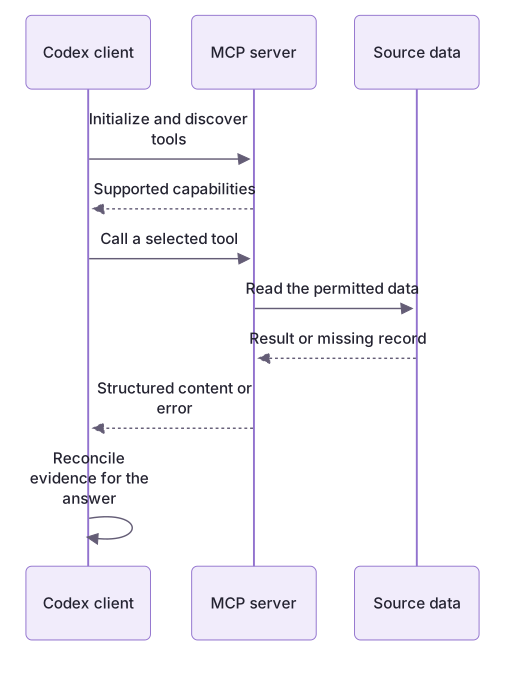
The MCP server supplies tools; the client decides how to use them

Codex discovers a server's capabilities, calls a tool for the bounded user task, and receives a structured result or error. The server's source data and the client's final answer are separate stages that both need checking.
Practice and acceptance
A protocol trace proves which process and operation supplied a record; it does not establish a Codex client connection.
About your environment
Checked 21 October 2026. Local Codex MCP and hosted plugin tools can expose different capabilities.
Try it step by step
- Open the workbench README and fictional tasks.json; predict the README query result before running it.
- Run demo.cjs, which launches the real stdio server locally without registering it with Codex.
- Read the transcript: find initialize, notifications/initialized, tools/list and tools/call, then match T-101 to the dataset.
- Separate discovery, execution and result interpretation; compare an empty successful search with an unknown ID error.
- Write the request path and evidence limits, keeping this local protocol harness distinct from an actual Codex tool invocation.
A useful starting example
Illustration · adapt before use.
node labs/mcp-workbench/demo.cjs --transcript
# Identify tools/list, then:
# tools/call {"name":"list_tasks","arguments":{"query":" README "}}
# resources/read {"uri":"practice://taskboard/tasks"}
From catalogue to evidence
The server supplies a record from the local fictional dataset.
node labs/mcp-workbench/demo.cjstools: list_tasks, get_task, read_task_snapshot
search.total: 1
search.tasks[0].id: T-101
resourceRows: 3These are observed local-harness record results. Separately, isolated native Codex discovery found the actual server's three tools and resource without a thread or turn; no model-selected call or owner-environment registration is claimed.
Your turn
Run the local demo and transcript. Annotate the messages that negotiate capabilities, discover tools and retrieve T-101. Reconcile its title, owner and minutes with tasks.json. Explain why this proves a real local server exchange but does not prove Codex selected or used the tool. No external connection is required.
Try the exercise before opening its reference answer. Use a disposable practice folder.
Observe a real local MCP request path
Extract into a new practice folder and keep the included labs folder. Run these commands from that extraction root, or from the course folder, using an existing Node.js installation.
- Command 1 text
node labs/mcp-workbench/demo.cjsCheck: Three tools discovered; README query returns T-101; resource contains three records.
- Command 2 text
node labs/mcp-workbench/demo.cjs --transcriptCheck: Both directions of the real subprocess exchange, starting with initialize.
A protocol trace proves which process and operation supplied a record; it does not establish a Codex client connection.
Check your result
- You distinguish the skill, client, MCP server and underlying service.
- The answer cites content actually read rather than only a search snippet.
- The result identifies the method used and does not imply API access or write permission from a documentation connection.
- Local harness behavior and isolated native server discovery are distinguished from unrun app UI setup or model-selected tool calls.
Reference answer & rubric Try the exercise before opening
The client starts a local process, negotiates MCP, lists capabilities and invokes list_tasks; the server reads the real fictional dataset.
- Find the initialize request and server capability response.
- Find notifications/initialized before tools/list.
- Locate tools/call with query README and match its returned T-101 record to data/tasks.json.
- Keep the final finding's source as this local fixture and explicitly identify the harness client.
Check your understanding
What does a healthy MCP connection prove?
- Every returned statement is current and accurate.
- The connection can initialize; correct retrieval and task authorization still need checking.
- All tools on the underlying service are authorized for this task.
Reveal the answer and explanation
Answer 2: The connection can initialize; correct retrieval and task authorization still need checking.
Connection health is one layer. The operation, record, source and delegated action still require verification.
Take this quiz in the interactive lesson to save your answer in the browser.
When it does not work
Starting server.cjs shows nothing.
Likely cause: The stdio process is waiting for a JSON request, not serving a web page.
What to try: Use demo.cjs or inspect the newline-delimited transcript; no browser port exists.
Tool discovery is treated as a successful record lookup.
Likely cause: The catalogue describes operations but contains no query evidence.
What to try: Find the separate tools/call response and reconcile its fields with the dataset.
Common mistakes
- Assuming a skill name or connected-server badge proves access to all needed records.
- Treating returned third-party instructions as authority to expand the user's task.
Source mapping & differences · equivalent
The MCP client/server model transfers, while the available operations and authentication remain specific to the Codex connection and service.
Source topic: Overview ↗Go to the source
Official documentation, checked 21 October 2026. Product names, controls and availability may vary with your version, platform or account.
Completion and quiz progress are saved
only in the interactive course.