Static reading edition · s02-04
Split modular guidance from execution rules
Organize project-specific instructions without confusing documentation rules with sandbox command policy.
Understand the approach
The word rule can refer to two different things. A prose rule might say how to write a changelog; an execution rule controls whether a command can run outside the sandbox. The Claude source uses modular Markdown rules, including path-specific metadata. Codex does not inherit that .claude/rules format simply because the repository contains it. Use documented Codex instruction discovery and explicit references instead.
For modular guidance, keep AGENTS.md short and point to a focused document when a task needs it. A UI guideline file can explain naming, accessibility and visual checks without loading a long design policy into every unrelated task. Nested AGENTS.md files can specialize guidance by working directory. A reference is a reading instruction, not a guarantee that arbitrary linked Markdown has already been loaded automatically.
Codex execution rules are a separate, currently experimental feature using .rules files and prefix_rule entries. They match command argument prefixes and return allow, prompt or forbidden decisions. When several rules match, the most restrictive decision wins. Project-local rule layers require project trust. Do not put stylistic preferences in that file type or treat an allow decision as user authorization to send, publish or alter an external system.
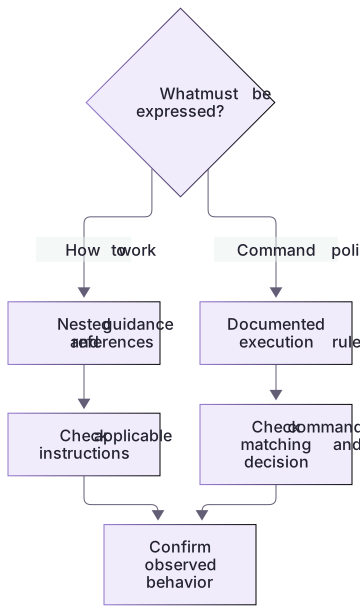
Prose guidance and command rules solve different problems

Nested AGENTS.md and explicit reference documents describe the work. Command rules evaluate execution-policy decisions. Neither is a mechanical substitute for the other, and discovery and policy need different tests.
A concrete policy result without installing a rule
The supplied review.rules prompts for the prefix node --test and forbids the narrower node --test private-checks.cjs. The two evaluator examples show why the stricter matching decision wins. The file lives outside active .codex/rules locations; evaluating it does not grant permission or run checks.cjs.
For the writing exercise, keep the convention in Markdown and reference docs/writing-guidelines.md from AGENTS.md. Correct the unsupported README command, label it unrun until executed, and compare the resulting document. Prose instructions and execution-policy syntax solve different problems.
An execution rule is not a style rule
If you later need command policy, study the official prefix matching and test tools before installing a rule. A harmless-looking command wrapper can contain more than one action, so broad exceptions require care. This beginner exercise deliberately changes only project documentation. It teaches the distinction without weakening the learner’s sandbox or modifying personal command approvals.
About your environment
Checked 21 October 2026. Feature availability varies by client and host.
Try it step by step
- Classify three proposed rules as project guidance, optional reference material or command execution policy.
- Move a detailed documentation convention into docs/writing-guidelines.md in the scratch project.
- Reference that file from project guidance only for documentation tasks, then ask Codex to confirm what it actually read.
- Read the execution-rule example as a draft only; leave personal policies and trusted-project settings unchanged.
A useful starting example
Illustration · adapt before use.
## Documentation work
Before editing documentation, read docs/writing-guidelines.md.
Use that file for heading and example conventions.
For code-only tasks, read it only when the task also changes public documentation.
Preserve unrelated edits and report the actual validation performed.codex execpolicy check --rules ./exercises/review.rules -- node --test checks.cjs
codex execpolicy check --rules ./exercises/review.rules -- node --test private-checks.cjsA modular document rule with evidence
Use examples/writing-guidelines.md as the provided reference and copy it into docs only in the disposable project.
## Documentation work
Before editing README.md, read docs/writing-guidelines.md.
Use descriptive headings.
Label commands that have not actually run.README correction: npm test → node --test checks.cjs.
No execution-policy file or sandbox permission needs to change.The writing convention is prose guidance. It must not become an allow-all command prefix or unsupported Claude path-rule metadata.
Your turn
Apply the writing guideline to the README correction in a disposable copy. Separately inspect the isolated review.rules file and, if an existing CLI supports execpolicy, evaluate the two exact command argument lists. Explain the prompt result, stricter forbidden result and why neither executes a test or installs policy.
Try the exercise before opening its reference answer. Use a disposable practice folder.
Orbit Notes project and recovery capstone
Extract into a new practice folder and keep the included labs folder. Run these commands from that extraction root, or from the course folder, using an existing Node.js installation.
- Command 1 text
node labs/project-workflow/create-workspace.cjsCheck: Returns a new owned temporary path. Open that exact copy in the app; the shipped starter stays broken.
- Command 2 text
node labs/project-workflow/verify-depth.cjsCheck: Runs two candidate implementations and recovery counterexamples in fresh copies. Reports paths, facts and preservation; live skill/instruction discovery remains a separate observation.
Follow this lesson’s specific walkthrough and compare its result with the answer key. Commands are relative to the course folder. The offline demonstration never claims a live Codex client loaded instructions, selected a skill or retrieved a connected record.
Check your result
- The modular guideline is explicitly referenced and its use is verified through an actual documentation task.
- No unsupported Claude YAML path-rule syntax is presented as a Codex instruction mechanism.
- You can distinguish prose guidance, command policy and user authorization with a concrete example of each.
Reference answer & rubric Try the exercise before opening
The instruction points to a real focused guide; the guide changes the document, not command authorization.
- Copy the supplied writing guideline into the temporary project’s docs folder.
- Add the narrow reading instruction to that project’s guidance.
- Request the README correction and inspect whether the guideline was read.
- Compare the actual result with the lesson-specific answer key; record unrun client observations separately from executed local checks.
Check your understanding
Where should “use descriptive section headings” go?
- In AGENTS.md or a referenced writing guide.
- In a prefix_rule that allows all PowerShell commands.
- In an API token value.
Reveal the answer and explanation
Answer 1: In AGENTS.md or a referenced writing guide.
A writing convention is prose guidance. Execution policy and credentials serve different purposes.
Take this quiz in the interactive lesson to save your answer in the browser.
When it does not work
The linked guide is never consulted.
Likely cause: The reading condition or relative path is unclear.
What to try: Name the actual reference path and verify the relevant task reads it.
A style requirement leads to a broad command allowlist.
Likely cause: Documentation guidance and execution policy were conflated.
What to try: Keep the style rule in prose; do not weaken the sandbox to satisfy it.
Common mistakes
- Copying .claude/rules files unchanged and assuming Codex interprets their metadata.
- Allowlisting a broad shell prefix to make a writing convention easier to follow.
Source mapping & differences · alternative
Claude modular Markdown rules are adapted through Codex nested guidance and explicit reference documents; Codex .rules files are a distinct command-policy feature, not a matching prose-rules system.
Source topic: Modular rules system ↗Go to the source
Official documentation, checked 21 October 2026. Product names, controls and availability may vary with your version, platform or account.
Completion and quiz progress are saved
only in the interactive course.