Static reading edition · s02-05
Use local memories with provenance and limits
Understand optional Codex memory generation, inspect the controls and verify recalled facts before relying on them.
Understand the approach
When enabled, local Codex memories can turn useful context from eligible earlier chats into generated files for future work. Current documentation says the feature is off by default. Memories are produced in the background after a chat has been idle long enough; active or short-lived sessions may be skipped, and generation can pause near usage limits. “We discussed it” is therefore not evidence that a durable memory already exists.
The desktop app offers machine-level controls under Settings, Personalization, including Enable Codex memories and a choice about memories from tool-assisted chats. The /memories command controls whether the current chat uses existing memories or can contribute to future memory generation. Those chat choices do not change global settings. CLI and IDE behavior follows the connected Codex host; ChatGPT web memory is a separate system.
Generated state lives under the Codex home memories directory and can be inspected when troubleshooting. Do not make manual edits there your primary control surface. Keep mandatory project rules in AGENTS.md and important deliverables in canonical project files. Memory can help you find earlier evidence, but a recalled path, package version or business fact may be stale. Recheck the actual source before a consequential decision or action.
Use memory only after checking its applicability

If local memories are unavailable or disabled, use explicit project records. If a memory is available, verify its scope and current source before relying on it. A closed chat is not proof that memory generation completed.
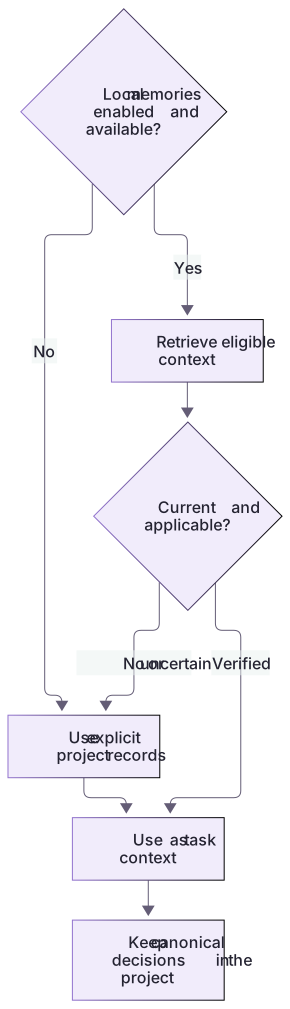
Demonstrate stale recall without requiring a feature toggle
The old checkpoint records baseline 4 pass/2 fail. The reference implementation now passes six. A correct resumed task labels the old count historical and refreshes the current check; it does not report two current failures because an earlier note says so. The saved checkpoint provides a fallback when memories are disabled or have not generated.
If actual recall is available, record which earlier decision it located and inspect the current canonical file. Do not force memory generation or edit generated state to make the exercise pass. A remembered path, package version or test command may have changed.
A safe fallback when memory is unavailable
When memory is unavailable, use a project checkpoint containing the objective, decisions, source paths and unresolved work. Supply it to the next task. This inspectable artifact is a valid fallback; do not change privacy settings merely to make the tutorial appear successful.
About your environment
Checked 21 October 2026. Feature availability varies by client and host.
Try it step by step
- Inspect available memory controls in your client without toggling them merely to complete the lesson.
- Distinguish machine-wide enablement from the current chat’s use and contribution choices.
- If memories are already enabled, ask a read-only question about a harmless earlier practice decision and request provenance.
- Verify the recalled claim against a current project file, recording a missing or outdated result honestly.
A useful starting example
Illustration · adapt before use.
If local memories are available, use them only to locate the earlier decision about this practice project. State what came from recall, identify any supporting source you can inspect, and verify the current README before treating the decision as current. Do not save or delete memories or change personalization settings.Resume from an explicit checkpoint
The supplied checkpoint is a manual project artifact. It works when local memories are disabled or generation has not occurred.
Goal: normalize note search.
Baseline: 4 pass, 2 fail.
Allowed: notes.cjs and README.md.
Preserve: notes.json, checks.cjs, WORK-NOTE.md.
Next: inspect current files and rerun checks.A resumed task has a concrete starting record.
Its test status must be refreshed; the old count is not automatically current.This is a dependable fallback artifact, not a claim that background memory updated. Inspecting memory controls never requires toggling privacy choices for the lesson.
Your turn
Leave the old checkpoint unchanged after fixing the practice implementation. In a fresh task ask for the current status using that checkpoint and the actual files. Run the six checks and compare old and current results. Inspect memory controls only if available; no privacy toggle or generated-memory edit is needed to pass.
Try the exercise before opening its reference answer. Use a disposable practice folder.
Orbit Notes project and recovery capstone
Extract into a new practice folder and keep the included labs folder. Run these commands from that extraction root, or from the course folder, using an existing Node.js installation.
- Command 1 text
node labs/project-workflow/create-workspace.cjsCheck: Returns a new owned temporary path. Open that exact copy in the app; the shipped starter stays broken.
- Command 2 text
node labs/project-workflow/verify-depth.cjsCheck: Runs two candidate implementations and recovery counterexamples in fresh copies. Reports paths, facts and preservation; live skill/instruction discovery remains a separate observation.
Follow this lesson’s specific walkthrough and compare its result with the answer key. Commands are relative to the course folder. The offline demonstration never claims a live Codex client loaded instructions, selected a skill or retrieved a connected record.
Check your result
- The exercise records whether memory was actually available rather than implying a hidden successful background update.
- The answer separates recalled context from current verified evidence and identifies staleness if the project note changed.
- No secrets, private customer information or mandatory team rules are stored only in generated memory.
Reference answer & rubric Try the exercise before opening
Use memory as an optional lead; the complete checkpoint supplies a verifiable fallback with explicit freshness limits.
- Read solution/CONTEXT-CHECKPOINT.md and compare its paths with the current copy.
- Inspect memory availability without changing the current settings.
- Resume using the checkpoint and verify the current implementation before repeating its status.
- Compare the actual result with the lesson-specific answer key; record unrun client observations separately from executed local checks.
Check your understanding
Which claim is justified after a memory-enabled chat ends?
- Its content has definitely been saved immediately.
- It may become an input for later background memory generation.
- Its decisions now override the current repository instructions.
Reveal the answer and explanation
Answer 2: It may become an input for later background memory generation.
Generation is asynchronous and eligibility-dependent; current source evidence and required guidance still matter.
Take this quiz in the interactive lesson to save your answer in the browser.
When it does not work
The newest chat is not reflected in memories.
Likely cause: Eligible background generation may not have occurred yet.
What to try: Use the explicit checkpoint; do not claim a failed or successful memory pass without evidence.
Recall reports the old failing status after the fix.
Likely cause: The remembered state is older than the current code.
What to try: Run the current check and state that the old status was superseded.
Common mistakes
- Expecting a new chat to appear in memories immediately, or treating a skipped pass as proof of a broken installation.
- Assuming deleting a chat, turning off recall and deleting the local memory store are the same action.
Source mapping & differences · different
Codex has a documented optional local memory store and /memories controls, with background generation and host-specific settings; it is not Claude’s auto-memory directory or singular /memory editor command.
Source topic: Auto memory ↗Go to the source
Official documentation, checked 21 October 2026. Product names, controls and availability may vary with your version, platform or account.
Completion and quiz progress are saved
only in the interactive course.