Static reading edition · s02-03
Understand the AGENTS.md instruction chain
Predict which global, repository and nested instruction files apply to a specific working directory.
Understand the approach
Codex discovers instructions in a defined chain when it starts. At the global layer, it looks in the Codex home directory, normally .codex in your user home. It prefers a nonempty AGENTS.override.md over AGENTS.md there. At project scope, it walks from the project root toward the current working directory and selects at most one instruction file at each directory level.
Within a directory, the order is AGENTS.override.md, AGENTS.md, then configured fallback filenames. More specific files appear later in the combined instructions and can refine earlier guidance. An override in one directory does not mean that every parent instruction disappears: it replaces the ordinary file selected at that same directory. Keep specialized instructions close to the work they govern rather than changing the global layer for a single project.
This mechanism depends on the actual working directory and project root. A file sitting in a sibling folder is not automatically the governing source for your session. Instruction size is also bounded; the documented combined default limit is 32 KiB. When guidance looks wrong, inspect the selected path and override files, then restart in the intended directory. Do not try to solve discovery problems by repeatedly pasting conflicting instruction copies into chat.
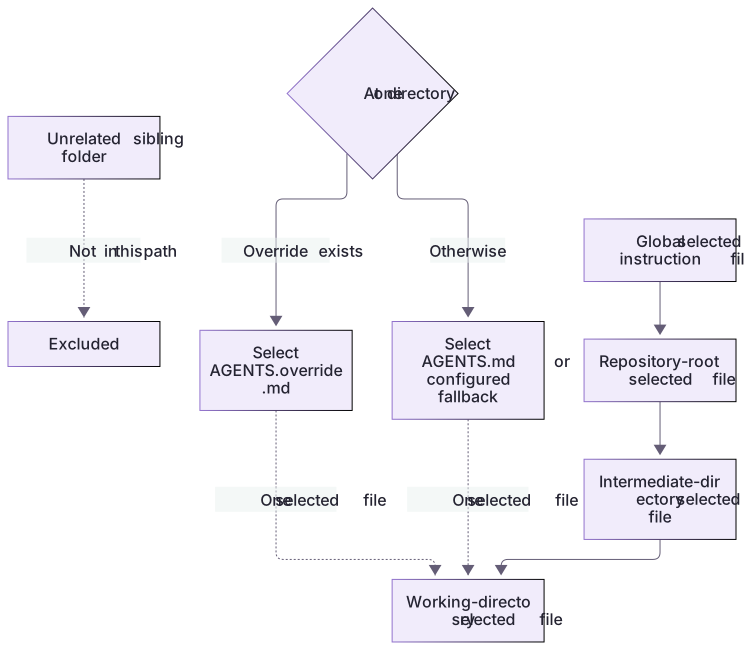
Instruction discovery follows the working-directory path

The global layer precedes repository guidance, followed by directories along the path to the working directory. At each directory, an override replaces the ordinary file selected at that same level. An unrelated sibling does not join the chain.
Test the override and its absence
The fixture includes root AGENTS.md, ordinary docs guidance, a docs override and contradictory sibling guidance. At docs, the expected project chain retains the root preservation rule and selects the docs override’s short-heading rule. The ordinary docs file and sibling file are counterexamples: neither should be selected at that level.
Remove the override only in the disposable exercise and start a new docs session. The ordinary docs rule should now apply. Compare actual loaded paths, not just a fluent summary. The offline verifier checks these fixture files; it does not claim to have executed Codex discovery.
Resolve conflicts explicitly
If two instructions appear incompatible, name the files, scopes and concrete conflict. A local test command can refine a root command for a specialized service, but it should not erase unrelated requirements. Put the resolution in the smallest maintainable source when you are authorized to edit it. For a shared repository, preserve existing agreements and ask about a material unresolved conflict instead of silently choosing whichever sentence is easiest to follow.
About your environment
Checked 21 October 2026. Feature availability varies by client and host.
Try it step by step
- Draw the path from your scratch repository root to a nested docs folder, marking every applicable instruction file.
- Predict which file is selected at a directory containing both AGENTS.md and AGENTS.override.md.
- Start a fresh session at the root, then another in docs, and ask for the loaded source paths and applicable differences.
- Compare the predictions with the evidence; correct the folder or file placement before editing any configuration defaults.
A useful starting example
Illustration · adapt before use.
codex --cd ./codex-lab --sandbox read-only "List the instruction files loaded for this directory and summarize their scope."
codex --cd ./codex-lab/docs --sandbox read-only "List the instruction sources and explain which docs-specific guidance applies."Resolve a same-directory override
Follow examples/hierarchy.md in a disposable copy. This is the expected chain to compare with actual loaded sources, not a claimed live discovery trace.
project/AGENTS.md → preserve WORK-NOTE.md
project/docs/AGENTS.md → descriptive headings
project/docs/AGENTS.override.md → headings under eight words
Working directory: project/docsRoot guidance remains applicable.
At docs/, AGENTS.override.md replaces AGENTS.md for that directory.
The ordinary docs heading rule is not loaded alongside its override.An override changes selection at one directory; it does not erase all parent instructions. Use a fresh session and the correct Git project root to test this.
Your turn
Copy the supplied hierarchy files into a fresh Git-enabled practice copy, merging root guidance carefully. Compare a fresh root task with a fresh docs task. Move the docs override to a holding folder only in that disposable copy, start another docs task, and observe the changed selection. Record the sibling exclusion and applicable global guidance without changing it.
Try the exercise before opening its reference answer. Use a disposable practice folder.
Orbit Notes project and recovery capstone
Extract into a new practice folder and keep the included labs folder. Run these commands from that extraction root, or from the course folder, using an existing Node.js installation.
- Command 1 text
node labs/project-workflow/create-workspace.cjs --gitCheck: Returns a new owned temporary path. Open that exact copy in the app; the shipped starter stays broken.
- Command 2 text
node labs/project-workflow/verify-depth.cjsCheck: Runs two candidate implementations and recovery counterexamples in fresh copies. Reports paths, facts and preservation; live skill/instruction discovery remains a separate observation.
Follow this lesson’s specific walkthrough and compare its result with the answer key. Commands are relative to the course folder. The offline demonstration never claims a live Codex client loaded instructions, selected a skill or retrieved a connected record.
Check your result
- The reported instruction paths belong to the expected root-to-working-directory chain.
- A same-directory override is distinguished from parent guidance, rather than described as deleting the entire hierarchy.
- The result is checked in fresh sessions, and no user-global instruction file is changed for the experiment.
Reference answer & rubric Try the exercise before opening
Predict the root-to-directory chain, then compare it with the actual selected paths.
- Copy the exact reference contents from examples/hierarchy.md into the temporary project.
- Open a fresh task at the root and record its instruction sources.
- Test the docs working directory, first without and then with its override.
- Compare the actual result with the lesson-specific answer key; record unrun client observations separately from executed local checks.
Check your understanding
A directory contains both AGENTS.md and a nonempty AGENTS.override.md. Which is selected there?
- Both are concatenated in that same directory.
- AGENTS.override.md is selected for that directory.
- Every parent instruction is automatically discarded.
Reveal the answer and explanation
Answer 2: AGENTS.override.md is selected for that directory.
Codex selects at most one file per directory, preferring the override; applicable parent files remain part of the chain.
Take this quiz in the interactive lesson to save your answer in the browser.
When it does not work
Both docs files are reported as selected.
Likely cause: The explanation may be guessing rather than reporting actual discovery.
What to try: Ask for evidence of selected source paths and verify the documented precedence.
A sibling guideline appears to govern the task.
Likely cause: The working directory or assumed root is wrong.
What to try: Inspect the actual directory and repository root before changing guidance.
Common mistakes
- Assuming every AGENTS.md anywhere in the repository loads into every chat.
- Confusing config.toml precedence with Markdown instruction discovery; they are related configuration mechanisms with different purposes.
Source mapping & differences · different
The hierarchical idea transfers from Claude memory, but Codex has explicit AGENTS.override.md selection, root-to-working-directory discovery and its own size/configuration limits.
Source topic: The memory hierarchy ↗Go to the source
Official documentation, checked 21 October 2026. Product names, controls and availability may vary with your version, platform or account.
Completion and quiz progress are saved
only in the interactive course.