Static reading edition · s02-02
Initialize useful project guidance
Create a concise AGENTS.md grounded in the repository, then verify that a fresh session reads it.
Understand the approach
AGENTS.md is a plain Markdown file for instructions that should outlive one conversation. The CLI /init command generates a starting scaffold in the current directory. In the desktop app or IDE, you can also ask Codex to draft project guidance from the files it inspects. This is a writing task with consequences: an inaccurate instruction can be repeated in every later task, so the generated draft needs review.
Begin with facts visible in the scratch repository. Identify the project purpose, the documented run and test commands, and the files that should not be modified routinely. If a command is absent, record the gap instead of adopting a familiar npm script. Add a small working agreement about checking results and preserving unrelated changes. A short accurate file is more useful than a long generic engineering policy.
Inspect any existing AGENTS.md before generating or replacing it. There may already be important local rules or another contributor’s changes. In this lesson, create guidance only inside the disposable practice project and leave your Codex home untouched. Once the file is reviewed, start a fresh session in that project and ask which instruction sources loaded. Discovery happens at session startup, so a stale session is a poor test of a newly written file.
Generate guidance, review it, then test discovery

Inspect the repository before drafting guidance. Review generated claims, start a fresh session, and check which instructions apply. Incorrect run commands or vague guidance lead back to the file, not to a claim that initialization proved correctness.
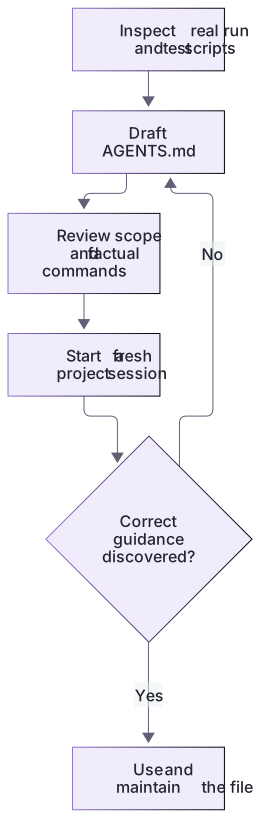
Initialize from repository evidence
The starter already has useful instructions, so blindly running initialization risks replacing them. Draft into AGENTS.proposed.md first. Verify each path and command: checks.cjs exists, package.json does not, and WORK-NOTE.md must survive. Keep the original object-preservation contract.
After review, integrate into AGENTS.md and start a fresh session at the intended project. Ask for loaded source paths and the test command. In the optional CLI track /init generates a scaffold inside the current directory. It is a composer control, not a terminal command or proof that the scaffold’s assertions are true.
Review guidance like code
Read each sentence as a future instruction. Replace vague demands with observable expectations and verify commands against the repository. Keep task authority separate from build documentation. Improve the smallest relevant guidance file instead of duplicating policies globally.
About your environment
Checked 21 October 2026. Feature availability varies by client and host.
Try it step by step
- Confirm the scratch project root and check whether AGENTS.md or AGENTS.override.md already exists there.
- Read README.md and the actual project configuration; distinguish verified commands from plausible but untested suggestions.
- Use CLI /init, or ask for a project-local draft, then edit the result to remove unsupported claims and broad permissions.
- Start a fresh session and request an instruction-source summary before delegating a small practice task.
A useful starting example
Illustration · adapt before use.
# Orbit Notes guidance
Read README.md, notes.cjs and checks.cjs before a search change.
The local verification command is node --test checks.cjs.
Preserve notes.json, checks.cjs and WORK-NOTE.md.
Return original note objects in their original order.
Report changed files and observed checks.Review an initialized instruction file
Use the capstone AGENTS.md as a reviewable reference. App drafting is primary; CLI /init is optional and should not overwrite existing guidance.
Read README.md and the relevant source.
Preserve notes.json, checks.cjs and WORK-NOTE.md.
Run the exercise’s actual check command.
Report changed files and observed results.Supported preservation paths exist in the starter.
The actual check is node --test checks.cjs.
No installation or publication authority is added.Review every proposed instruction against project evidence. A scaffold containing npm test must be corrected rather than treated as authoritative.
Your turn
Create the review artifact AGENTS.proposed.md in your practice copy, compare it with the existing AGENTS.md, and integrate only the accurate improvement. Reject an invented npm test instruction. Open a fresh task and record the actual loaded guidance and test command; the proposed filename itself is not automatically discovered.
Try the exercise before opening its reference answer. Use a disposable practice folder.
Orbit Notes project and recovery capstone
Extract into a new practice folder and keep the included labs folder. Run these commands from that extraction root, or from the course folder, using an existing Node.js installation.
- Command 1 text
node labs/project-workflow/create-workspace.cjsCheck: Returns a new owned temporary path. Open that exact copy in the app; the shipped starter stays broken.
- Command 2 text
node labs/project-workflow/verify-depth.cjsCheck: Runs two candidate implementations and recovery counterexamples in fresh copies. Reports paths, facts and preservation; live skill/instruction discovery remains a separate observation.
Follow this lesson’s specific walkthrough and compare its result with the answer key. Commands are relative to the course folder. The offline demonstration never claims a live Codex client loaded instructions, selected a skill or retrieved a connected record.
Check your result
- The new file is inside the intended practice project, with no overwrite of existing shared guidance.
- Every command or repository fact in the file has an inspected source or is explicitly marked unverified.
- A fresh session identifies the file as an instruction source and follows its relevant requirements in a real small task.
Reference answer & rubric Try the exercise before opening
Initialization is complete when concise, accurate guidance is saved and its relevant behavior is verified in a new task.
- Inspect existing guidance and preserve it before drafting changes.
- Compare every path and command with the starter files and exercise brief.
- Retain the specific preservation boundary and remove unsupported setup claims.
- Compare the actual result with the lesson-specific answer key; record unrun client observations separately from executed local checks.
Check your understanding
The generated AGENTS.md says npm test, but package.json has no test script. What should you do?
- Keep it because initialization is always authoritative.
- Install a testing framework immediately.
- Correct or remove the unsupported instruction and record the actual project state.
Reveal the answer and explanation
Answer 3: Correct or remove the unsupported instruction and record the actual project state.
Initialization is a draft. Instructions must reflect the repository rather than inventing its tooling.
Take this quiz in the interactive lesson to save your answer in the browser.
When it does not work
The scaffold includes an absent package script.
Likely cause: The initializer inferred a familiar toolchain.
What to try: Replace it with the verified command or explicitly record the gap.
Changes do not affect the running session.
Likely cause: Instruction discovery may have occurred before the edit.
What to try: Test a fresh session in the intended directory instead of assuming a cache failure.
Common mistakes
- Running initialization from a parent workspace and unintentionally setting rules for unrelated projects.
- Keeping scaffold suggestions such as npm test when the project has no corresponding script.
Source mapping & differences · equivalent
Codex /init serves the same broad scaffolding purpose as the source lesson, but creates AGENTS.md rather than CLAUDE.md and still requires repository-specific review.
Source topic: Quick start: initialize memory ↗Go to the source
Official documentation, checked 21 October 2026. Product names, controls and availability may vary with your version, platform or account.
Completion and quiz progress are saved
only in the interactive course.