Static reading edition · s02-01
Separate instructions, chat context and memories
Put durable project rules in the right place and understand which kinds of context may persist.
Understand the approach
A chat transcript, project instructions and generated memory solve different problems. The transcript records what happened in one conversation. AGENTS.md states durable working guidance in a file the team can review. Local Codex memories can recall useful context from earlier eligible chats when that feature is enabled. None of these is a complete, continuously updated database of the project’s current truth.
Use AGENTS.md for requirements that must apply, such as the correct test command, boundaries around generated files, or how to preserve another developer’s changes. Keep changing facts in their canonical project documents, not duplicated across every prompt. A remembered test command can become stale after a package migration; the current configuration and relevant project instructions are the evidence to inspect before running it.
Local Codex memory is distinct from ChatGPT web memory and is off by default in current documentation. The desktop setting is Enable Codex memories under Personalization; the CLI exposes chat-level /memories controls when available. The IDE uses its connected host’s memory store. Enabling a feature on one computer does not establish the same state on another host, and generated recall does not replace a saved project artifact.
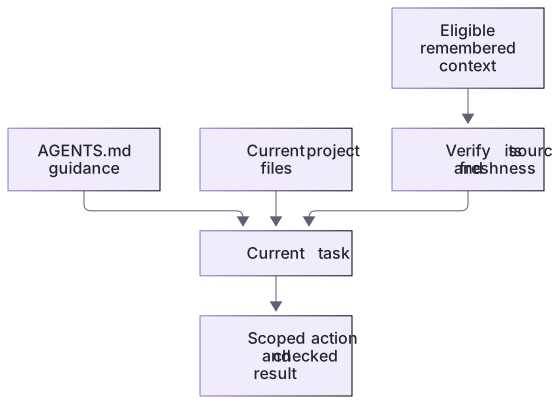
Instructions, working evidence, and memory are distinct inputs

AGENTS.md supplies project guidance, current files supply evidence, and eligible memory may help retrieve context. These inputs meet at the task, but a remembered claim still needs checking against its current source.
Context classification has a falsifiable result
The rule to preserve WORK-NOTE.md belongs in AGENTS.md. The current count comes from notes.json. The old 4-pass/2-fail result describes the baseline and can become stale immediately after a fix. A request to return only an outline belongs to the current task unless deliberately saved as continuing guidance.
The linked ledger supplies all four cases and a stale-result counterexample. A fresh conversation should be given the task goal and relevant checkpoint; it should not promote every past decision into a permanent rule. Optional memory can locate evidence, but the exercise works without it.
A useful source-of-truth habit
Give each important fact one maintainable home. Reference that file when a task needs it instead of copying its contents into several instruction layers. When two sources disagree, identify their scope and dates before choosing which applies. For example, a recent package script can invalidate an old setup note, but it does not silently authorize a deployment that the current task never requested.
About your environment
Checked 21 October 2026. Feature availability varies by client and host.
Try it step by step
- List one durable team requirement, one changing project fact and one temporary task decision from your scratch project.
- Assign the requirement to AGENTS.md, the fact to a canonical document, and the temporary decision to the current task context.
- Inspect whether memory controls are available in your chosen client without changing their current setting.
- Ask Codex to identify the source of each relevant claim and recheck any memory-derived fact against the current files.
A useful starting example
Illustration · adapt before use.
Read AGENTS.md, notes.json and CONTEXT-CHECKPOINT.md if supplied. Separate required guidance, current facts, historical test results and this turn’s request. Give a file path for each. Recheck any old count before reporting the current state; do not change memory settings.Classify the context before trusting it
The table is an answer key for supplied project artifacts; optional generated memory is not assumed to be enabled.
AGENTS.md: preserve WORK-NOTE.md
notes.json: four current sample records
CONTEXT-CHECKPOINT.md: prior task status
Generated memory: availability not establishedRequired guidance → AGENTS.md
Current fact → inspect notes.json
Prior status → recheck against current files
Recall → optional lead, not a guaranteed sourceA remembered note count or old test result cannot override the current file and actual check. The explicit checkpoint remains usable when recall is absent.
Your turn
Use the context ledger to classify the preservation rule, four note IDs, baseline failure count and one-turn outline request. After applying the reference fix, start another task with the old checkpoint and current files. Verify that the old 4/2 result is treated as history and the current six checks are refreshed.
Try the exercise before opening its reference answer. Use a disposable practice folder.
Orbit Notes project and recovery capstone
Extract into a new practice folder and keep the included labs folder. Run these commands from that extraction root, or from the course folder, using an existing Node.js installation.
- Command 1 text
node labs/project-workflow/create-workspace.cjsCheck: Returns a new owned temporary path. Open that exact copy in the app; the shipped starter stays broken.
- Command 2 text
node labs/project-workflow/verify-depth.cjsCheck: Runs two candidate implementations and recovery counterexamples in fresh copies. Reports paths, facts and preservation; live skill/instruction discovery remains a separate observation.
Follow this lesson’s specific walkthrough and compare its result with the answer key. Commands are relative to the course folder. The offline demonstration never claims a live Codex client loaded instructions, selected a skill or retrieved a connected record.
Check your result
- You can identify the canonical file for a required rule rather than relying on a remembered conversation.
- Changing facts are checked against current evidence and stale recall is not presented as confirmed.
- You distinguish the local host’s memory controls from ChatGPT web settings and from this website’s course progress.
Reference answer & rubric Try the exercise before opening
Use a reviewed rule file, a current factual source and a task checkpoint for their separate jobs.
- Locate the preserve rule in the actual AGENTS.md.
- Count the current note IDs directly in notes.json.
- Read the supplied checkpoint and verify whether its status matches the learner’s copy.
- Compare the actual result with the lesson-specific answer key; record unrun client observations separately from executed local checks.
Check your understanding
Where should a team’s mandatory test command primarily live?
- Only in the agent’s generated memories.
- In reviewed project guidance or checked-in documentation.
- Only in a chat that one person remembers.
Reveal the answer and explanation
Answer 2: In reviewed project guidance or checked-in documentation.
Mandatory guidance needs an explicit, reviewable source. Memory is an optional recall layer, not the only home for a rule.
Take this quiz in the interactive lesson to save your answer in the browser.
When it does not work
A prior note count conflicts with the file.
Likely cause: Recall or a duplicated note is stale.
What to try: Use the current canonical file and record which earlier claim was superseded.
The next chat forgets a required rule.
Likely cause: The rule existed only in a conversation or optional memory.
What to try: Put the reviewed requirement in project guidance and verify discovery in a fresh session.
Common mistakes
- Putting passwords, customer records or one-time instructions into a reusable project-guidance file.
- Assuming a generated memory is current, complete, or available in every client and on every machine.
Source mapping & differences · different
Claude’s CLAUDE.md and auto-memory model are replaced by Codex AGENTS.md guidance plus a separate, optional host-local memory system with its own controls.
Source topic: Overview ↗Go to the source
Official documentation, checked 21 October 2026. Product names, controls and availability may vary with your version, platform or account.
Completion and quiz progress are saved
only in the interactive course.