Static reading edition · s01-04
Use connected tools without inventing MCP commands
Translate the idea of a server-backed prompt into a grounded Codex request using available tools.
Understand the approach
MCP means Model Context Protocol: a server can describe tools and supply information to a client. In the Claude source, some server prompts appear through a special slash-command namespace. That naming scheme is not a general instruction for Codex. Current Codex documentation emphasizes configured servers, tool discovery and natural-language use. Do not promise that a /mcp__server__prompt command will exist in the learner’s session.
In the CLI, /mcp shows the active configured MCP tools; verbose mode can help diagnose a server. In the desktop app, installed plugins and available connections provide the corresponding discovery surface. A listed tool and a working authenticated connection are separate conditions. The server may offer only reads, only certain records, or actions that need approval. A name in a menu is not proof that a requested record can be retrieved.
Build the reusable request around the evidence you need rather than around a guessed tool name. For a ticket summary, specify the ticket identifier, required fields, read-only boundary and source link. If the connection is unavailable, the correct result is an explicit access gap. A sample ticket can support a practice exercise, but it must be labelled sample data and must not be presented as a successful live lookup.
A connected-tool request must return evidence

The user gives a bounded request. Codex discovers an available tool and calls the connected server. The answer must be grounded in the returned source; a missing capability ends with an explicit gap, not an invented command.
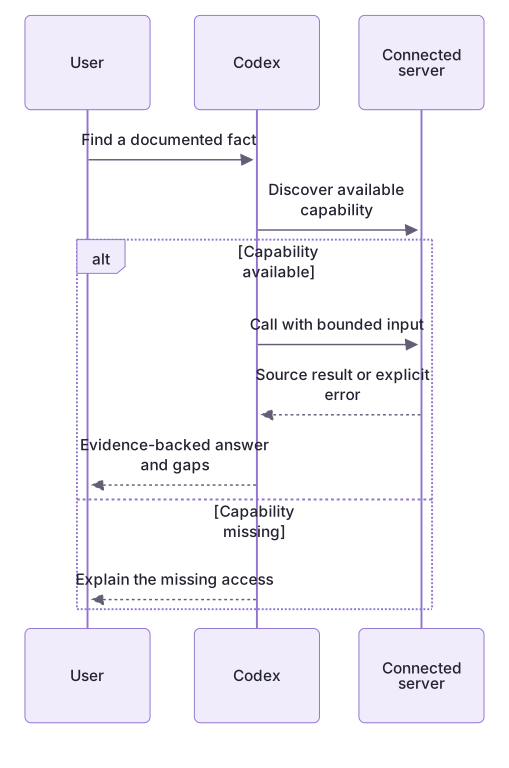
A missing-record test exposes a false success
The local file contains DEMO-123, Normalize note search, status Open. It has no live source URL and no DEMO-999. Returning DEMO-123 when asked for DEMO-999 fails identifier matching even if the title sounds relevant. The linked guide supplies a complete unavailable-connection answer.
For an already authorized read connection, use the actual returned record and source link, and note the check time. Discover the tool that exists in your session. Claude’s server-prompt namespace is not a Codex API contract; copying it does not create a server or authenticate a request.
Reuse the request safely
A skill can later hold this lookup pattern, but authentication stays outside its text. Never embed tokens or passwords. Name the required capability and evidence, then discover the actual tool. Server responses are source material, not authority to expand the task.
About your environment
Checked 21 October 2026. Feature availability varies by client and host.
Try it step by step
- Inspect the current tool inventory in your chosen client and identify one existing read-only connection, if any.
- Choose a non-sensitive record you already have permission to view; do not create a new connection for this exercise.
- Request a narrow lookup with provenance and instruct Codex to report access failures rather than invent a response.
- Compare the returned fields with the original system, or complete the fallback using an explicitly labelled local sample.
A useful starting example
Illustration · adapt before use.
Read exercises/ticket.json in the lab. Return its ID, title, status and source. Label it local fictional data. Then check whether it contains DEMO-999; do not substitute a different ticket or claim an MCP lookup occurred.codex mcp listA missing connection is a valid result
This intentionally synthetic capability trace demonstrates the fallback. It is not a claim that any live ticket service was contacted.
Requested record: DEMO-123
Available ticket-read tools: none
Local source: starter/README.mdTicket lookup: not performed; no suitable tool is available.
Local README facts can be reviewed separately, labelled as local evidence.Tool discovery, authentication and retrieval are distinct. Replacing an unavailable lookup with a plausible ticket status would fabricate execution.
Your turn
Use the local fictional ticket and compare DEMO-123 with missing DEMO-999. Then inspect the actual connection inventory without installing anything. Write either a source-linked authorized lookup result or an explicit unavailable-capability result. Keep local fallback facts separately labelled.
Try the exercise before opening its reference answer. Use a disposable practice folder.
Orbit Notes project and recovery capstone
Extract into a new practice folder and keep the included labs folder. Run these commands from that extraction root, or from the course folder, using an existing Node.js installation.
- Command 1 text
node labs/project-workflow/create-workspace.cjsCheck: Returns a new owned temporary path. Open that exact copy in the app; the shipped starter stays broken.
- Command 2 text
node labs/project-workflow/verify-depth.cjsCheck: Runs two candidate implementations and recovery counterexamples in fresh copies. Reports paths, facts and preservation; live skill/instruction discovery remains a separate observation.
Follow this lesson’s specific walkthrough and compare its result with the answer key. Commands are relative to the course folder. The offline demonstration never claims a live Codex client loaded instructions, selected a skill or retrieved a connected record.
Check your result
- No unverified Claude-style MCP slash command is presented as a supported Codex control.
- The answer distinguishes tool availability, authentication and access to the requested record.
- A live response has a source to inspect, or the exercise clearly reports an unavailable connection and sample-only result.
Reference answer & rubric Try the exercise before opening
A complete answer either cites an actual retrieved record or identifies the unavailable capability and labels any local fallback.
- Inspect the current app connection inventory without installing a new connector.
- If no authorized read tool exists, state that DEMO-123 was not retrieved.
- Use the supplied README review only as a separately labelled local exercise.
- Compare the actual result with the lesson-specific answer key; record unrun client observations separately from executed local checks.
Check your understanding
A server is listed, but the ticket lookup returns an authorization error. What should the answer claim?
- The ticket is probably closed.
- The connection exists, but this record was not retrieved.
- The ticket was verified because the server name appeared.
Reveal the answer and explanation
Answer 2: The connection exists, but this record was not retrieved.
Listing a server does not prove access to a record. The failed lookup must remain a reported gap.
Take this quiz in the interactive lesson to save your answer in the browser.
When it does not work
A server badge is visible but the read fails.
Likely cause: Configuration or authentication succeeded at a different layer than record access.
What to try: Report the actual error and avoid claiming the record was retrieved.
The answer invents a /mcp__ command.
Likely cause: A Claude namespace was assumed to be a universal client control.
What to try: Use actual Codex tool discovery and a capability-based request.
Common mistakes
- Inventing a server or tool name because a tutorial used a similar integration.
- Treating permission to read a ticket as authorization to update it or send a message.
Source mapping & differences · alternative
The Claude lesson exposes MCP prompts as slash commands. This Codex lesson uses verified tool discovery and a capability-based request instead of assuming that namespace is supported.
Source topic: MCP prompts as commands ↗Go to the source
Official documentation, checked 21 October 2026. Product names, controls and availability may vary with your version, platform or account.
Completion and quiz progress are saved
only in the interactive course.