Static reading edition · s01-05
Create a small project skill
Build and test an instruction-only skill with a clear trigger and a checkable result.
Understand the approach
Use a project skill when a workflow has already proved useful through ordinary prompting. For this exercise, a read-only README review is narrow enough to inspect completely. Create a folder under .agents/skills/readme-check in your disposable repository and put SKILL.md inside it. The required metadata is a name and description in YAML front matter, followed by plain instructions.
The description tells Codex when to select the skill; the body explains what to do after selection. Keep those roles distinct. The skill should identify setup claims, compare them with available files, and return a short list of findings. It should neither rewrite the README nor install dependencies merely to make a missing command pass. If evidence is incomplete, a useful finding describes the gap instead of guessing.
Codex detects skill changes automatically, although restarting the client can help when an update does not appear. In CLI or IDE, use /skills or a dollar-prefixed skill mention to select it. The desktop product also exposes a Skills area and selectors; use the invocation offered by that client. Saving a valid file is only a structural milestone. You still need a positive task, an out-of-scope task and a factual result check.
Test a skill against relevant and irrelevant requests

Create the skill, invoke it on a relevant fixture, and compare its result with the rubric. An irrelevant request is a separate test of the skill's boundary. Failures return to the instructions rather than being hidden by a passing example.
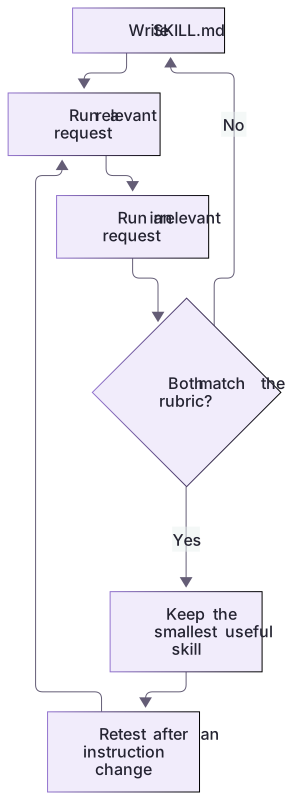
Judge the skill by findings, not its filename
A correct review identifies unsupported npm test, the raw case-sensitive implementation, and the absent deployment URL. It distinguishes a requirement from an observed capability: the brief requires trimmed, case-insensitive search; notes.cjs does not yet implement it. A table that simply repeats the README misses the planted defect.
The app’s skill selector is the primary path here; CLI and IDE can use the dollar mention. Valid metadata is not proof that the installed client discovered or used the skill. Record selection and output separately, then make a README correction through a new scoped edit request.
Keep the first version boring
No script is needed for this exercise. An instruction-only skill is easier to review and travels with the repository without extra runtime dependencies. When a workflow repeatedly needs deterministic parsing, add a small supporting script later and test that script separately. Preserve a clear boundary between the skill being available, being invoked, producing a file and passing a real user review.
Optional explicit-only selection
When a workflow must be selected deliberately, the documented Codex agents/openai.yaml policy can set allow_implicit_invocation: false. Create that optional file inside the skill directory only if you choose this behavior; explicit dollar invocation remains available. Keep it separate from Claude’s differently named front matter.
This metadata controls selection, not authorization for commits, messages or publication. The first skill remains instruction-only and read-only. Compare visibility and activation in the installed client rather than treating valid YAML as a successful invocation.
About your environment
Checked 21 October 2026. Feature availability varies by client and host.
Try it step by step
- Create only the project-local skill folder in the disposable repository; leave personal and global skill directories untouched.
- Save the example as SKILL.md and adapt the description if your real workflow has a narrower trigger.
- Invoke it for a README containing one deliberately missing setup instruction, then inspect every reported finding.
- Try a request to redesign the UI and confirm this read-only README skill is not used as an implementation workflow.
A useful starting example
Illustration · adapt before use.
$readme-check Review README.md against notes.cjs and checks.cjs. Check the npm test claim against actual files. Return a Claim / Evidence / Finding / Suggested correction table. Do not edit files or claim a check ran unless it did.---
name: readme-check
description: Review README setup claims against project files without edits. Use for README checks, not implementation or UI design.
---
Read README.md and relevant configuration files.
List unsupported setup claims and missing prerequisites with file evidence.
Do not edit files, install dependencies or contact services.
Return findings, evidence and unresolved questions.policy:
allow_implicit_invocation: falseWhat the small skill should find
Copy the supplied reference skill only into the disposable project, then compare its actual output with this source-grounded answer key.
README claim: npm test
Project evidence: checks.cjs exists; package.json does not
Required output: evidence-backed finding, no editsFinding: the npm test instruction is unsupported.
Correction: document node --test checks.cjs.
Unverified: deployment and external-service behavior.The complete skill and README-REVIEW.md are included. The exercise succeeds through a real mismatch and preserved files, not merely a valid YAML header.
Your turn
Copy the complete SKILL.md into the fresh practice project and select it through the app skill control. Run the README audit and compare all four findings with the answer key. Inspect file changes to confirm the audit did not edit the project. Try an unrelated implementation request and evaluate whether the description excludes it.
Try the exercise before opening its reference answer. Use a disposable practice folder.
Orbit Notes project and recovery capstone
Extract into a new practice folder and keep the included labs folder. Run these commands from that extraction root, or from the course folder, using an existing Node.js installation.
- Command 1 text
node labs/project-workflow/create-workspace.cjsCheck: Returns a new owned temporary path. Open that exact copy in the app; the shipped starter stays broken.
- Command 2 text
node labs/project-workflow/verify-depth.cjsCheck: Runs two candidate implementations and recovery counterexamples in fresh copies. Reports paths, facts and preservation; live skill/instruction discovery remains a separate observation.
Follow this lesson’s specific walkthrough and compare its result with the answer key. Commands are relative to the course folder. The offline demonstration never claims a live Codex client loaded instructions, selected a skill or retrieved a connected record.
Check your result
- The skill contains a valid name, description and readable instructions at the expected project-local path.
- A positive request finds the deliberately unsupported claim and cites actual project evidence.
- An unrelated UI request does not inherit the skill’s review-only workflow or gain additional execution permission.
Reference answer & rubric Try the exercise before opening
The file must be discoverable, selected for the intended task, and produce the planted finding without changing the project.
- Copy solution/.agents/skills/readme-check/SKILL.md into the temporary practice project.
- Select it through the app’s available skill control; CLI dollar invocation is optional.
- Compare the report with README-REVIEW.md, checking source evidence for each finding.
- Compare the actual result with the lesson-specific answer key; record unrun client observations separately from executed local checks.
Check your understanding
Which test best demonstrates that readme-check works?
- Its folder has a professional-looking name.
- The YAML parses without an error.
- It detects a planted setup mismatch and does not edit the repository.
Reveal the answer and explanation
Answer 3: It detects a planted setup mismatch and does not edit the repository.
A behavioral test checks both useful findings and the workflow boundary; file validity alone is not enough.
Take this quiz in the interactive lesson to save your answer in the browser.
When it does not work
The skill is not listed.
Likely cause: It is in the wrong local path or the client has not refreshed its catalogue.
What to try: Confirm the copied project path and filename, then refresh or restart as documented.
The skill says npm test passed.
Likely cause: It inferred execution from README text instead of running or inspecting evidence.
What to try: Require actual result evidence and classify the starter command as unsupported.
Common mistakes
- Using an attractive name with a description so broad that almost every task matches.
- Treating discovery of the skill as proof that its instructions produce accurate results.
Source mapping & differences · equivalent
The reusable-workflow concept transfers, while Codex requires its own .agents/skills discovery path and supported explicit invocation rather than Claude command syntax.
Source topic: Create your own commands ↗Go to the source
Official documentation, checked 21 October 2026. Product names, controls and availability may vary with your version, platform or account.
Completion and quiz progress are saved
only in the interactive course.