Static reading edition · s01-03
Replace old custom commands with reusable skills
Recognize deprecated custom-prompt workflows and choose a maintainable Codex skill instead.
Understand the approach
Repeated requests often begin as saved text: a release-note checklist, a repository orientation prompt, or a review routine. Codex previously supported custom Markdown prompts in the user prompts directory, invoked through a prompts namespace. The current official documentation marks custom prompts as deprecated and recommends skills. Existing prompts are useful migration inputs; their presence does not make them the preferred format for new work.
A skill gives a workflow a name, a description of when it applies, and instructions in SKILL.md. Repository skills live under .agents/skills so a team can version them with the project. Personal skills can live in the user .agents/skills directory. Unlike a saved prompt that must be inserted manually, a skill can support explicit invocation and description-based selection. An accurate trigger matters as much as the instructions.
Migration is a behavioral redesign, not a filename substitution. Remove assumptions about Claude paths, slash namespaces or implicit permissions. Identify the input, permitted actions and concrete output. A skill that drafts release notes should not also create a commit, open a pull request or publish a release unless those actions are part of the current authorization. Review and run the workflow in a scratch project before treating it as reusable.
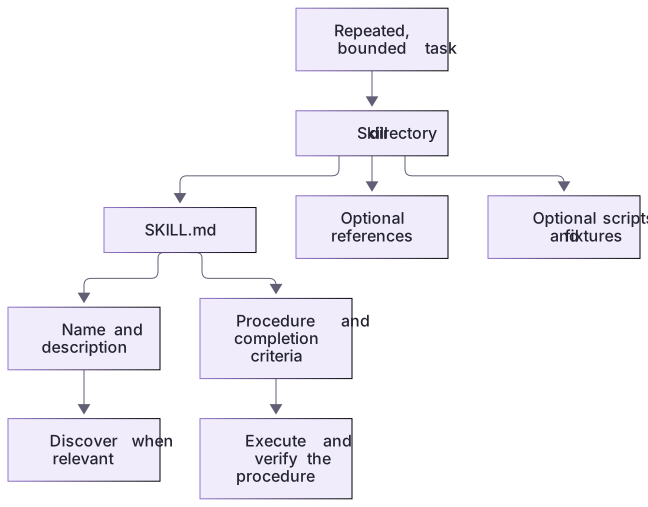
A reusable skill has a discoverable boundary

A reusable request becomes a skill with metadata and instructions. References, scripts, and fixtures are supporting files, not text that must all be loaded for every request.
A migration changes the workflow contract
The legacy input says review, then asks for npm test, a rewrite and a commit. The starter has no package.json, and a read-only audit should produce findings. The replacement names source files, defines a four-column output and leaves edits for a separately scoped task.
Do not carry Claude-specific argument substitutions, tool front matter or dynamic shell blocks across by analogy. For this instruction-only skill, the target README is ordinary request text. The optional Codex metadata file is a separate documented format; it is unnecessary for this first migration.
A small migration is easier to trust
Start with a read-only workflow that returns a document. Add scripts only when deterministic processing is useful. Record which legacy behavior remains and what changes, so reviewers can compare the migration without modifying global configuration.
About your environment
Checked 21 October 2026. Feature availability varies by client and host.
Try it step by step
- Choose one saved request that you repeat and describe a successful outcome without relying on its old command name.
- List the files or information it consumes, the output it creates, and actions it is not authorized to take.
- Draft a skill description that distinguishes a positive trigger from a nearby task that should not activate it.
- Test the draft manually with two contrasting requests, then move to the complete skill-creation exercise in the next lessons.
A useful starting example
Illustration · adapt before use.
---
name: readme-check
description: Audit README setup claims against source files. Use for read-only README checks, not implementation.
---
Read README.md, notes.cjs and checks.cjs. Check whether package.json exists.
Return Claim, Evidence, Finding and Suggested correction.
Label unrun commands; do not edit, install, commit or publish.A concrete command-to-skill migration
The complete local reference skill is supplied under the capstone solution. Review it before copying it into a disposable project.
---
name: readme-check
description: Review README setup and verification claims against files. Do not use for code changes.
---
Read the named README and actual project files.
Return Claim, Evidence, Finding and Suggested correction.
Do not edit or install anything.Positive case: README readiness review → relevant workflow.
Excluded case: change the search implementation → separate implementation task.The migration retains the review method while replacing old prompt directories and implicit authority. The answer key identifies unsupported npm test without installing dependencies.
Your turn
Read the two-line legacy prompt as data, then migrate it in a fresh practice copy using the supplied before/after table. Remove its unsupported npm test and automatic commit. Compare the new skill report with README-REVIEW.md, then test a code-change request as a negative activation case.
Try the exercise before opening its reference answer. Use a disposable practice folder.
Orbit Notes project and recovery capstone
Extract into a new practice folder and keep the included labs folder. Run these commands from that extraction root, or from the course folder, using an existing Node.js installation.
- Command 1 text
node labs/project-workflow/create-workspace.cjsCheck: Returns a new owned temporary path. Open that exact copy in the app; the shipped starter stays broken.
- Command 2 text
node labs/project-workflow/verify-depth.cjsCheck: Runs two candidate implementations and recovery counterexamples in fresh copies. Reports paths, facts and preservation; live skill/instruction discovery remains a separate observation.
Follow this lesson’s specific walkthrough and compare its result with the answer key. Commands are relative to the course folder. The offline demonstration never claims a live Codex client loaded instructions, selected a skill or retrieved a connected record.
Check your result
- The plan uses the current SKILL.md format rather than creating a new deprecated custom-prompt setup.
- Its trigger clearly distinguishes orientation from implementation or release publication.
- The proposed output can be checked against specific project files without relying on a confident summary.
Reference answer & rubric Try the exercise before opening
The migrated workflow is a project-scoped read-only skill, with a positive trigger, an exclusion and a concrete findings table.
- Compare the old prompt with the supplied SKILL.md and remove legacy paths or slash namespaces.
- Keep README and source files as inputs; use the four-column findings table as the output.
- Check that the planted npm test claim is identified as unsupported.
- Compare the actual result with the lesson-specific answer key; record unrun client observations separately from executed local checks.
Check your understanding
What is the recommended starting point for a new reusable Codex workflow?
- A focused skill with a clear description and SKILL.md.
- A new Claude slash-command namespace.
- A global script with permission to publish by default.
Reveal the answer and explanation
Answer 1: A focused skill with a clear description and SKILL.md.
Current Codex documentation recommends skills; their scope should remain proportional to the actual workflow.
Take this quiz in the interactive lesson to save your answer in the browser.
When it does not work
The skill drafts a fix instead of a review.
Likely cause: The trigger or procedure mixes analysis and implementation.
What to try: Narrow its description and body to the findings table, then retest both request types.
The old /prompts entry still appears.
Likely cause: The deprecated local prompt remains installed in that environment.
What to try: Do not create another legacy entry; inspect and migrate it through a deliberate maintenance task.
Common mistakes
- Mechanically renaming .claude/commands to a Codex directory while retaining incompatible front matter and invocation syntax.
- Packaging broad execution authority into a convenience shortcut for what was originally a drafting task.
Source mapping & differences · different
Both ecosystems evolved from custom commands toward skills, but Codex uses its own discovery locations and invocation controls; deprecated /prompts workflows should not anchor new teaching.
Source topic: Custom commands (now skills) ↗Go to the source
Official documentation, checked 21 October 2026. Product names, controls and availability may vary with your version, platform or account.
Completion and quiz progress are saved
only in the interactive course.