Static reading edition · s10-04
Capture final answers and structured events
Choose human-readable, JSON Lines or schema-constrained output and validate the actual files produced.
Understand the approach
A scripted task can produce several kinds of output. In ordinary codex exec mode, progress goes to stderr while the final agent message goes to stdout. That distinction helps when a shell saves a report. The --output-last-message option, also available as -o, saves the final answer to a named file. Choose a new report path rather than redirecting into a source file you meant only to inspect.
With --json, stdout becomes a stream of JSON Lines events: each line is a separate JSON object describing progress or an item. This is not one large JSON document and not necessarily just the final answer. A consumer must parse each line and distinguish completion from failure. Saving a final message alongside an event stream gives you both an inspectable summary and execution evidence without confusing their formats.
For a stable machine-readable final result, --output-schema requests a response shaped by a JSON Schema. The schema constrains structure, not factual truth. A project name can satisfy a string field while still being invented. Include a way to report unknown information, compare returned values with the actual project files, and validate the saved output with the downstream tool that will consume it.
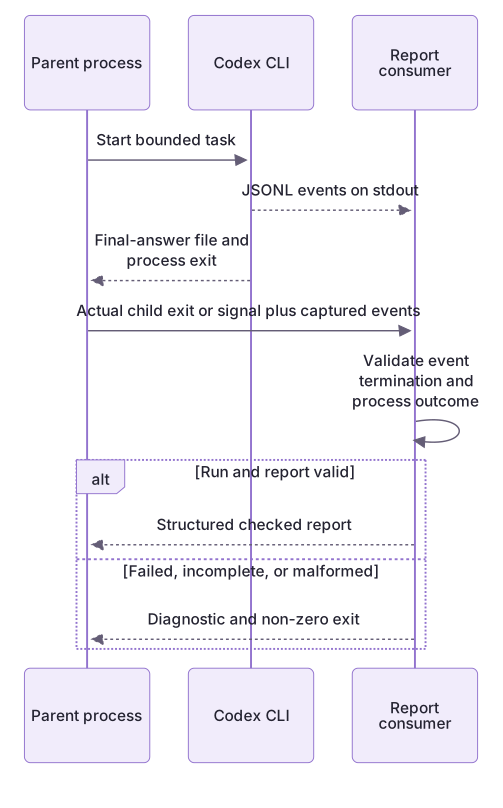
Consume events and final output without confusing them

The parent starts the CLI and passes captured JSONL plus the actual child exit or signal to the report consumer. The final-answer artifact is separate. A report is accepted only when process outcome, terminal event and report data all pass; malformed, incomplete and failed runs return distinct non-zero outcomes.
Structure can pass while the facts fail
The wrong answer has every required field and allowed type, but invents npm test and a deployment URL while omitting deployment_url from unknowns. The validator reports structure: valid and facts: rejected. A malformed object or missing field fails the structural gate; a missing source format is unverifiable.
This checker is intentionally limited to the fixture’s explicit Project, Check and Deployment lines. It is not a universal README or JSON Schema engine. JSONL belongs in report.cjs, where each line and lifecycle transition is checked. A complete stream and producer exit zero cannot turn a fabricated URL into a fact.
A report file is evidence of output, not success
A saved output can still contain gaps. Inspect its source and decide whether the task passed. If a parser consumes the file, test an unknown value and a failed run first. This exercise creates local reports; it does not configure CI or schedules.
About your environment
Checked 21 October 2026. Feature availability varies by client and host.
Try it step by step
- Choose final text, event JSONL or a final schema object according to its next consumer.
- Inspect valid and invented authored final objects against schema and current source.
- Run the final-object validator and the separate lifecycle/process matrix; record each actual result.
- For an optional live capture, preserve actual process status and fact-check the returned final file; do not label fixtures live output.
A useful starting example
Illustration · adapt before use.
node labs/cli-pipeline/validate-extraction.cjs --input labs/cli-pipeline/exercises/answers/red-valid.json --source labs/cli-pipeline/exercises/projects/red/README.md
node labs/cli-pipeline/validate-extraction.cjs --input labs/cli-pipeline/exercises/answers/red-invented.json --source labs/cli-pipeline/exercises/projects/red/README.mdnode labs/cli-pipeline/capture-codex.cjs --project redcodex exec --sandbox read-only --output-schema ./report-schema.json -o ./project-report.json "Extract the documented fields from README.md; preserve missing information as unknown."Consume success, failure and truncation
The fixtures are synthetic; the parser, subprocesses and test outcomes are real local executions.
node labs/cli-pipeline/run-pipeline.cjs success
node labs/cli-pipeline/run-pipeline.cjs error
node labs/cli-pipeline/run-pipeline.cjs malformed
node labs/cli-pipeline/run-pipeline.cjs incompletesuccess: completed, exit 0
error: failed, exit 2
malformed: invalid at line 3, exit 3
incomplete: no accepted final answer, exit 4The complete parser handles JSONL line boundaries, lifecycle errors and a missing final turn. The final agent message is distinct from command output and from business acceptance.
Your turn
Compare both authored final objects with report-schema.json and the red README. The valid object exits 0; the invented object has valid structure but exits 3 for source disagreement. Run the event-consumer failure matrix separately and explain why final-object validation, event completion and process status are distinct gates. Try actual output only through a separately chosen capture.
Try the exercise before opening its reference answer. Use a disposable practice folder.
Offline CLI event pipeline
Extract into a new practice folder and keep the included labs folder. Run these commands from that extraction root, or from the course folder, using an existing Node.js installation.
- Command 1 text
node labs/cli-pipeline/verify-extraction.cjsCheck: Accepts current red/blue answers and rejects invented, crossed, malformed and missing-source cases; no model runs.
- Command 2 text
node --test labs/cli-pipeline/pipeline.test.cjs labs/cli-pipeline/extraction.test.cjsCheck: 32 local tests pass: lifecycle/process gates and final-object factual checks are distinct.
Commands are relative to the course folder. Open the lab in the Codex app first. Lesson-specific artifacts separate offline execution from optional authenticated CLI observations; a dry-run plan is not a live model result.
Check your result
- The final answer file exists at the intended new path and does not overwrite a project source.
- You can distinguish JSON Lines events from a single final JSON object and identify failures separately from completion.
- Structured fields are checked against the README, with missing facts represented honestly.
Reference answer & rubric Try the exercise before opening
A downstream consumer must validate parsing, lifecycle and actual process status, then check factual output separately.
- Compare red-valid.json and red-invented.json against both schema and source.
- Run the validator and observe exit 0 versus exit 3, then inspect each factual error.
- Run the event matrix separately with actual producer status; inspect malformed and truncated cases.
- Choose any actual capture separately; an authored fixture is not a generated response.
Check your understanding
What does --output-schema primarily constrain?
- The final response structure.
- Whether every returned claim is true.
- Whether the application has been deployed.
Reveal the answer and explanation
Answer 1: The final response structure.
A schema constrains fields and types. Facts still need reconciliation with the source and the task still needs verification.
Take this quiz in the interactive lesson to save your answer in the browser.
When it does not work
JSON.parse rejects the entire capture.
Likely cause: JSONL is several JSON values separated by newlines, not one JSON document.
What to try: Parse nonblank lines separately and preserve line-numbered failures.
A printed final message is accepted after truncation.
Likely cause: The consumer never required the last turn to complete.
What to try: Keep the message pending until completion and reject an incomplete last turn.
Common mistakes
- Passing an entire JSONL stream to a parser that expects one JSON object.
- Assuming schema compliance proves the extracted project facts are correct.
Source mapping & differences · different
Claude text/json/stream-json output is replaced by Codex stdout/stderr behavior, JSONL events, output-last-message and output-schema with their distinct contracts.
Source topic: Output and formats ↗Go to the source
Official documentation, checked 21 October 2026. Product names, controls and availability may vary with your version, platform or account.
Completion and quiz progress are saved
only in the interactive course.