Static reading edition · s09-04
Understand automatic approval review
Explain how Approve for me changes review without removing execution boundaries.
Understand the approach
The source's Auto Mode uses a background classifier to review actions. Codex's closest documented mechanism is automatic approval review, exposed as Approve for me when available. A separate reviewer examines eligible approval requests. The main agent still uses its sandbox, network limits, and filesystem scope. This is a change in who reviews a boundary-crossing request, not a grant of unrestricted access.
Review applies to actions that already need approval; routine operations permitted within the sandbox do not all receive a fresh review. The current documentation describes interactive approval policies such as on-request. With approval_policy never, there is no approval prompt to route to the reviewer. Computer Use app-level approvals remain a separate case. Managed requirements and account availability can limit the option.
An explicit review denial is meaningful evidence, not an inconvenience to bypass. The agent should seek a materially safer alternative or explain the required user decision. Repackaging the same outcome through another shell, tool, or indirect command is not a safer path. Automatic review also does not replace the user's task authorization: a request to draft a message still does not become permission to send it.
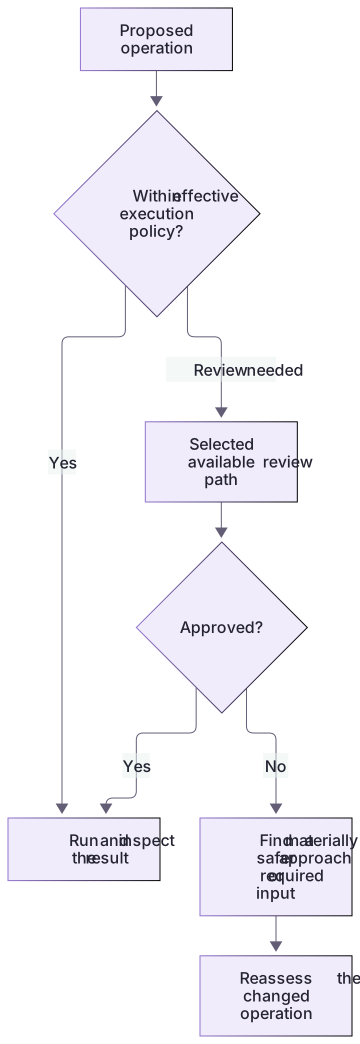
Automatic review operates at a permission boundary

An operation within current scope may proceed under effective policy. An operation needing review follows the selected review path, if available. Rejection requires a materially safer alternative or the required user decision, not repeating the same action.
Evaluate a safer alternative by its effect
If an operation would overwrite an external shared file, a safer alternative might prepare a local patch and show the exact proposed change. Merely calling a different program to overwrite the same file has the same effect and is not materially safer. Record the protected resource, intended effect, and reduced exposure in the comparison. This helps both the reviewer and the user assess what changed about the proposal.
Native control and stopping point
The complete native workflow guide shows the app control and CLI equivalent. It also teaches restoring Ask for approval. The policy fixtures do not invoke automatic review, and no arbitrary destructive test is needed to learn this control.
About your environment
Verified October 21, 2026. Native controls depend on current client, account, model, host and managed policy. Local graders and isolated plugin metadata lifecycle were tested; authenticated model runs, app selection changes and scheduling were not performed by the course author.
Try it step by step
- Open the app permission control under the composer and inspect the current selected mode; available is not selected.
- Choose Approve for me if available. In supported builds Settings > General > Permissions controls its availability; managed policy can omit it.
- Use a generated project and a bounded local task. Inspect actual tool and approval activity; ordinary in-boundary work may need no escalation at all.
- Explain the unchanged workspace-write sandbox and the automatic reviewer for eligible requests. Do not infer a classifier decision from ordinary successful editing.
- Return the chat to Ask for approval when finished; if a mode is unavailable, retain the supported current mode and record why.
A useful starting example
Illustration · adapt before use.
codex --sandbox workspace-write --ask-for-approval on-request -c approvals_reviewer=auto_reviewSelect the real reviewer and inspect its activity
A learner chooses the documented mode in a supported scratch chat.
App composer permission control → Approve for me
CLI: workspace-write + on-request + approvals_reviewer=auto_review
After the exercise → Ask for approval
Expected observation: same workspace boundary, eligible escalations sent to automatic review.
An ordinary workspace edit may have no approval item.This is an illustrated native workflow from current documentation, not an author-recorded classifier decision. Inspect actual activity in your client; the offline guard provides no reviewer evidence.
Your turn
Observe the real selected permission/reviewer mode in a supported scratch client. Run a bounded local edit and distinguish ordinary in-boundary work from an actual escalation/review event. Include an unavailable-mode case if applicable. Do not create a dangerous operation merely to force a classifier result.
Try the exercise before opening its reference answer. Use a disposable practice folder.
Separate a policy decision from its reviewer
Extract into a new practice folder and keep the included labs folder. Run these commands from that extraction root, or from the course folder, using an existing Node.js installation.
This exercise uses both packs. Extract each into the same practice root, keeping their separate folders under labs.
- Command 1 text
node labs/hook-policy/replay.cjs deny-protectedCheck: Returns a PreToolUse denial for a protected patch; no actual approval reviewer is invoked.
- Command 2 text
node labs/workflow-plugin/workflows/validate-artifact.cjs permissions labs/workflow-plugin/workflows/permissions-matrix.jsonCheck: permissions artifact passed local checks. No client action was performed.
The guard is a local policy example, not a simulation of Auto-review. Real reviewer selection and effective sandbox settings must be observed in a supported client.
Check your result
- The actual selected mode, environment and observed action are recorded.
- Automatic reviewer selection is separated from sandbox access and from the absence of an approval event.
- The original mode is restored and no classifier result is invented from offline guard output.
Reference answer & rubric Try the exercise before opening
Map the ordinary action, boundary escalation, reviewer, and task authorization independently.
- For an allowed workspace read, state that routine access may proceed inside the effective sandbox without an approval request.
- For a hypothetical out-of-scope write, identify the sandbox boundary first. Automatic review changes who reviews an eligible request, not the writable roots.
- Inspect the current permission control or /permissions in a supported CLI without changing it. Record availability separately from the mode actually selected.
- Explain that approval_policy never supplies no interactive approval request to review; do not interpret it as universal user authorization.
- If review denies the action, propose a materially safer local deliverable or ask about the specific missing authorization. Do not rephrase the same operation to bypass the decision.
Check your understanding
Does Approve for me expand writable roots?
- Yes; it removes all filesystem restrictions.
- Only when a hook prints allow.
- No; it changes the review path for eligible requests.
Reveal the answer and explanation
Answer 3: No; it changes the review path for eligible requests.
Automatic review does not itself expand the sandbox or enable networking. It evaluates requests at the existing boundary.
Take this quiz in the interactive lesson to save your answer in the browser.
When it does not work
A normal in-workspace read produced no automatic-review item.
Likely cause: Auto-review was expected on every action rather than eligible approval requests.
What to try: Check whether the action crossed an effective boundary; absence of review can be normal for allowed work.
Approve for me is missing or disabled.
Likely cause: Client, account, execution environment, configuration, or organization requirements do not expose it.
What to try: Record the actual state and follow permission troubleshooting; do not change policy or choose full access as a workaround.
Common mistakes
- Calling Approve for me full access or claiming it reviews every tool call.
- Retrying the same denied effect through an indirect mechanism and labeling it a workaround.
Source mapping & differences · different
Codex automatic review swaps the reviewer for eligible approval requests while retaining the sandbox; it is not identical to the source's per-action Auto Mode.
Source topic: Auto mode ↗Go to the source
Official documentation, checked 21 October 2026. Product names, controls and availability may vary with your version, platform or account.
Completion and quiz progress are saved
only in the interactive course.