Static reading edition · s08-05
Use Git checkpoints as durable file evidence
Create a small reviewable baseline, inspect the candidate and distinguish version history from chat history.
Understand the approach
Git records versions of selected files. A commit is useful because it identifies content you can inspect later, independently of a chat interface. It does not automatically include every file in the folder, preserve ignored outputs or snapshot an external service. Before calling a commit a recovery point, verify which files it contains and whether the working tree already had changes that must be preserved.
The default Orbit Notes --git setup stages the named starter files and records an index tree without creating a commit. It is a useful comparison baseline, but not durable history. The separate verify-commit demonstration creates a fresh owned repository and two actual commits using fictional author identity only for those invocations; it does not save identity settings or use a remote. In your own real repository, use its normal reviewed Git workflow and author identity instead of copying this fictional practice identity. Neither exercise requires changing global Git configuration.
After the Codex task, compare the working tree with the baseline and run the relevant project check. The chat explains the intent; the diff shows file changes; the check supplies behavior evidence. A later commit can preserve the accepted candidate, but committing is not the same as customer acceptance or deployment. Keep those milestones separate so a clean repository does not become a misleading claim that all work is finished.
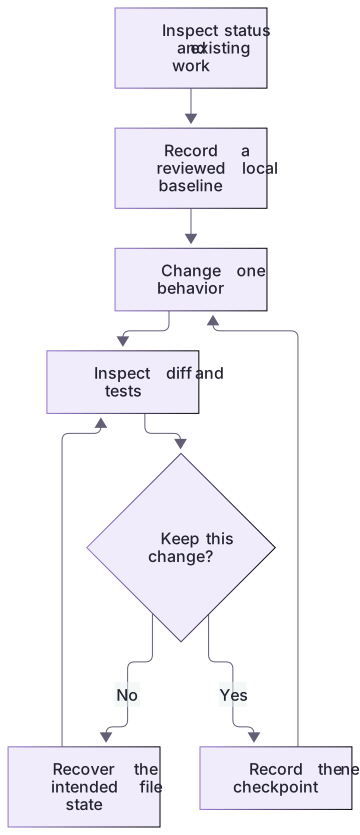
Git records file evidence, not every effect of a task

Inspect the starting state, record a local baseline when appropriate, make a bounded change, and inspect the resulting diff and tests. An accepted change can become a new checkpoint; external effects remain separate.
Create and inspect a real practice commit
The separate verifier creates two actual commits only inside its newly owned temporary repository. Fictional author identity and disabled signing are invocation-only Git options; no identity settings are saved. The first commit deliberately records the broken starter, and the second records only the focused README and search fix.
Inspect the returned path, commit IDs, git ls-tree --name-only HEAD and git show HEAD:README.md. The draft stays untracked. A later README paragraph stays unstaged and is absent from HEAD. This makes history concrete while retaining the index-only default for earlier recovery exercises.
Verify coverage before naming a checkpoint
The optional setup stages .gitignore, AGENTS.md, README.md, WORK-NOTE.md, checks.cjs, cli.cjs, notes.cjs and notes.json. Inspect the actual staged list and tree identifier. Later git add changes the index; the exercise calls it a disposable comparison baseline, not durable commit history.
After the candidate, inspect the working diff and untracked draft separately. The offline demonstration restores one file from the index and confirms the draft survives. A real reviewed commit records selected content in history, but it still does not include untracked/ignored material or prove deployment, user acceptance or external rollback.
Git and Codex have complementary roles
Use Codex to explain a diff, identify a missing regression case or draft a recovery plan. Verify the baseline in Git. When rejecting a change, preserve unrelated work through a targeted correction rather than requesting unrestricted repository cleanup.
About your environment
Checked 21 October 2026. Feature availability varies by client and host.
Try it step by step
- Create a fresh Orbit Notes --git copy using the linked lab guide, inspect its actual path and review every staged file.
- Use the staged index tree for the exercise and identify it explicitly; choose a separate copy if Git is unavailable.
- Complete the focused task and compare its working files with that index baseline and the original six-check contract.
- Record the actual index tree or copy, relevant check results, and untracked/ignored outputs. Treat a later commit only as a separate optional step with an already usable identity.
A useful starting example
Illustration · adapt before use.
git status --short
git diff --cached --name-only
git diff -- README.md notes.cjs
git show :README.mdgit add -- README.md
git diff --cached --name-only
# Inspect the complete staged list before choosing to commit.
git commit -m "Record reviewed practice baseline"node labs/project-workflow/verify-commit.cjsA Git exercise that needs no identity setup
The capstone optional Git stage is verified locally and deliberately avoids commits or user Git configuration.
git status --short
git diff -- README.md notes.cjs
git show :README.mdThe staged index is the exercise baseline.
A working diff shows the candidate.
No commit, user.name or user.email is created or changed.This makes file comparison runnable without personal identity setup. It is explicitly weaker than durable commit history; normal real-project commits remain a separate workflow.
Your turn
Run the separate verify-commit demonstration in a new owned scratch repository. Inspect both actual commit IDs, the eight committed paths and the focused README/notes.cjs change. Verify HEAD excludes the untracked draft and later unstaged README observation. Compare with the default index-only copy, and explain why neither chat history nor a clean-looking report establishes accepted behavior.
Try the exercise before opening its reference answer. Use a disposable practice folder.
Orbit Notes project and recovery capstone
Extract into a new practice folder and keep the included labs folder. Run these commands from that extraction root, or from the course folder, using an existing Node.js installation.
- Command 1 text
node labs/project-workflow/create-workspace.cjs --gitCheck: Returns a new owned temporary path. Open that exact copy in the app; the shipped starter stays broken.
- Command 2 text
node labs/project-workflow/verify-depth.cjsCheck: Runs two candidate implementations and recovery counterexamples in fresh copies. Reports paths, facts and preservation; live skill/instruction discovery remains a separate observation.
- Command 3 text
node labs/project-workflow/verify-commit.cjsCheck: Two actual commit IDs in a new owned repository; eight selected paths, focused candidate, excluded draft/later unstaged edit, unchanged config bytes and no remote.
Follow this lesson’s specific walkthrough and compare its result with the answer key. Commands are relative to the course folder. The offline demonstration never claims a live Codex client loaded instructions, selected a skill or retrieved a connected record.
Check your result
- The baseline identifier points to the expected named content and does not silently include unrelated files.
- Untracked and ignored files are accounted for instead of being assumed recoverable through the commit.
- The final report distinguishes committed, checked, accepted and published states.
Reference answer & rubric Try the exercise before opening
Identify exactly what the index or commit protects and never call a clean-looking report complete acceptance.
- Compare the default index-only copy with the separate actual commit verifier.
- Inspect returned baseline/candidate commits and HEAD content; baseline intentionally records broken practice behavior.
- Identify untracked draft and later unstaged edit excluded from HEAD.
- Verify config bytes remain unchanged; no global identity, remote, owner repo or Codex task is involved.
Check your understanding
A baseline commit exists. Which statement is safest?
- Every local file and external action can be restored from it.
- The committed files have a recorded version; other state must be checked separately.
- The task is automatically deployed and accepted.
Reveal the answer and explanation
Answer 2: The committed files have a recorded version; other state must be checked separately.
A commit protects the file content it contains, not every local artifact or external system.
Take this quiz in the interactive lesson to save your answer in the browser.
When it does not work
Git asks for identity while following the optional lesson.
Likely cause: A normal commit was attempted instead of the supplied index-only workflow.
What to try: Use the provided index exercise or a file copy; leave personal identity unchanged.
The candidate diff includes unrelated files.
Likely cause: Staging or editing scope was too broad.
What to try: Review the named files and preserve work outside the exercise before proceeding.
Common mistakes
- Using git add . in a shared working tree without inspecting every included file.
- Treating a commit, passing test or saved transcript as a universal record of all project and external state.
Source mapping & differences · equivalent
The source’s distinction between conversational checkpoints and version control is retained, with Git serving as the explicit durable file baseline for the Codex workflow.
Source topic: Checkpoints and Git ↗Go to the source
Official documentation, checked 21 October 2026. Product names, controls and availability may vary with your version, platform or account.
Completion and quiz progress are saved
only in the interactive course.