Static reading edition · s08-03
Choose between chat reset and file restoration
Select a recovery action that matches the problem, preserving unrelated work and verifying the outcome.
Understand the approach
The Claude source offers distinct rewind choices for conversation and code. Codex has different documented controls. /new starts a fresh CLI chat, /resume reloads a saved chat, and /fork creates a new chat from history. The desktop’s Undo last app action shortcut is documented, but that wording does not establish a complete rollback of arbitrary files, shell commands or external actions. Use only the behavior you can verify.
If the conversation is confused but the files are correct, start a fresh task with a compact factual handoff. If the files are wrong, inspect their diff and restore only the intended content from a known baseline. Those are different operations. You may keep the full conversation for diagnosis while reverting a local document, or keep a correct implementation while abandoning an unhelpful chat direction.
File restoration can discard work, so first identify and preserve changes outside the experiment. The linked Orbit Notes exercise requires a targeted heading correction while retaining a useful later paragraph; a whole-file restore does not meet that requirement. In a separate case where every working edit to the named tracked file is deliberately rejected, git restore --worktree -- README.md restores the lab’s staged index version. A verified committed baseline can be selected with --source=HEAD only when HEAD actually exists. Neither operation removes new untracked files or reverses remote effects.
Choose chat recovery or file correction deliberately

Confused conversation context can be replaced by a factual handoff. Incorrect file content needs a scoped correction. If a file contains both useful and rejected changes, correct the rejected part rather than restoring the whole file.
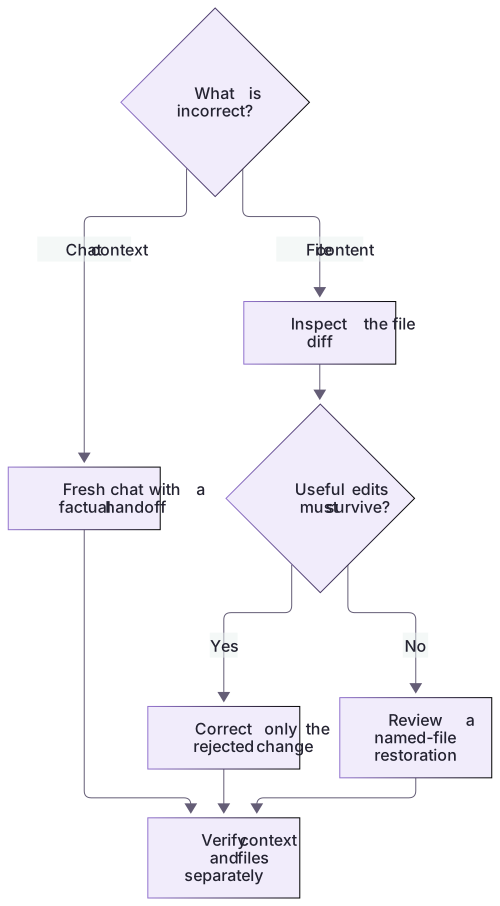
Three edits, only one rejected
Keep the corrected check command and append Useful review: preserve this paragraph. Then reject the heading experiment. The wanted document has the original Orbit Notes heading, corrected node command and later paragraph. A targeted heading edit achieves all three.
In a different disposable copy, whole-file restoration from the index removes both unstaged improvements and leaves the untracked draft untouched. The offline verifier executes both transformations and compares actual content. It does not emulate a Codex rewind or claim that chat history changes file state.
The narrowest successful recovery
A small corrective edit can preserve more useful work than whole-file restoration. Inspect its diff and keep a recovery copy if needed. For external effects, use the affected system’s supported correction process within the current authorization.
About your environment
Checked 21 October 2026. Feature availability varies by client and host.
Try it step by step
- Classify the problem as incorrect conversation context, incorrect local files or an external action needing separate handling.
- Inspect the baseline and current diff, and preserve any unrelated edits before choosing the recovery action.
- For this heading-only Orbit Notes exercise, correct just the rejected heading in the current README; retain the useful paragraph and avoid whole-file restoration.
- Recheck the recovered behavior and add a factual handoff if a new chat will continue the task.
A useful starting example
Illustration · adapt before use.
Review the changes to README.md in this disposable repository. Compare them with the verified baseline and identify unrelated work. Propose restoring only the rejected heading edit while keeping the useful new paragraph. Show the intended diff before applying it, then verify the final document. Do not reset the whole repository.git restore --worktree -- README.mdRecover one rejected edit and preserve another
The automated capstone reference verifies this exact content transformation in its own temporary copy.
Before: # Rejected heading experiment
Later paragraph: The useful additional paragraph must survive...
Wanted: # Orbit Notes, with that later paragraph retainedHeading restored to Orbit Notes.
Useful paragraph remains.
Protected files are byte-for-byte unchanged.A whole-file restore from the earlier baseline would remove the useful paragraph too. A targeted edit matches the intended recovery more closely.
Your turn
In the disposable Orbit Notes README, add one useful paragraph and make one deliberately rejected heading edit. Correct only the heading and preserve the paragraph. Explain why restoring the entire index or committed version would discard too much, why HEAD is absent in the provided index-only copy, and why a fresh chat would not repair either file edit.
Try the exercise before opening its reference answer. Use a disposable practice folder.
Orbit Notes project and recovery capstone
Extract into a new practice folder and keep the included labs folder. Run these commands from that extraction root, or from the course folder, using an existing Node.js installation.
- Command 1 text
node labs/project-workflow/create-workspace.cjs --gitCheck: Returns a new owned temporary path. Open that exact copy in the app; the shipped starter stays broken.
- Command 2 text
node labs/project-workflow/verify-depth.cjsCheck: Runs two candidate implementations and recovery counterexamples in fresh copies. Reports paths, facts and preservation; live skill/instruction discovery remains a separate observation.
Follow this lesson’s specific walkthrough and compare its result with the answer key. Commands are relative to the course folder. The offline demonstration never claims a live Codex client loaded instructions, selected a skill or retrieved a connected record.
Check your result
- The chosen action matches the state that is actually wrong: conversation, files or external system.
- The useful paragraph and unrelated edits survive the recovery.
- The final file content and relevant check confirm the intended state, with remaining untracked outputs accounted for.
Reference answer & rubric Try the exercise before opening
Correct only the rejected heading and verify the paragraph and unrelated files remain.
- Inventory the heading and useful paragraph as separate changes.
- Replace the exact rejected heading with the accepted one.
- Read the final README and confirm the useful paragraph remains.
- Compare the actual result with the lesson-specific answer key; record unrun client observations separately from executed local checks.
Check your understanding
You want to reject one heading change while retaining a useful new paragraph. What is best?
- Reset every repository file to the previous commit.
- Inspect the diff and apply a targeted heading correction.
- Start a new chat and assume the files revert.
Reveal the answer and explanation
Answer 2: Inspect the diff and apply a targeted heading correction.
A targeted correction preserves the useful work; a whole-file restore or broad reset can discard more than intended.
Take this quiz in the interactive lesson to save your answer in the browser.
When it does not work
The useful paragraph disappears.
Likely cause: A whole-file restore was used instead of a targeted correction.
What to try: Recover the preserved candidate and reapply only the heading correction.
The chat changed but files did not.
Likely cause: Conversation state and filesystem state are independent.
What to try: Inspect and edit the actual named file using its verified baseline.
Common mistakes
- Using a repository-wide hard reset for a single rejected edit.
- Assuming Ctrl+Z, /new or /fork provides the same recovery guarantees as Claude’s rewind menu.
Source mapping & differences · alternative
Claude’s code/conversation rewind options are mapped to separate Codex chat controls and explicit file-level recovery; no identical checkpoint restore promise is made.
Source topic: Rewind options ↗Go to the source
Official documentation, checked 21 October 2026. Product names, controls and availability may vary with your version, platform or account.
Completion and quiz progress are saved
only in the interactive course.