Static reading edition · s08-02
Find the evidence needed for recovery
Use Codex review views and Git inspection to identify the actual baseline and changed files.
Understand the approach
The source lesson opens a dedicated checkpoint browser. In Codex, begin with the evidence your client actually offers: saved chats, the review panel and the repository’s version history. The desktop app documents a review-tab shortcut, including Ctrl+Shift+G on Windows. The CLI /diff command displays working changes. Neither interface should be described as a browser of guaranteed automatic file snapshots.
A useful recovery inspection answers what changed, which files belong to the experiment, and which baseline you intend to restore. Git status distinguishes tracked edits and untracked files; a normal git diff does not display an untracked file’s content. Codex /diff is documented to include untracked files, but you should still inspect their paths and contents. Do not let a clean-looking partial diff hide a newly generated file.
A chat transcript adds intent and tool history, while repository history adds file versions. Compare both when a change appears unexpected. A commit timestamp alone does not prove that all relevant files were included. The linked Orbit Notes --git copy deliberately uses a staged index baseline and has no HEAD commit: inspect it with git show :README.md. In a different repository with a verified commit, git show HEAD:README.md and git log inspect that committed history instead. Record the actual baseline type rather than assuming those commands are interchangeable.
Inspect both the change and its baseline

A working-tree diff shows current edits. The baseline establishes the desired earlier content. Compare both, preserve unrelated work, and choose a named-file or targeted correction.
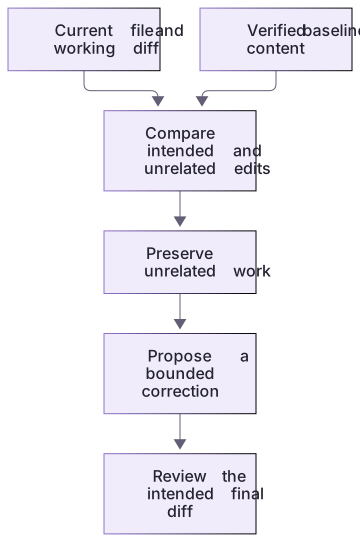
Read the index, worktree and untracked output separately
In this no-commit teaching repository, AM README.md means the file is added in the index and modified in the worktree. The untracked notes-draft.md appears as ??. git diff -- README.md compares the working candidate with the index; it does not include the draft’s contents. Open that file separately.
git show :README.md reads the staged version. git show HEAD:README.md cannot read a commit that does not exist here. The linked exercise records these real states and makes the baseline type explicit, so missing HEAD is understood rather than addressed through identity or remote changes.
When Git is unavailable
Use a separate known-good copy and compare the named file directly in an editor. Record that the exercise used a copy rather than pretending a commit exists. Do not install Git or alter global settings just to complete this inspection. The same reasoning applies: establish the source of the baseline, include newly created files in the inventory and preserve any work outside the experiment.
About your environment
Checked 21 October 2026. Feature availability varies by client and host.
Try it step by step
- Create the lab’s fresh Git-enabled copy from the course folder with node labs/project-workflow/create-workspace.cjs --git, if Git is already available; then open its returned path in Codex.
- Run the read-only commands below inside that exact practice directory, and inspect untracked files separately.
- Inspect the staged README baseline and current working file before proposing restoration; use a separate known-good copy if Git is unavailable.
- Write a recovery note naming the target files, the index tree or recovery copy, preserved unrelated work, and the check to run afterward.
A useful starting example
Illustration · adapt before use.
git status --short
git diff -- README.md notes.cjs
git show :README.mdgit log --oneline -5
git show HEAD:README.mdInspect a real narrow diff
The optional Git verifier creates a new index-only repository and saves its actual evidence.diff. It does not create a commit or alter Git identity.
git status --short
git diff -- README.md notes.cjs
git show :README.mdREADME.md and notes.cjs have working edits against the staged baseline.
WORK-NOTE.md, notes.json and checks.cjs have no working diff.
HEAD has no commit in this teaching repository.The Git index supplies the comparison point. An AM status is expected here; it is not a mysterious merge state. Untracked outputs still require separate inspection.
Your turn
In the disposable Git-enabled Orbit Notes copy, add an untracked notes-draft.md beside a README change. Compare git status, git diff and the Codex review interface. Inspect git show :README.md for the index baseline. Explain which view reveals the new file, why no HEAD commit exists in this supplied exercise, and which states your recovery note protects.
Try the exercise before opening its reference answer. Use a disposable practice folder.
Orbit Notes project and recovery capstone
Extract into a new practice folder and keep the included labs folder. Run these commands from that extraction root, or from the course folder, using an existing Node.js installation.
- Command 1 text
node labs/project-workflow/create-workspace.cjs --gitCheck: Returns a new owned temporary path. Open that exact copy in the app; the shipped starter stays broken.
- Command 2 text
node labs/project-workflow/verify-depth.cjsCheck: Runs two candidate implementations and recovery counterexamples in fresh copies. Reports paths, facts and preservation; live skill/instruction discovery remains a separate observation.
Follow this lesson’s specific walkthrough and compare its result with the answer key. Commands are relative to the course folder. The offline demonstration never claims a live Codex client loaded instructions, selected a skill or retrieved a connected record.
Check your result
- The evidence note includes tracked changes and any untracked output, without assuming git diff covers everything.
- The selected baseline contains the specific file version you intend to recover.
- The review interface is described by its observed behavior, not labelled a universal checkpoint browser.
Reference answer & rubric Try the exercise before opening
The recovery note must identify the actual baseline type and every relevant changed or untracked file.
- Create the optional Git copy only if Git is already available.
- Inspect the index baseline and current working diff rather than assuming HEAD exists.
- Add an untracked draft and verify that status reveals it while ordinary diff omits its content.
- Compare the actual result with the lesson-specific answer key; record unrun client observations separately from executed local checks.
Check your understanding
Why can git status show a file that ordinary git diff does not display?
- The file may be untracked.
- Git status always invents extra files.
- The file is guaranteed to have no useful content.
Reveal the answer and explanation
Answer 1: The file may be untracked.
Untracked files are reported by status but are not included in a normal working-tree diff until separately handled.
Take this quiz in the interactive lesson to save your answer in the browser.
When it does not work
git show HEAD fails in the provided Git exercise.
Likely cause: The lab deliberately uses an index baseline without an identity-dependent commit.
What to try: Use git show :README.md and document the baseline type.
A new draft is absent from the diff.
Likely cause: It is untracked.
What to try: Inspect status and the actual file separately; do not assume it is protected.
Common mistakes
- Restoring files from the newest commit without checking whether that commit is the desired baseline.
- Equating a conversation timestamp with proof that the corresponding file version is available.
Source mapping & differences · alternative
The source checkpoint-access lesson becomes a Codex review/history inspection workflow, using real diffs and a verified baseline instead of an invented checkpoint menu.
Source topic: Accessing checkpoints ↗Go to the source
Official documentation, checked 21 October 2026. Product names, controls and availability may vary with your version, platform or account.
Completion and quiz progress are saved
only in the interactive course.