Static reading edition · s03-04
Control when a skill is invoked
Separate explicit selection, implicit matching and action permission when designing skill activation.
Understand the approach
Explicit invocation names the workflow you want; implicit invocation lets Codex select a matching description. Use explicit selection while learning or diagnosing a skill so you know which procedure was intended. Then test normal phrasing to evaluate discovery. Client affordances differ: the documented CLI and IDE options include /skills and dollar-name mentions. Use the selector actually available in the app rather than assuming Claude's slash-command syntax is portable.
Codex supports an optional agents/openai.yaml file for skill metadata and policy. Setting policy.allow_implicit_invocation to false prevents automatic selection while leaving explicit invocation available. This is different from a permission boundary. A user-invoked release-draft skill still needs an explicit task to publish, send or change a live system; choosing it does not authorize every action its text mentions. Conversely, disabling implicit invocation does not make a procedure harmless once someone selects it.
Build a two-column activation test rather than relying on one successful call. Put requests that name readme-evidence-review in the first column and ordinary readiness questions in the second. Add a nearby but wrong task such as rewriting an advertisement. Record what was selected and what was produced. If you add the explicit-only policy for a sensitive workflow, rerun both columns. Do not copy Claude's disable-model-invocation or user-invocable frontmatter and claim they have the same meaning in Codex.
Use --explicit-only to prepare a second fresh project. It places the policy at the actual agents/openai.yaml path inside the copied skill and creates activation-results.csv with unrun observations. In the first project test a direct selection, a plain readiness question and unrelated styling; repeat those exact requests in the explicit-only project. Require the same two grounded findings whenever the skill is actually invoked. This fixes input and procedure while changing only discovery policy. If a native result selects correctly but invents a third defect, score selection as correct and the report as incorrect.
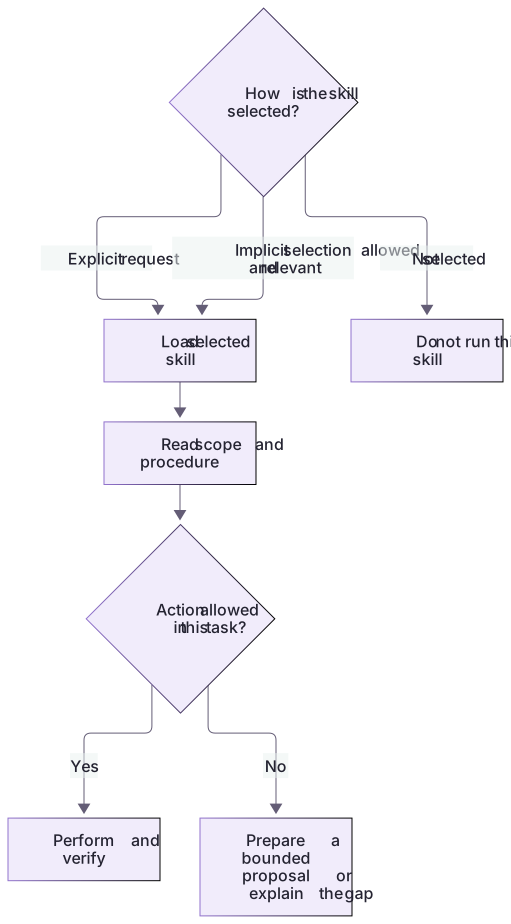
Invocation policy and authorization are different checks

A skill may be selected explicitly or, when allowed and relevant, implicitly. Selection supplies instructions; it does not grant permission to perform every action those instructions mention.
Practice and acceptance
An explicit-only policy changes discovery behavior; it cannot make an incorrect report correct or authorize side effects.
About your environment
Checked 21 October 2026. Client selectors can differ; test the policy in the environment where the skill will be used.
Try it step by step
- Read the linked lab guide, inputs and expected outputs before running the exercise.
- Start with a working, narrowly described skill and write a direct request, a paraphrase and an unrelated request.
- Run the direct request through the actual client selector. Confirm the intended procedure was read rather than inferring invocation from fluent output.
- For the practice explicit-only variant, create agents/openai.yaml inside that skill folder using the policy shown below. Keep existing metadata if the file already exists.
- Repeat direct and indirect cases in a fresh or refreshed client context as needed. Record activation separately from the accuracy of the report.
- Review the procedure's side effects independently of its trigger. A draft-only exercise should still produce no external message or project edit.
A useful starting example
Illustration · adapt before use.
# .agents/skills/readme-evidence-review/agents/openai.yaml
interface:
  display_name: "README Evidence Review"
  short_description: "Inspect documented run and test claims"
policy:
allow_implicit_invocation: falsenode labs/skill-workflow/prepare-scratch.cjs ../readme-skill-explicit --explicit-only
# In its Codex composer explicitly select:
# $readme-evidence-review Review README.md and report grounded defects.A two-axis result sheet
One case can select correctly and still produce a false finding.
Case: complete README review
Expected activation: yes
Expected findings: none
Case: redesign colors
Expected activation: noHelper output on complete: findings=[]
Client activation: record actual observation, not supplied by this helpercases.json specifies expectations; only a real client observation can fill its activation column.
Your turn
Use cases.json as the fixed evaluation matrix. Record deterministic helper results now, then test direct selection, paraphrased review and unrelated UI work in a chosen scratch Codex environment. If comparing explicit-only policy, copy the inactive policy into that practice skill deliberately and preserve the previous version. Report expected versus observed activation separately from report accuracy.
Try the exercise before opening its reference answer. Use a disposable practice folder.
Evaluate invocation separately from output
Extract into a new practice folder and keep the included labs folder. Run these commands from that extraction root, or from the course folder, using an existing Node.js installation.
- Command 1 text
node --test labs/skill-workflow/review.test.cjsCheck: 13 local checks pass; no implicit-selection claim is made.
- Command 2 text
node --test labs/skill-workflow/native-setup.test.cjsCheck: Five checks include exact explicit-only placement and preservation of existing destinations.
An explicit-only policy changes discovery behavior; it cannot make an incorrect report correct or authorize side effects.
Check your result
- You can demonstrate the difference between naming a skill and having it matched automatically.
- The policy is in agents/openai.yaml rather than an invented Codex frontmatter field.
- The activation test does not confuse successful selection with permission to perform an external action.
- Helper results, actual host activation and unexecuted application commands remain distinguishable.
Reference answer & rubric Try the exercise before opening
Direct and implicit invocation need their own observations; allow_implicit_invocation:false leaves explicit invocation available.
- Use the complete skill's narrow description as the baseline and keep fixtures unchanged.
- Run helper checks to establish output behavior without claiming host selection.
- For optional Codex cases, record the exact request and visible selection/source evidence before grading the result.
- Apply an explicit-only draft only in the chosen scratch package, refresh as required and compare the same requests; keep authorization boundaries unchanged.
Check your understanding
What does allow_implicit_invocation: false establish?
- The skill cannot make file changes under any circumstances.
- The skill is hidden from every user and client.
- Codex will not choose the skill implicitly; explicit selection still works.
Reveal the answer and explanation
Answer 3: Codex will not choose the skill implicitly; explicit selection still works.
It controls implicit selection, not the permissions or correctness of an explicitly invoked workflow.
Take this quiz in the interactive lesson to save your answer in the browser.
When it does not work
The policy is called ineffective because a direct mention still works.
Likely cause: Explicit invocation was confused with implicit matching.
What to try: Test a paraphrase without direct selection; explicit selection is documented to remain available.
An unrelated request returns a plausible answer and is counted as skill activation.
Likely cause: Fluent output was used as invocation evidence.
What to try: Inspect the actual client selection or instruction-read evidence, and mark activation unknown when unavailable.
Common mistakes
- Using a Claude invocation-control field in Codex without checking support.
- Assuming an explicitly selected skill may perform every side effect described in its examples.
Source mapping & differences · different
Codex uses allow_implicit_invocation in agents/openai.yaml; Claude's invocation-control frontmatter is not a direct configuration mapping.
Source topic: Control skill invocation ↗Go to the source
Official documentation, checked 21 October 2026. Product names, controls and availability may vary with your version, platform or account.
Completion and quiz progress are saved
only in the interactive course.