Static reading edition · s05-06
When Codex is the agent you want to embed
Recognize the removed Codex MCP server and select a current integration approach without assuming protocol compatibility.
Understand the approach
The source lesson runs Claude itself as an MCP server. There is no supported command-name substitution for that example in current Codex. OpenAI's migration page states that codex mcp-server and the standalone codex-mcp-server binary have been removed. This affects hosting Codex behind MCP, not Codex's ability to connect to external MCP servers. Keep those directions separate: an agent consuming tools is different from another application invoking the agent.
OpenAI points integrations needing authentication, history, approvals and streamed events toward the Codex app server. It uses its own JSON-RPC protocol and is not an MCP server or a drop-in replacement for an MCP client. The migration guidance also marks the app-server command experimental and unsupported for production workloads. Those constraints matter more than a similarly shaped launch command. A real migration must review protocol messages, lifecycle handling, approvals, failure behavior and the support level before changing a live integration.
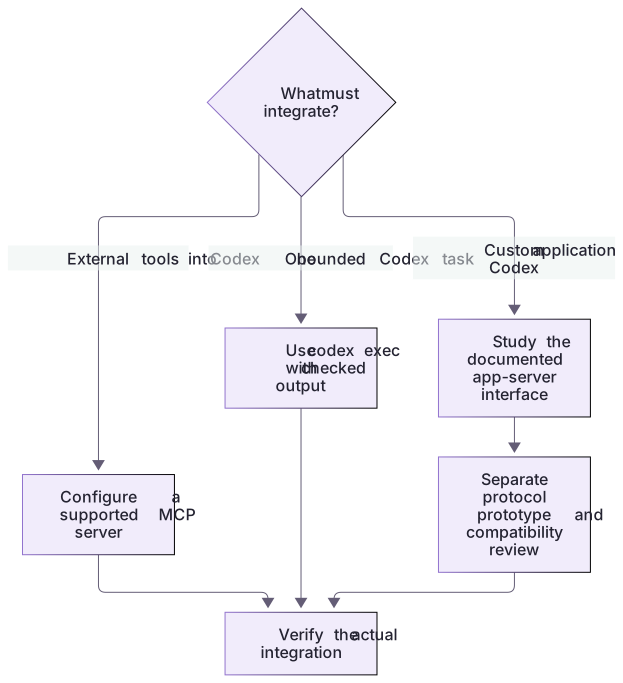
Choose the smallest interface for the outcome. Documentation uses external MCP. A bounded README summary can use codex exec and its checked process/output contract. A custom conversational client needs app-server’s thread/turn/event lifecycle, current schema and approval handling. Read app-server-migration.md and run its complete fixture/client pair, then compare the actual sequence with the MCP transcript. The fixture is a real subprocess but explicitly not Codex; native compatibility is a separate deliberate learner stage.
The supplied app-server-client.cjs sends initialize, the app-server-specific initialized notification, thread/start and turn/start, then waits for the returned turn’s turn/completed event and that same turn’s completed agent-message text. Unlike MCP, its wire omits the jsonrpc header. Its teaching path launches an explicit protocol fixture. Failed/interrupted turns, an empty completed result, malformed stdout, missing executable and early exit are checked failures. A completion event is only a candidate until stdout is drained and transport teardown is checked. Wrong-turn messages, malformed trailing stdout and a natural nonzero exit cannot produce success. The receipt distinguishes a natural process exit from deliberate post-result termination by the client. Command/file-change approvals are declined. app-server-migration.md also gives an explicit --native path, installed-version schema generation and read-only scratch setup. That stage can create conversation history and consume account usage; the offline checks do not perform it.
The author additionally checked installed codex-cli 0.163.0-alpha.11 without starting a thread or turn: app-server help and schema generation succeeded in a separate temporary configuration home, followed by a native initialize/initialized handshake. Its ThreadStartParams schema requires sandbox="read-only"; the returned SandboxPolicy uses type="readOnly". These are distinct shapes, and the client follows the installed schema rather than copying a conflicting illustrative spelling. The fixture and eight failure/lifecycle checks validate the teaching client; account-backed native generation remains unrun.
Choose external tools, bounded execution, or application embedding

Connecting external capabilities to Codex, running a one-shot Codex task, and embedding Codex in a custom application are different requirements. The experimental app-server protocol is not a drop-in MCP-server replacement.
Practice and acceptance
A running external MCP server does not turn Codex into an MCP server; embedding and tool consumption have different interfaces.
About your environment
Checked 21 October 2026. The reviewed migration guide marks the app-server command experimental and unsupported for production workloads.
Try it step by step
- Run audit-integration.cjs and identify the removed command and intended README-summary outcome.
- Read app-server-migration.md and compare bounded codex exec with the different thread/turn interface.
- Run the complete fixture client, then failed, approval and empty cases; inspect terminal status plus final message handling.
- Run app-server.test.cjs and compare the client sequence with MCP initialize/notifications/initialized.
- For an optional native check, generate your installed schema first, compare exact field shapes and use only a deliberately chosen scratch environment. Keep any account-backed turn unrun until observed.
A useful starting example
Illustration · adapt before use.
node labs/mcp-workbench/app-server-client.cjs --fixture complete
node labs/mcp-workbench/app-server-client.cjs --fixture failed
node labs/mcp-workbench/app-server-client.cjs --fixture approval
node --test labs/mcp-workbench/app-server.test.cjscodex exec --sandbox read-only "Read README.md and summarize its purpose in three bullets. Do not change files or run project commands."
# Check process exit, actual answer and source evidence. This is not an MCP endpoint.A complete checked conversational exchange
The original Node client exchanges app-server-shaped messages with an explicit fixture process.
node labs/mcp-workbench/app-server-client.cjs --fixture completekind: protocol-fixture
nativeCodexExecuted: false
threadId: fixture-thread
turnId: fixture-turn
status: completed
text: Fixture summary: README describes a fictional local task workbench. No Codex model was run.Transport and lifecycle execute against a protocol fixture. Native authentication, installed schema and model behavior require the separate optional track.
Your turn
Run the static legacy audit, then the complete app-server client against successful, failed, approval and empty fixtures. Explain why it needs both terminal status and a final message. Deliver a decision for the README-summary case: bounded CLI or the different conversational protocol. If deliberately testing native app-server, follow its separate guide/schema/paths and retain the actual result; fixture output does not establish native interoperability.
Try the exercise before opening its reference answer. Use a disposable practice folder.
Run a checked conversational-protocol migration
Extract into a new practice folder and keep the included labs folder. Run these commands from that extraction root, or from the course folder, using an existing Node.js installation.
- Command 1 text
node labs/mcp-workbench/audit-integration.cjsCheck: removedCommand:true and executedLaunch:false.
- Command 2 text
node labs/mcp-workbench/demo.cjsCheck: External-tool consumption still works in the independent local MCP harness.
- Command 3 text
node --test labs/mcp-workbench/app-server.test.cjsCheck: Eight named checks cover lifecycle, requested-turn text, failed/interrupted and empty results, malformed JSON, natural process failure, missing executable and intentional teardown.
- Command 4 text
node labs/mcp-workbench/app-server-client.cjs --fixture completeCheck: Completed fixture-thread/fixture-turn with explicit fixture text and nativeCodexExecuted:false.
A removed reverse-MCP command needs a different interface. The complete client proves its fixture lifecycle; native handshake/schema and an account-backed turn are separate evidence stages.
Check your result
- The lesson's conclusion explicitly identifies the removed command rather than renaming Claude's serve command.
- The proposal states that app-server uses a different protocol and includes its support limitation.
- No claim of a working integration or production readiness is made without the corresponding implementation evidence.
- Local harness behavior and isolated native server discovery are distinguished from unrun app UI setup or model-selected tool calls.
Reference answer & rubric Try the exercise before opening
Use external MCP for tools, bounded CLI for one-shot work, or the supplied app-server client for a schema-reviewed conversational integration; the removed reverse-MCP command has no drop-in substitution.
- Run the legacy audit and confirm it identifies the removed command without launching it.
- Run the complete fixture case and inspect initialize → initialized → thread/start → turn/start → checked turn/completed.
- Run failed, approval, empty, wrong-turn, trailing-malformed and trailing-exit cases; each must fail. Inspect the client and eight named lifecycle tests.
- Compare bounded CLI with the conversational requirement. For native testing review the migration guide and installed generated schema first, then retain native evidence separately.
Check your understanding
What is the current relationship between app-server and an MCP client?
- App-server uses a distinct protocol and is not a drop-in MCP server.
- An MCP client can launch it under the old command name without changes.
- Removing codex mcp-server also removed external MCP connections.
Reveal the answer and explanation
Answer 1: App-server uses a distinct protocol and is not a drop-in MCP server.
The removed hosting interface and external MCP consumption are separate. App-server integration requires protocol changes and a support review.
Take this quiz in the interactive lesson to save your answer in the browser.
When it does not work
A replacement process starts and is called a migrated integration.
Likely cause: The caller still speaks the old protocol.
What to try: Verify the entire request/response contract rather than process startup alone.
A healthy workbench server is used to claim Codex still serves MCP.
Likely cause: The two integration directions were conflated.
What to try: Trace who is client and who is server in each case; keep the removed-command finding intact.
Common mistakes
- Replacing claude mcp serve with codex mcp-server based on an old tutorial.
- Assuming that any JSON-RPC-speaking process is an interchangeable MCP server.
Source mapping & differences · alternative
Hosting Codex as MCP has been removed. App-server is a separate, experimental protocol integration, not a direct equivalent.
Source topic: Claude as an MCP server ↗Go to the source
Official documentation, checked 21 October 2026. Product names, controls and availability may vary with your version, platform or account.
Completion and quiz progress are saved
only in the interactive course.