Static reading edition · s04-06
Separate agent threads from worktree isolation
Use an explicit worktree workflow when file changes must be isolated and verify the actual checkout being edited.
Understand the approach
A subagent thread and a Git worktree separate different things. A thread carries its own conversation and assignment; it may still edit the same checkout as the parent. A worktree provides separate working files backed by shared repository history. It does not isolate every external service, database, port or ignored local file. Decide which boundary the task needs before assuming another thread creates isolation.
For an actual app worktree, use your own disposable Git repository with a reviewed baseline commit. In a new chat choose Worktree beneath the composer, select the intended branch or available start state and submit the task. Verify its returned directory before editing. The app normally uses detached HEAD and offers Handoff/Create branch flows. The offline program performs a separate temporary Git flow with command-local identity; it does not initialize the course checkout or change personal configuration.
Implement starter/normalize.cjs and starter/report.cjs in the chosen checkout, preserving their frozen interface. Record the directory alongside run.cjs starter and candidate.test.cjs results. A passing check in another folder does not establish the destination's state. Review the desired changes, integrate them deliberately and repeat the candidate checks in the destination. Before eventual cleanup, preserve useful work and account for non-Git inputs; a worktree label alone is not a recovery plan.
worktree-demo.cjs copies the lab into a new OS-temporary directory, makes a baseline commit with command-local fictional identity, creates a detached worktree and prints its actual paths/SHA. Both repairs are checked in the worker, while the temporary parent remains broken until the two-file patch passes git apply --check and is integrated. The destination then runs its own four candidate checks. Git environment variables are stripped so an inherited GIT_DIR cannot redirect scratch operations. The original starter and your global Git identity remain unchanged. This is real checkout isolation and integration; it starts zero Codex agents.
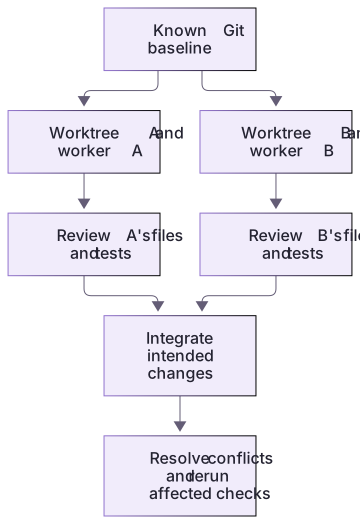
Separate contexts and separate file trees solve different conflicts

Two agent contexts do not by themselves isolate files. Independent worktrees start from a chosen baseline, keep changes apart, and require checks and integration before the final result is accepted.
Practice and acceptance
Code checks must identify the checkout they tested. Agent threads, shared resources and Git worktrees are separate boundaries.
About your environment
Checked 21 October 2026. Requires Git and a disposable repository. The course does not change your Git identity.
Try it step by step
- Use a disposable capstone copy and establish a Git baseline only if Git is already available with a usable identity; do not alter global identity for the lesson.
- Inspect status and the baseline commit, then choose the start state explicitly.
- For optional actual isolation, use the documented app worktree flow or the bounded Git example in the worked section, and verify the new directory before edits.
- Run the capstone candidate inside that actual worktree and retain its path with the output.
- Review the desired changes and repeat the candidate check in the destination after integration; account for non-Git files and shared services separately.
A useful starting example
Illustration · adapt before use.
node labs/delegation-capstone/worktree-demo.cjs
node --test labs/delegation-capstone/worktree.test.cjsA worker pass does not certify the destination
A real temporary worktree is repaired and checked before applying its bounded patch to a temporary parent.
node labs/delegation-capstone/worktree-demo.cjskind: real-disposable-git-worktree
changedFiles: starter/normalize.cjs, starter/report.cjs
parentBeforeIntegration: done=1, doneMinutes=80
integrated: total=4, done=2, doneMinutes=55
workerCandidateExit: 0
destinationCandidateExit: 0
actualAgentsSpawned: 0The receipt includes real generated paths and SHA. App-created worktrees and real agent activity are not inferred from this Git-only route.
Your turn
First run the capstone in your disposable copy and record its directory. If Git prerequisites are available, create one separate worktree from the chosen baseline, verify its path, implement the two starter fixes there and compare both checkouts. Recheck the destination after integration. If you do not create a worktree, report local execution only rather than claiming isolation.
Try the exercise before opening its reference answer. Use a disposable practice folder.
Verify the actual checkout before trusting isolation
Extract into a new practice folder and keep the included labs folder. Run these commands from that extraction root, or from the course folder, using an existing Node.js installation.
- Command 1 text
node labs/delegation-capstone/run.cjs solutionCheck: The reference candidate passes five integrated checks in the current checkout.
- Command 2 text
node --test labs/delegation-capstone/candidate.test.cjsCheck: The unedited starter intentionally fails 4 candidate checks; all 4 should pass after both fixes.
- Command 3 text
node --test labs/delegation-capstone/worktree.test.cjsCheck: Two checks pass with real Git: isolated repair/integration and protection against ambient Git-location settings.
Code checks must identify the checkout they tested. Agent threads, shared resources and Git worktrees are separate boundaries.
Check your result
- A claimed worktree has an actual verified separate path and reviewed baseline.
- The recorded check identifies its checkout, and the destination is rechecked after integration.
- Shared services and ignored/local inputs are accounted for rather than assumed isolated.
Reference answer & rubric Try the exercise before opening
A worktree provides separate working files backed by the same repository history. It is created and verified explicitly; a delegated thread does not imply one.
- Inspect the original working tree and preserve unrelated changes.
- Choose a baseline commit; create a distinct checkout through the actual supported flow.
- Confirm the real path and run the candidate there, not in a terminal still pointing at the original folder.
- Integrate the reviewed change and check the destination's files; preserve ignored/local resources before any eventual cleanup.
Check your understanding
A worker reports tests passed in its worktree. What remains before delivery?
- Verify every external service is a copy of production.
- Delete the worktree immediately because all work is already in Local.
- Review and integrate the intended changes, then check the destination state.
Reveal the answer and explanation
Answer 3: Review and integrate the intended changes, then check the destination state.
A worktree result is evidence about that checkout. Integration can change the final state and needs its own verification.
Take this quiz in the interactive lesson to save your answer in the browser.
When it does not work
The worker edits the original folder despite a worktree plan.
Likely cause: The actual working directory was never confirmed.
What to try: Report and verify the real path before editing; run checks from that checkout.
The isolated check passes but the destination fails.
Likely cause: The integrated state differs or local/ignored inputs were not carried over.
What to try: Inspect the destination diff and prerequisites, then rerun its own relevant checks.
Common mistakes
- Adding Claude's isolation: worktree field to a Codex TOML role and assuming it isolated edits.
- Assuming a worktree copies every ignored file or isolates live services and credentials.
Source mapping & differences · alternative
Use Codex's explicit Git worktree workflow; the source's automatic subagent isolation field is not a verified Codex role setting.
Source topic: Worktree isolation ↗Go to the source
Official documentation, checked 21 October 2026. Product names, controls and availability may vary with your version, platform or account.
Completion and quiz progress are saved
only in the interactive course.