Static reading edition · s04-03
Use the actual Codex built-in roles
Choose between explorer, worker and default without importing Claude role names or assuming hidden restrictions.
Understand the approach
Codex's documented built-in roles are default, worker and explorer. Choose by the task's immediate purpose rather than importing Claude role names. An explorer can trace current behavior and cite the responsible code; a worker can implement an agreed change; the parent or default agent can coordinate and reconcile results. Inspect custom definitions before relying on a built-in name, because a custom role with the same name takes precedence.
In the capstone, exploration should locate both independent defects: missing trim in starter/normalize.cjs and the all-task reduction in starter/report.cjs. It should connect those expressions with the actual baseline result and frozen interface. Implementation then has concrete scope. Package A handles string normalization and its errors; package B validates normalized records and computes completed-only effort. Neither needs an extra specialist merely to rename a role.
After implementation, verification examines the actual combined files. run.cjs starter must return total=4, done=2 and doneMinutes=55. candidate.test.cjs must pass its four learner tests, including cases independent of the main fixture. The separate seven-test reference suite preserves the frozen baseline and checks the supplied solution. Report these different checks clearly. A role label, worker completion message or green reference suite does not establish that the edited starter is correct.
Make role choice a testable assignment. An explorer explains why padded DONE misses the done comparison and why the all-task reduction produces 80, citing the actual starter lines. Workers implement the two frozen contracts. The parent/default agent checks both diffs and runs the combined candidate plus independent invalid-input cases. The guide gives current app, CLI and IDE thread controls, so you can inspect actual delegation rather than merely repeat a role label. If a custom explorer shadows the built-in, preserve its source with the result instead of attributing its behavior to the default role.
Choose a role for the actual work

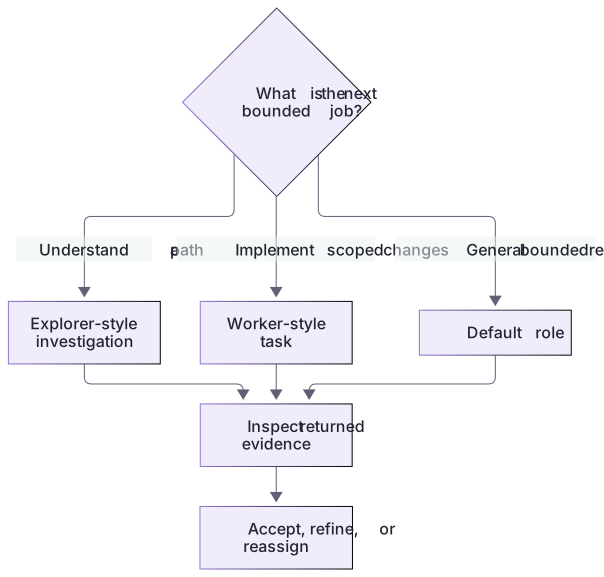
Use an exploratory role for understanding, a worker for bounded changes, or an appropriate general role for a mixed task. Role choice is followed by explicit verification of the actual output and constraints.
Practice and acceptance
Role selection should follow the current stage: evidence gathering, bounded implementation and integrated review.
About your environment
Checked 21 October 2026. Built-in names can be shadowed by custom roles; actual tools and policy remain environment-dependent.
Try it step by step
- Reproduce the starter result and identify which facts an explorer would need to establish.
- Read both module contracts before assigning an implementation role.
- Fix A and B in the disposable starter or request workers with those owned files through actual Codex delegation.
- Have the parent review the combined diff and run the integrated candidate.
- Report observed role activity only if actual agents ran; keep the local reference checks distinct.
A useful starting example
Illustration · adapt before use.
In labs/delegation-capstone, use an explorer or direct read-only inspection to explain the two baseline defects with source references. After reviewing that evidence, have workers implement the separate A and B contracts in their owned starter files. Keep the parent responsible for the combined diff and run.cjs starter plus candidate.test.cjs. Use actual Codex roles available in this client; record any custom role that shadows a built-in. Do not claim reference-solution tests grade the edited starter.explorer: cite both defects in starter/normalize.cjs and starter/report.cjs
worker A: implement normalizeStatus; check padded strings and errors
worker B: implement buildReport; check completed-only effort and validation
default/parent: inspect both diffs; run run.cjs starter and candidate.test.cjsEvidence before implementation
The original starter contains two separate causes.
normalize.cjs: value.toLowerCase()
report.cjs: tasks.reduce((n,t) => n+t.minutes, 0)Padded DONE is not equal to done.
All-task effort is 80; completed-only effort should be 55.These source facts justify two small implementation contracts; adding more role names would not improve the diagnosis.
Your turn
Use an explorer or direct inspection to locate both concrete defects, then implement the bounded packages using workers or your own sequential edits. Keep the parent responsible for integration. Deliver the final code/result and explain which role choice served each stage. Do not invent a Plan or Explore role by translating Claude names.
Try the exercise before opening its reference answer. Use a disposable practice folder.
Match roles to real stages
Extract into a new practice folder and keep the included labs folder. Run these commands from that extraction root, or from the course folder, using an existing Node.js installation.
- Command 1 text
node labs/delegation-capstone/run.cjs starterCheck: Intentional exit 1: four run.cjs integration predicates fail; the source-preservation predicate passes.
- Command 2 text
node --test labs/delegation-capstone/capstone.test.cjsCheck: 7 contract checks pass, including independent A/B cases.
- Command 3 text
node --test labs/delegation-capstone/candidate.test.cjsCheck: The unedited starter intentionally fails 4 candidate checks; all 4 should pass after both fixes.
Role selection should follow the current stage: evidence gathering, bounded implementation and integrated review.
Check your result
- Role names and responsibilities match actual Codex roles or inspected custom definitions.
- Both normalization and aggregation defects have concrete source and input evidence.
- The edited starter passes all four candidate tests and its actual combined output is retained.
Reference answer & rubric Try the exercise before opening
Codex built-ins are default, worker and explorer. The capstone gives each stage an observable deliverable without requiring extra specialists.
- Use exploration to cite value.toLowerCase without trim and a reduction over every task.
- Give workers the frozen normalization and aggregation contracts.
- Avoid changing model/provider/permissions merely to select a role.
- Integrate and verify the actual candidate; role labels do not substitute for correct results.
Check your understanding
Which statement about Codex explorer is accurate for this lesson?
- It is a documented read-heavy role; task scope and inherited controls still matter.
- It is Claude Explore with an identical guaranteed tool list.
- It automatically creates a separate Git worktree for every task.
Reveal the answer and explanation
Answer 1: It is a documented read-heavy role; task scope and inherited controls still matter.
Use the documented Codex role and verify actual controls instead of importing behavior from another product.
Take this quiz in the interactive lesson to save your answer in the browser.
When it does not work
A role name looks familiar but is unavailable.
Likely cause: A Claude role name or an unverified custom role was assumed.
What to try: Use current Codex built-ins or inspect an actual installed custom definition.
Exploration expands into implementation before the contract is settled.
Likely cause: The stage's expected output was not bounded.
What to try: Request source evidence first, then issue a separate owned-file implementation contract.
Common mistakes
- Requesting a Claude-specific built-in name and silently assuming identical Codex behavior.
- Treating the explorer label as a separately enforced read-only environment.
Source mapping & differences · different
Codex documents default, worker and explorer; Claude's Plan, Explore and guide-specific agents are not the same built-in catalogue.
Source topic: Built-in subagents ↗Go to the source
Official documentation, checked 21 October 2026. Product names, controls and availability may vary with your version, platform or account.
Completion and quiz progress are saved
only in the interactive course.